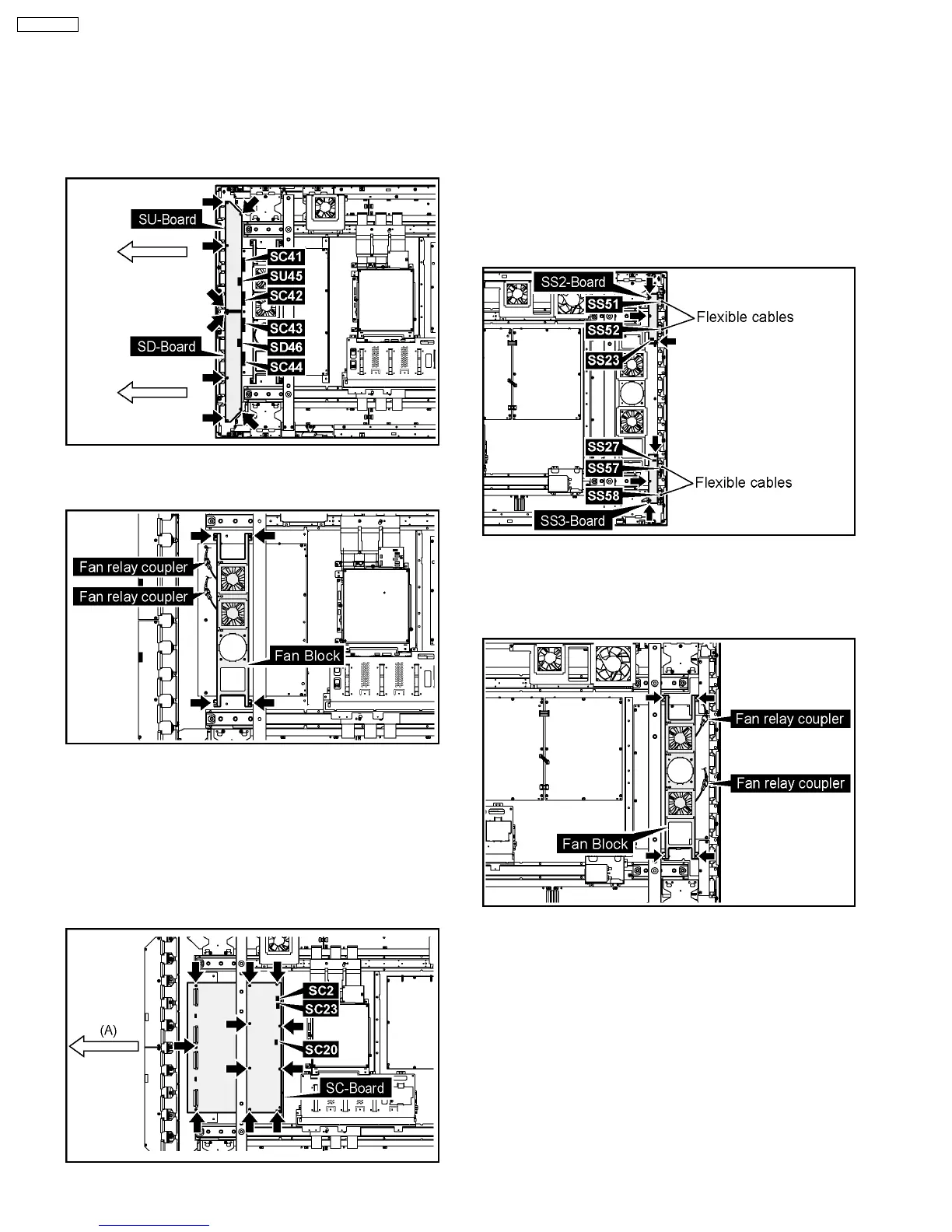
6.11. Removal of the SC-Board
1. Disconnect the couplers (SU45, SD46).
2. Remove the each 4 screws.
3. Slide the SU-Board and the SD-Board to the left, remove
the SU-Board and the SD-Board from the couplers (SC41,
SC42, SC43, SC44).
4. Disconnect the 2 fan relay couplers.
5. Remove the each 4 screws and then remove the Fan Block.
6. Disconnect the couplers (SC2, SC20, SC23).
7. Remove the 10 screws of the SC-Board and slide the SC-
Board in the direction of the arrow (A) and then remove the
SC-Board.
Note:
Remove the SC-Board not to damage the flexible cables
of the SU-Board and the SD-Board, parts on the SC-
Board.
6.12. Removal of the SS2-Board and
the SS3-Board
1. Disconnect the coupler (SS23).
2. Remove the flexible cables from the couplers (SS51,
SS52).
3. Disconnect the coupler (SS27).
4. Remove the flexible cables from the couplers (SS57,
SS58).
5. Remove the each 3 screws and then remove the SS2-
Board and the SS3-Board.
6.13. Removal of the SS-Board
1. Disconnect the 2 fan relay couplers.
2. Remove the 4 screws and then remove the Fan Block.
3. Disconnect the couplers (SS11, SS12, SS23, SS27, SS34,
SS35, SS42, SS44).
4. Remove the flexible cables from the couplers (SS53, SS54,
SS55, SS56).
12
TH-65PF9UK







 To Next Page