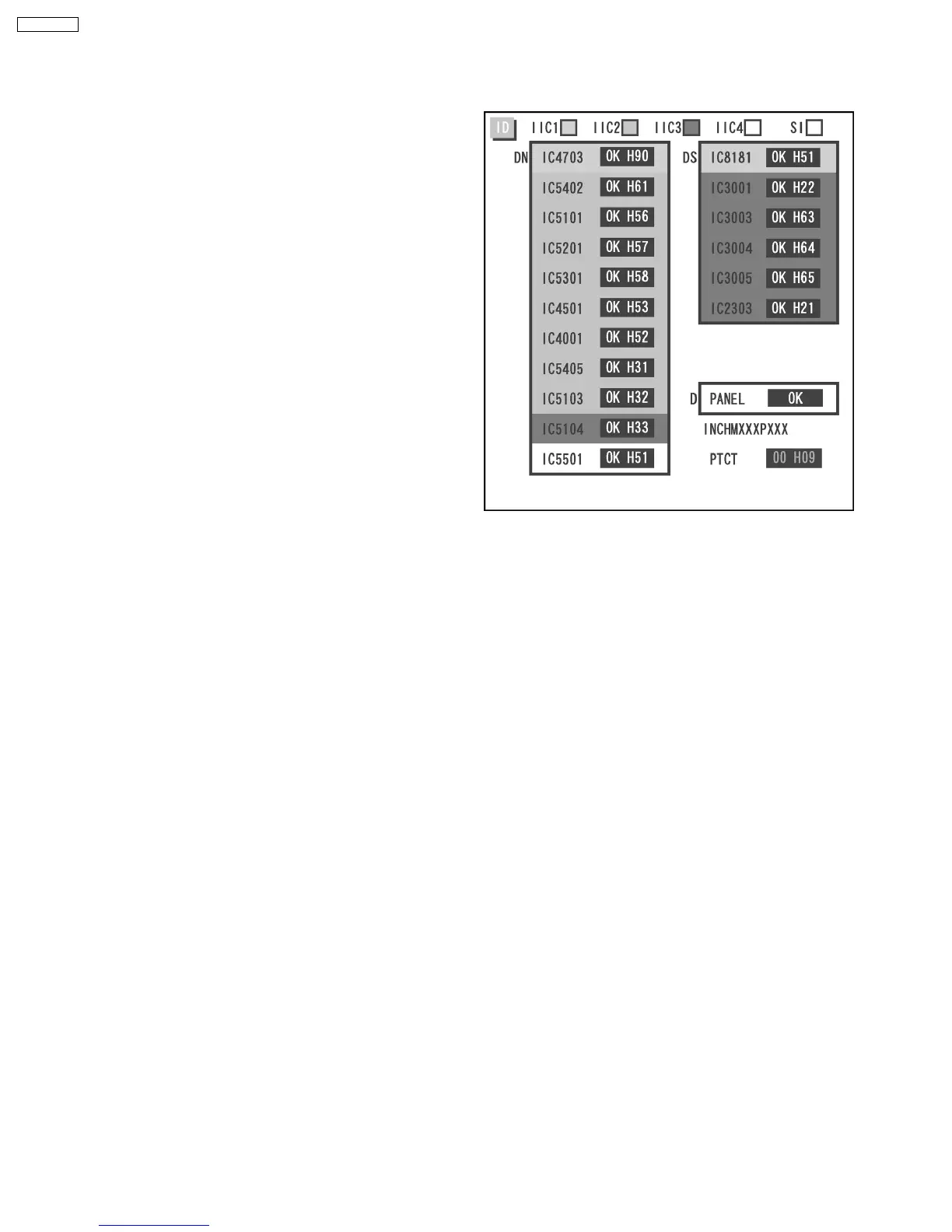
11.1.1. Display Indication
1. Self-check is used to automatically check the bus line
controlled circuit of the Plasma display.
2. To get into the Self-check mode, press the volume down
button on the customer controls at the bottom of the set, at
the same time pressing the OFF-TIMER button on the
remote control, and the screen will show .
If the CCU ports have been checked and found to be incorrect.
Or not located then " - - " will appear in place of " OK ".
“ 01 “ in the line of the “ PTCT ” means the number of blinks of
the Power LED is 1. (Reference to 11.1.2)
“ H09 “ in the line of the “ PTCT ” is the error code.
Note:
The line of the “ PTCT ” displays when you get into the Self-
check mode for the first time only after the Power LED
blinks.
11 Trouble shooting guide
11.1. Self Check
38
TH-65PF9UK







 To Next Page