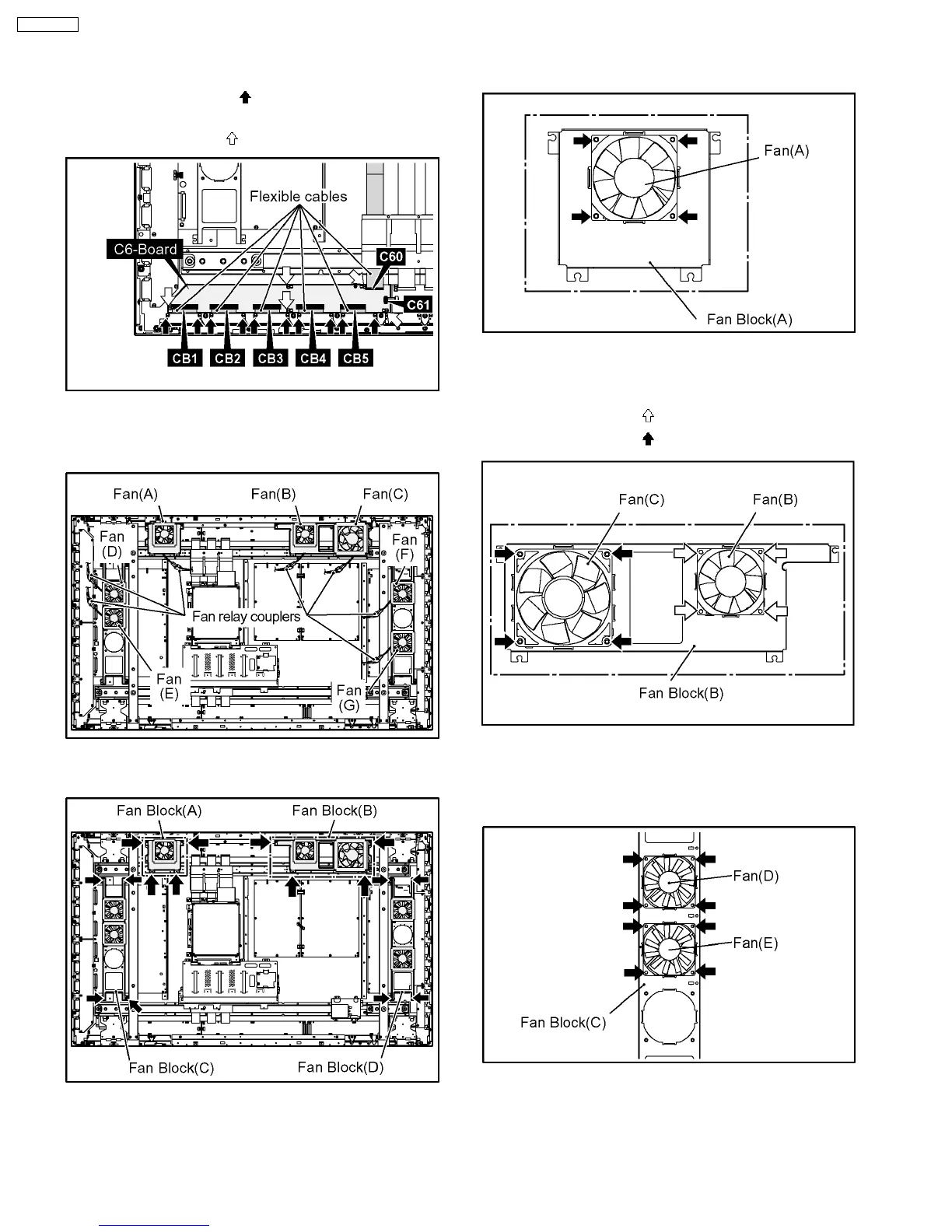
6.15.6. Removal of the C6-Board
1. Remove the flexible cable from the coupler (C60, C61).
2. Remove the 10 screws (
) and then remove the flexible
cables from the couplers (CB1, CB2, CB3, CB4, CB5).
3. Remove the 5 screws (
) and then remove the C6-Board.
6.16. Removal of the Fan
1. Disconnect the 7 fan relay couplers.
2. Remove the each 4 screws and then remove the Fan
Blocks (A), (B), (C), (D).
6.16.1. Removal of the Fan (A)
1. Remove the 4 screws and then remove the Fan (A).
6.16.2. Removal of the Fan (B) and the
Fan (C)
1. Remove the 4 screws ( ) and then remove the Fan (B).
2. Remove the 4 screws (
) and then remove the Fan (C).
6.16.3. Removal of the Fan (D), (E)
1. Remove the each 4 screws and then remove the Fans (D),
(E).
16
TH-65PF9UK







 To Next Page