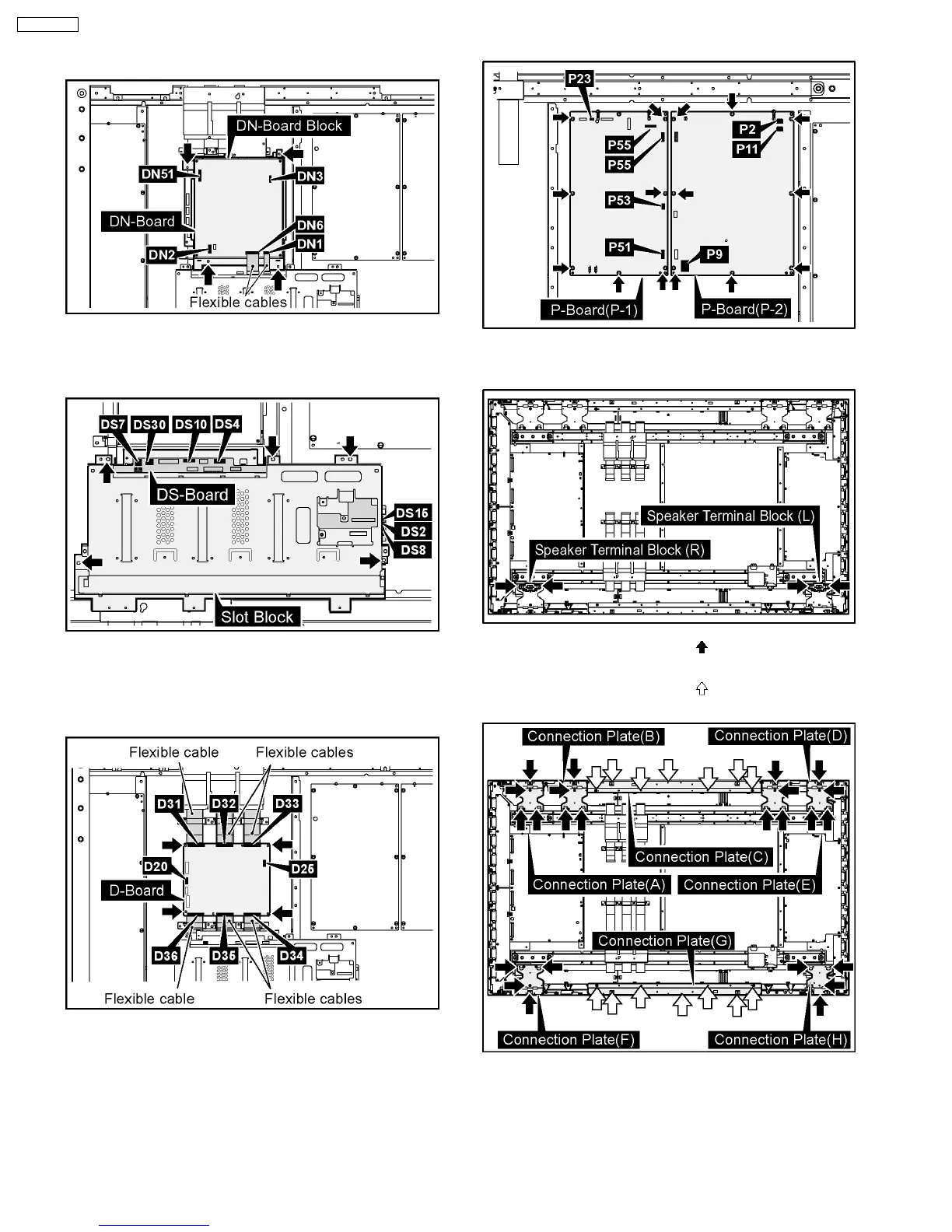
7. Remove the 4 screws and then remove the DN-Board
Block.
8. Disconnect the couplers (DS2, DS4, DS7, DS8, DS10,
DS15, DS30).
9. Remove the 5 screws and then remove the Slot Block.
10. Disconnect the couplers (D20, D25).
11. Remove the flexible cables from the couplers (D31, D32,
D33, D34, D35, D36).
12. Remove the 4 screws and then remove the D-Board.
13. Disconnect the couplers (P2, P9, P11, P12, P23, P51, P53,
P55).
14. Remove the 19 screws and then remove the P-Board.
15. Remove the each 2 screws and then remove the Speaker
Terminal Blocks (L), (R).
16. Remove the each 4 screws ( ) and then remove the
Connection Plate (A), (B), (D), (E), (F), (H).
17. Remove the each 7 screws (
) and then remove the
Connection Plate (C), (G).
20
TH-65PF9UK







 To Next Page