Chapter 17
DA7 Users’ Guide
17
-
15
17
Options
The buttons of [ON], [SELECT], [SOLO] and [FADER] that are placed
in the INPUT 1-16, 17-32 and the AUX Return channels can be
operated from the TopPanel of both the slave and master DA7. For the
output channels of AUX Send, BUS and the MASTER L/R, these
buttons and faders are inoperative from the TopPanel of the slave DA7.
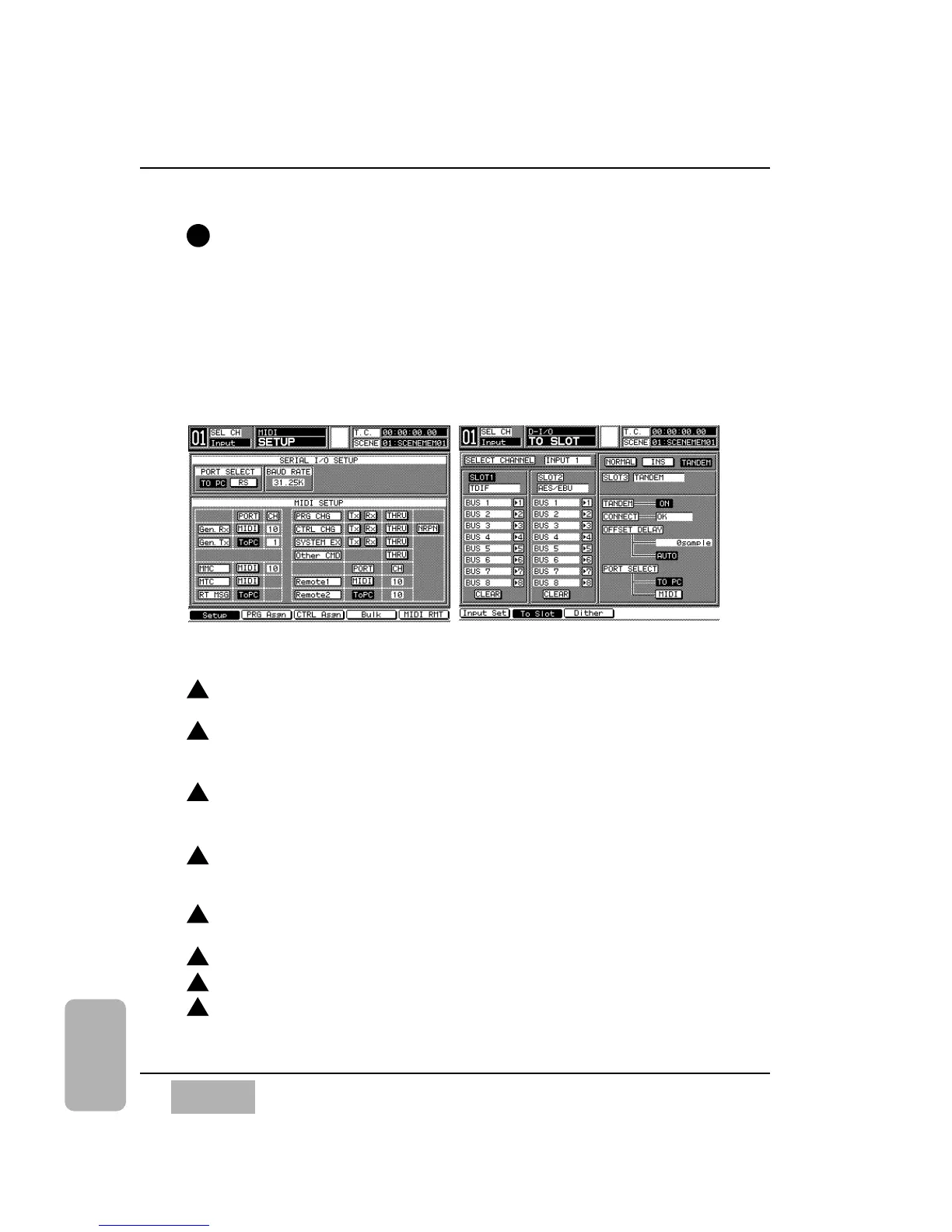
TANDEM connection settings
Settings are required in the [MIDI>SETUP] window and the [D-I/O>TO
SLOT] window for both the master and the slave DA7
Display the [MIDI>SETUP] window for both the master and the slave
DA7.
Select the TO PC button in the PORT SELECT area of the
[MIDI>SETUP] window for both the master and the slave when using
the TO PC port. For MIDI this selection is not required.
Set the same BAUD RATE in the BAUD RATE area for both the master
and the slave when using the TO PC port. For MIDI this selection is not
required. For ToPC operation, set BAUD RATE to 125 k.
Select the same MIDI channel for Gen. Rx and Gen. Tx in the MIDI
SETUP area of the [MIDI>SETUP] window. Set the same channel for
both the master and the slave.
Display the TANDEM mode of the [D-I/O>TO SLOT] window for both
the master and the slave DA7.
Set the TANDEM area to ON (inversed video) in the SLOT 3 section.
Set the OFFSET DELAY TIME area to AUTO.
Select TO PC or MIDI in the PORT SELECT area.
11
MIDI Setup Window TO SLOT Window, Tandem Mode
1
2
3
4
5
6
7
8













 To Next Page