Chapter 5
DA7 Users’ Guide
5
-
3
5
Channels,
Library, & Meters
5-2 Channel Window
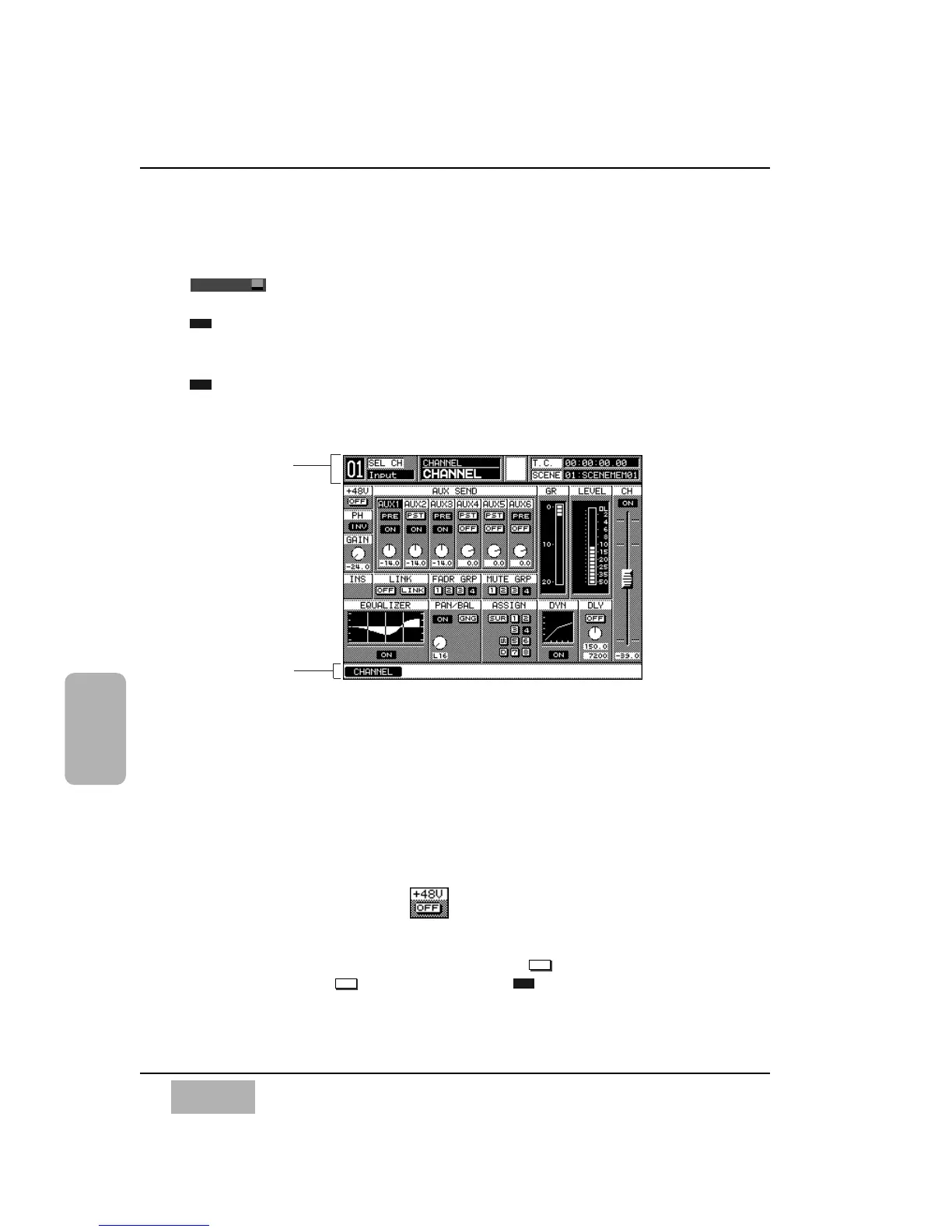
The [CHANNEL] window is displayed on the LCD screen by pressing the
button in the MASTER DISPLAY section of the Top Panel. When
the [AUTO DISP CHANGE] selection in the [UTILITY>CONFIG] window is
, you can also display the [CHANNEL] window by pressing one of the
AUX section LED buttons, or adjusting the AUX section LEVEL ON/OFF knob.
When [AUTO CHANNEL SELECT] in the [UTILITY>CONFIG] window is
, you can display the [CHANNEL] window by pressing the SELECT
button, or the ON button, or adjusting the fader for any channel.
The [CHANNEL] window areas reflect the current status of the selected
channel, and include indicators and controls for the primary functions of the
DA7. By using the SELECT buttons on a Channel Strip, any channel can be
selected. The number of the selected channels appears in the [taskbar] area
in the LCD, and the window information will reflect the newly selected
channel.
The following areas in the [CHANNEL] window can be changed to user-
selected parameters using the cursor controls:
Phantom Power [+48V] Area
A button is displayed when a Channel Strip for inputs 1 through 8 is
selected, and should be engaged when the source microphone requires
phantom power. To turn power on, cursor to the button, and press the
ENTER button. The button will toggle to .













 To Next Page