EasyManua.ls Logo

Panasonic WR-DA7 - Scene Memory Section

Panasonic WR-DA7
369 pages
Print Icon
To Next Page IconTo Next Page
To Previous Page IconTo Previous Page
Loading...
Appendix B
DA7 Users’ Guide
B
-
3
B
LCD Screen
Displays
SOLO
MONITOR
UTILITY MIDI
D-I/O
GROUP
AUTOMATION
SET UP
MIDI
button
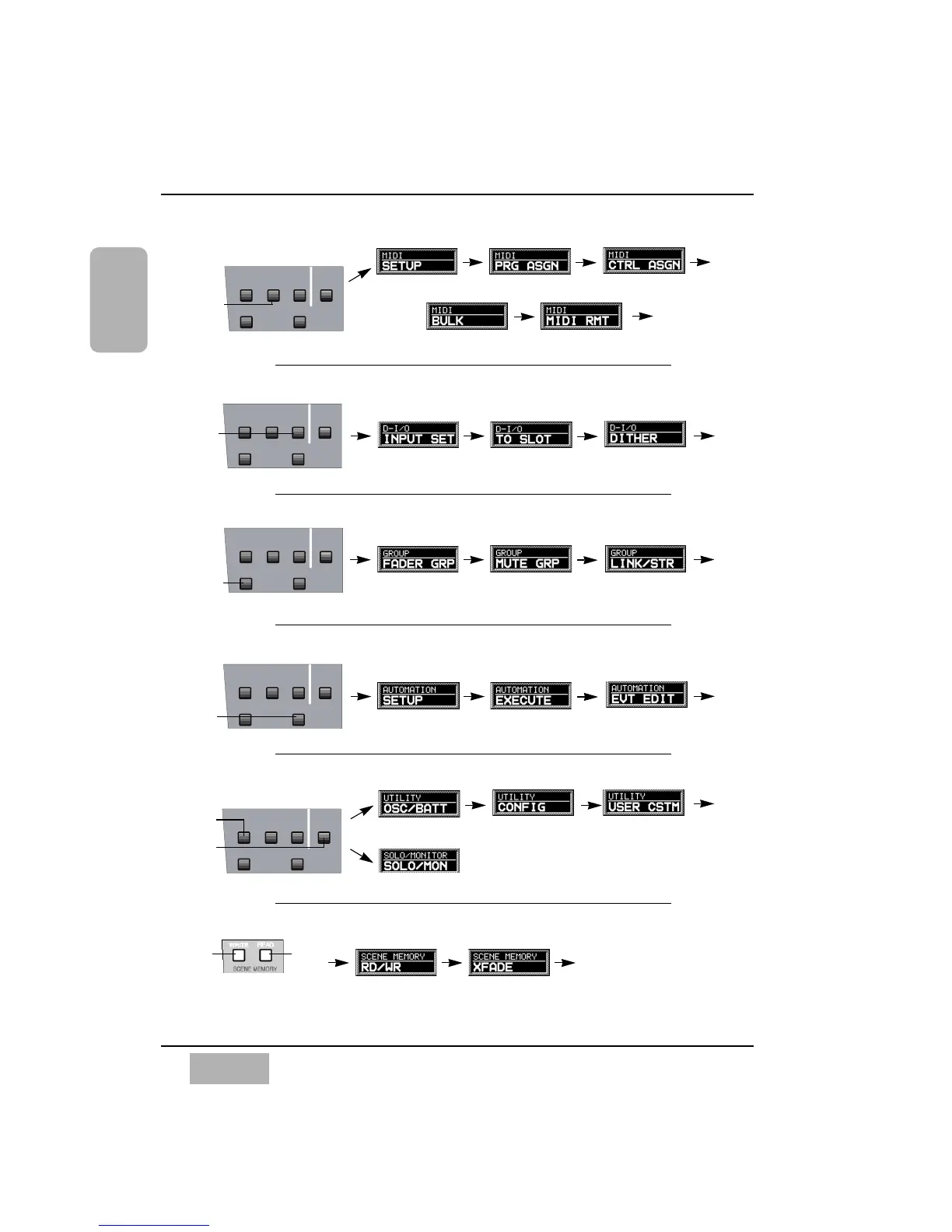
Setup Window Program Assign Window Control Assign Window
Return to
First
Window
Setup Section
Bulk Wndow Remote Window
SOLO
MONITOR
UTILITY MIDI
D-I/O
GROUP
AUTOMATION
SET UP
Setup Section
D-I/O
Button
Input Set Window To Slot Window Dither Window
Return to
First
Window
SOLO
MONITOR
UTILITY MIDI
D-I/O
GROUP
AUTOMATION
SET UP
Setup Section
Group
Button
Fader Group Window Mute Group Window Link/STR Window
Return to
First
Window
Automation
Button
SOLO
MONITOR
UTILITY MIDI
D-I/O
GROUP
AUTOMATION
SET UP
Setup Section
Setup Window Execute Window Event Edit Window
Return to
First
Window
SOLO
MONITOR
UTILITY MIDI
D-I/O
GROUP
AUTOMATION
SET UP
Setup Section
Utility
Button
Oscillator/Battery Window Configuration Window User Custom Window
Return to
First
Window
Scene Memory
Section
Write
Button
Read
Button
Read/Write Window XFade Window
Return to
First
Window
MIDI, SETUP SECTION
SCENE MEMORY SECTION
UTILITY/ SOLO MONITOR, SETUP SECTION
AUTOMATION, SETUP SECTION
GROUP, SETUP SECTION
D-I/O, SETUP SECTION
Solo/Monitor Window
Solo
Monitor
Button
# 1 # 2 # 3
# 4
# 5
# 1
# 2
# 3
# 1
# 2
# 3
# 1
# 2
# 3
# 1
# 2
# 3
Numbers with # indicate that pressing these numbers of the 10 KeyPad
recalls corresponding windows. For instance, pressing the UTILITY button
then the # 2 key displays the [UTILITY > CONFIG] Window.

Table of Contents

Other manuals for Panasonic WR-DA7

Related product manuals