K3.1.141e Manual NitroFlow HP_EN.doc - 37 -
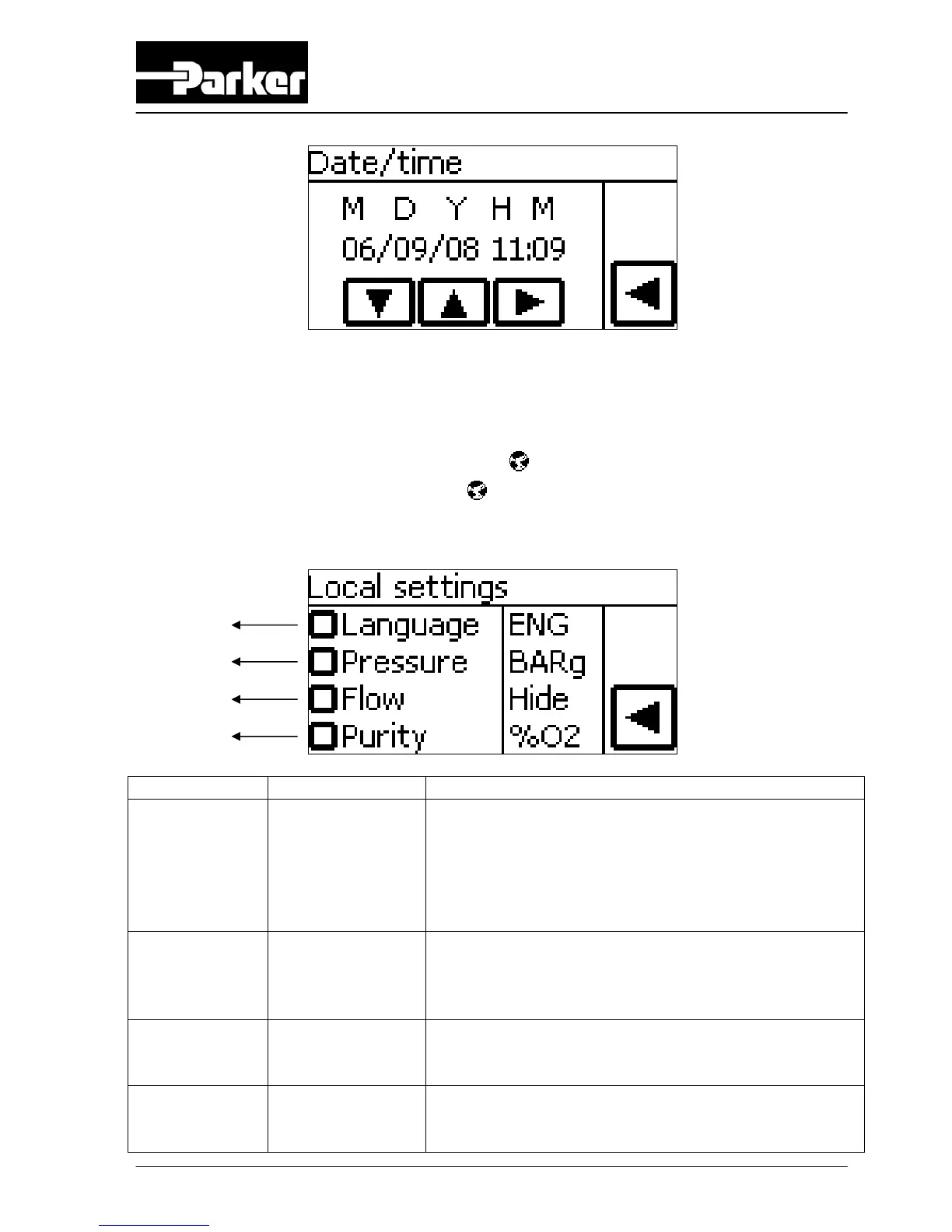
Button (A) can be used to make a selection and with buttons (B) adjustments can be
made.
6.2.7 Local settings menu
Access: Touch local settings menu button in settings screen
Function: Set data to local requirements
Button Selection Result
Language (A) English /
Nederlands /
Deutsch /
Francais /
Español /
Romana
All text in the screen will appear in the chosen
language.
Pressure (B) BAR(G) / PSIG Pressure indications will appear in the chosen
setting. If BAR(G) is chosen then temperature will
be automatically in °C. If PSIG is chosen then
temperature will be automatically in °F.
Flow (C) LPM / CFH /
CFM / M3H /
HIDE
Flow will appear in the chosen setting. If HIDE is
chosen flow will not be shown in main screen.
Purity (D) %N2 / %O2 /
HIDE
Purity will appear in nitrogen (%N2) or oxygen
(%O2) percentage. If HIDE is chosen purity will
not be shown in main screen.
B
C
D
B



 To Next Page