K3.1.141e Manual NitroFlow HP_EN.doc - 48 -
9.2 Replace inlet filter element
1. Close the compressed air supply.
2. Allow the system to depressurize. Check on
display.
3. Switch off the NitroFlow
®
HP on the touch screen.
4. Remove the side sheet metal of the gas separation
compartment (refer to fig. 3-2).
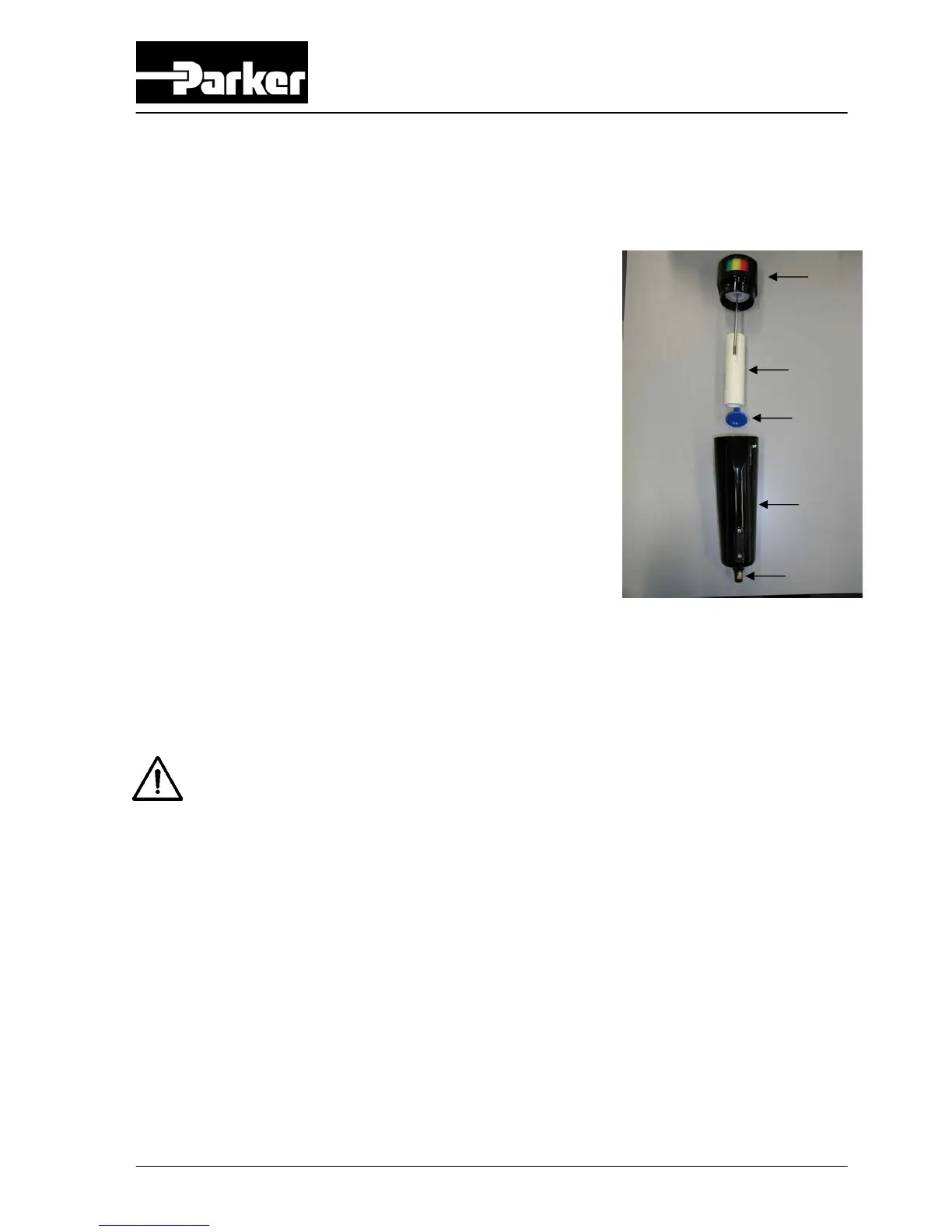
5. Open the bleed screw (E) to make sure that the
filter is depressurized.
6. Turn the filter bowl (D) clockwise and pull the bowl
from the filter housing (A).
7. Unscrew the blue knob (C).
8. Remove the old filter element (B).
9. Place a new filter element (B).
10. Assemble the parts in the reverse order.
11. Close the bleed screw (E).
12. Open pressurized air supply and switch the unit
back on.
13. Check on leakages at filter.
14. Replace the sheet metal.
Warning
Never run the system without filters; operating without filters will lead
to expensive repair
Fig. 9-1 Replace filter element
A
B
C
D
E



 To Next Page