K3.1.141e Manual NitroFlow HP_EN.doc - 55 -
12 Appendix A: NitroView Quick reference v1.0
First start up
After installing NitroView via the Suite installer you can start using it, start with 2
questions. First, you need to create a configuration file, where settings will be saved
in. (even width/height, column width/height/order)
You can exchange this file with other PC’s to create the same configuration
everywhere.
Main screen
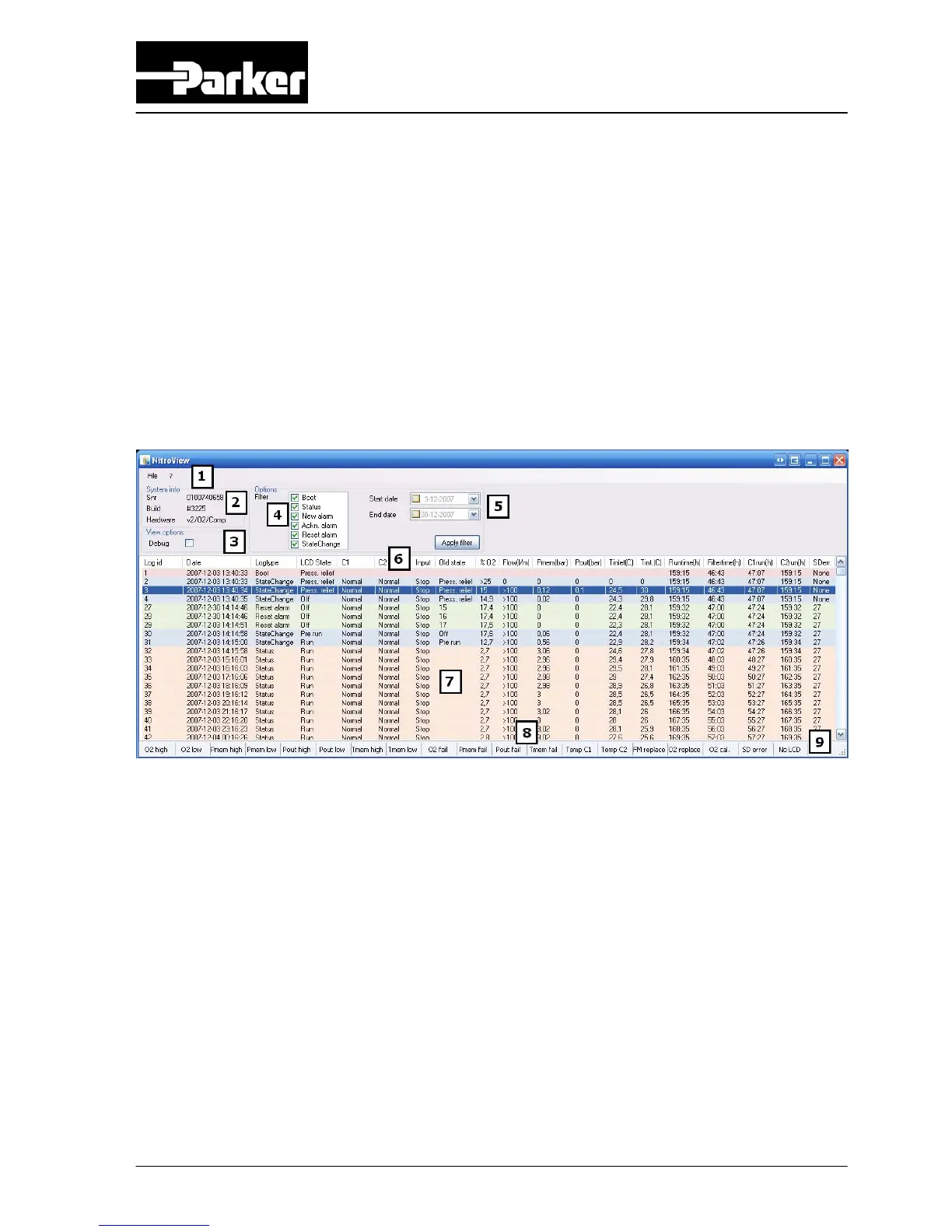
1: Menu bar The menus can be found on this bar
There are 2 menus: File (main menu) and ? (about)
2: System info Info about the log you are viewing
Info about the hardware the log came from
3: View options Enable extra columns of the log containing some detailed
information only readable by technical engineers
4: Filter options Filter logs out
After changing this you need to press ‘Apply filter’ so it
regenerates the log
5: Start/end date Logs are display between these dates
By default, the values will be filled with the first and last found log
date. You can change these dates to view a different period of the
logs. You can disable this by clicking the checkbox in front. After



 To Next Page