K3.1.141e Manual NitroFlow HP_EN.doc - 49 -
F
E
D
C
A
B
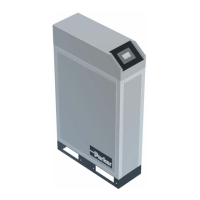
9.3 Replace automatic drains of filters
1. Open the filter (refer to §9.2).
2. Unscrew the nut (D).
3. Remove the old drain unit (B) from filter bowl (A).
4. Check if the O-ring (C) came out with old drain.
5. Replace new drain (B) in filter bowl (A).
6. Close filter (check on leakages after restarting
NitroFlow
®
HP).
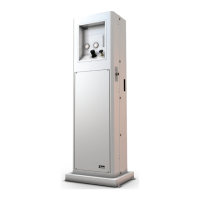
9.4 Replace oxygen sensor
1. Stop and switch off the NitroFlow
®
HP.
2. Remove the cover plate above inlet and outlet
connections of the NitroFlow
®
HP.
3. Disconnect connector (A).
4. Carefully remove the sensor cap (E). Do not
pull at the tube (F).
5. Unscrew the screw ring (D).
6. Install the new sensor (C) in reverse order of
removal.
7. Switch on and start the NitroFlow
®
HP.
8. Calibrate the oxygen sensor (refer to §9.5)
Fig. 9-2: Replace drain filter
Fig 9-3: Replace oxygen sensor
A
B
C
D



 To Next Page