PRUNING SHEARS C45, C45-P150, C45-P200
163529-D
5.3.1. DEACTIVATING ACTIV' SECURITY
Important
Carry out this operation without gloves. Do not wear gloves.
1. Switch on the battery.
See the operating instructions for the battery.
The battery beeps twice.
Note
The user's finger should not be placed on the
optical sensor when the battery is switched on.
Within 10 seconds of starting the tool:
2. Take the tool into your hand.
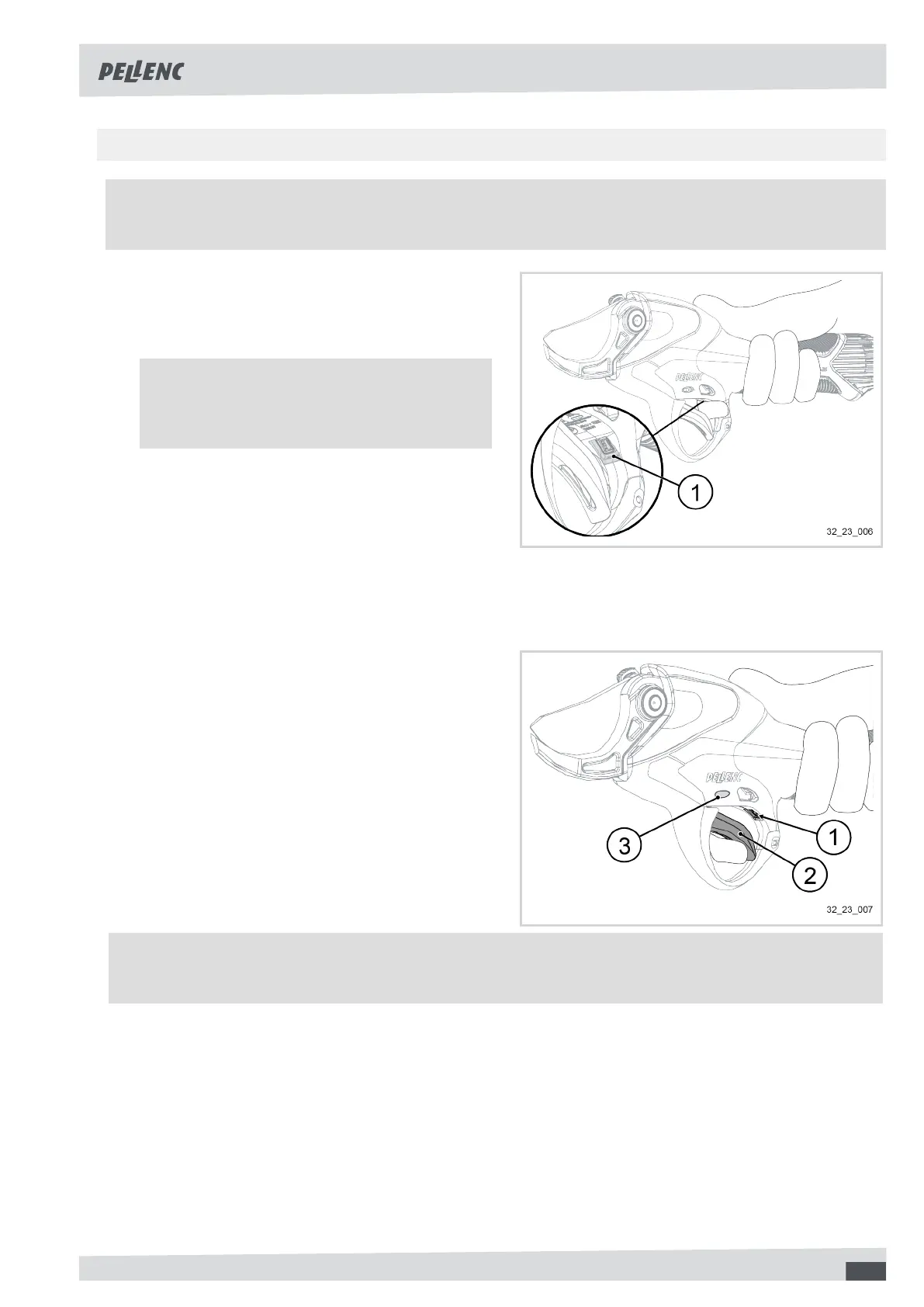
3. Position the index finger in front of the optical sensor
(1) for 1 second.
4. Press the trigger (2) in fully.
5. Release the trigger (2).
6. Position the index finger in front of the optical sensor
(1) for 1 second.
The tool will emit an alarm sound and the "Mode"
LED (3) will turn red to indicate that the Activ' Secu-
rity is deactivated.
Note
When the Activ' Security is deactivated, the tool emits an alarm sound each time it is switched on and off.
21



 To Next Page