PRUNING SHEARS C45, C45-P150, C45-P200
163529-D
5.5. SWITCHING TO AND FROM STANDBY
5.5.1. AUTOMATIC STANDBY MODE
The tool can be put to standby when the F8 mode is set between 1 and 8.
See 5.6.3. "Functional" setting modes, page 29.
If no action is taken on the pruning shears or the battery for 2 minutes, the tool automatically switches to standby.
Note
A beep from the battery indicates that the tool is in standby mode.
5.5.2. MANUAL STANDBY MODE
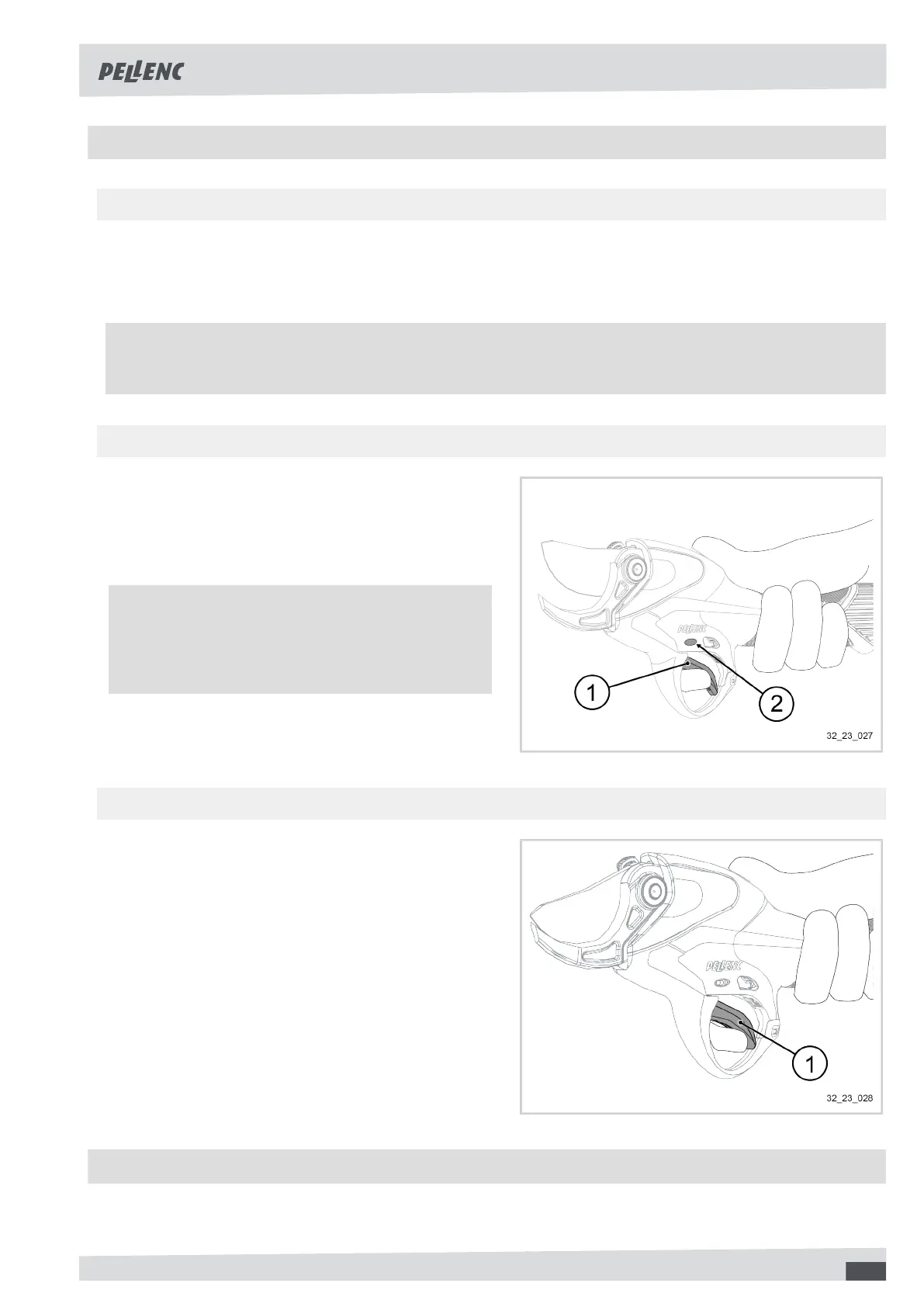
1. Press the trigger (1) fully in for a few seconds (long
press) until the blade closes.
The battery beeps and the LED MODE (2) flashes.
2. Release the trigger (1).
The blade remains closed.
Note
To adjust the time the trigger is held down for the
tool to go into standby, see 5.6.3. "Functional" set-
ting modes, page 29.
5.5.3. EXITING STANDBY
1. Press the trigger (1) in fully.
2. Release the trigger (1).
5.6. HMI (HUMAN MACHINE INTERFACE) SETTINGS OF THE TOOL
The Human Machine Interface (HMI) is an interface that links the user to the control system of a tool or machine.
The operator is then able to interact with the tool or machine.
25



 To Next Page