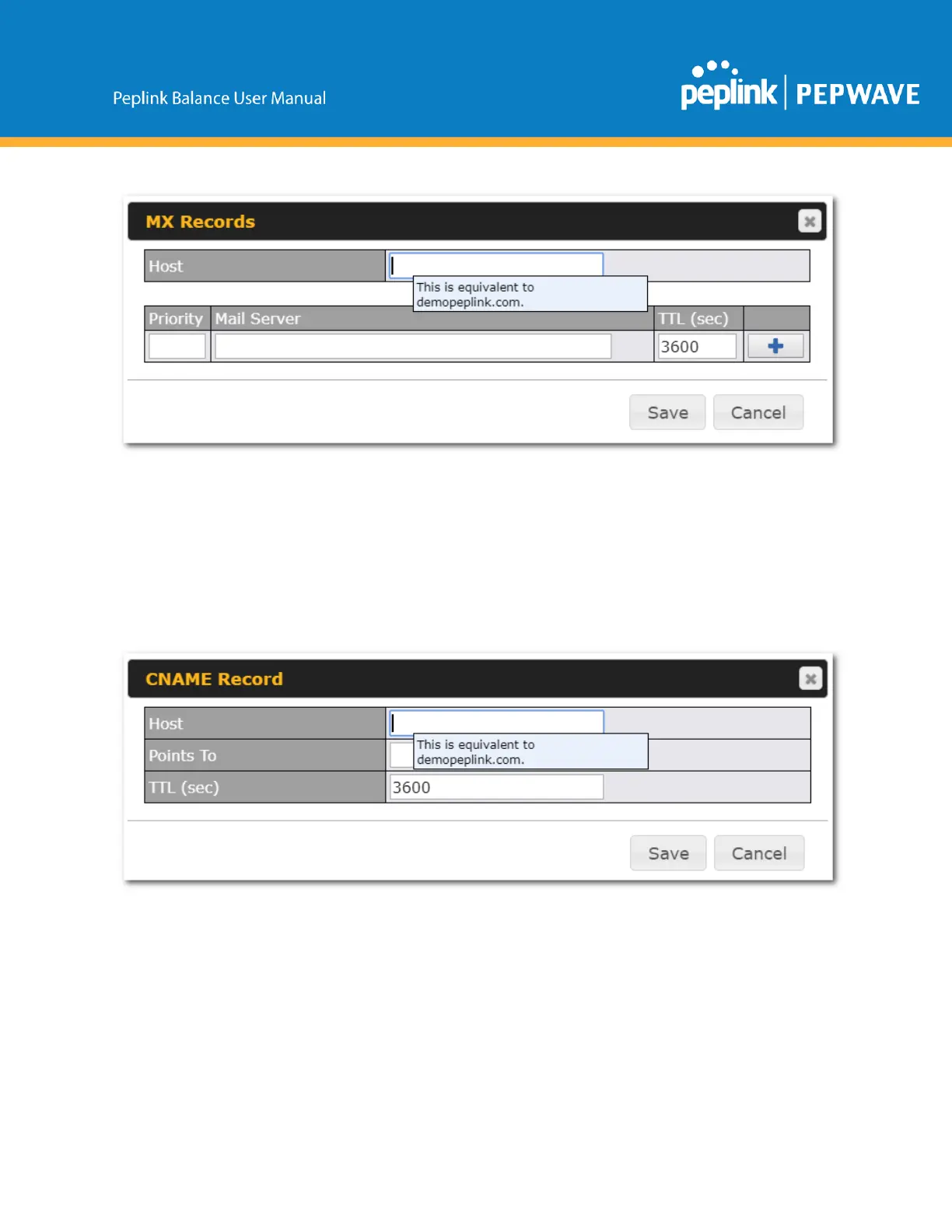
WhencreatinganMXrecordforthedomainitself(notasubdomain),theHostfieldshouldbeleftblank.
Foreachrecord,PriorityandMailServernamemustbeentered.Prioritytypicallyrangesfrom10to
100.Smallernumbershaveahigherapriority.AfterfinishingaddingMXrecords,clicktheSavebutton.
CNAMERecords
TheCNAMERecordtableshowsthedomain’sCNAMErecords.ToaddanewCNAMErecord,clickthe
NewCNAMERecordsbuttonintheCNAMERecordbox.Thenthetablewillexpandtolooklikethe
following:
WhencreatingaCNAMErecordforthedomainitself(notasubdomain),theHostfieldshouldbeleft
blank.
Thewildcardcharacter“*”issupportedintheHostfield.Thereferenceof".domain.name"willbereturned
foreverynameendingwith".domain.name"exceptnamesthathavetheirownrecords.
TheTTLfieldtellsthetimetoliveoftherecordinexternalDNScaches.
ARecords
ThistableshowstheArecordsofthedomainname.ToaddanArecord,clicktheNewARecordbutton.


 To Next Page