16.1.2 Firmware
Upgradingfirmwarecanbedoneinoneofthreeways.
Usingtherouter’sinterfacetoautomaticallycheckforanupdate,usingtherouter’sinterface
tomanuallyupgradethefirmware,orusingInControl2topushanupgradetoarouter.
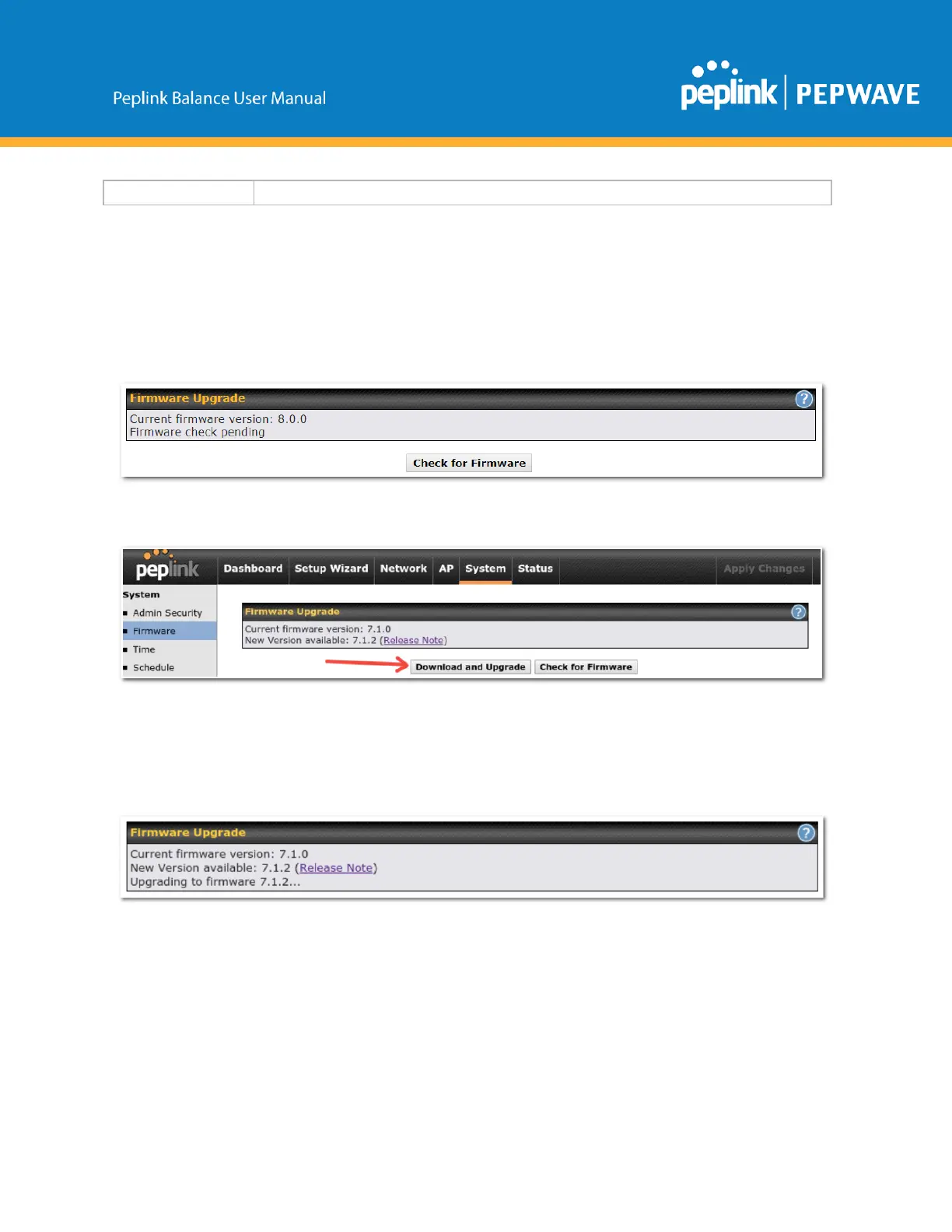
TheautomaticupgradecanbedonefromSystem>Firmware.
IfanupdateisfoundthebuttonswillchangetoallowyoutoDownloadandUpdatethe
firmware.
ClickontheDownloadandUpgradebutton.Apromptwillbedisplayedadvisingto
downloadtheCurrentActiveConfiguration.Pleaseclickontheunderlineddownloadtext.
AfterdownloadingthecurrentconfigclicktheOkbuttontostarttheupgradeprocess.
Therouterwilldownloadandthenapplythefirmware.Thetimethatthisprocesstakeswill
dependonyourinternetconnection’sspeed.
Thefirmwarewillnowbeappliedtotherouter*.Theamountoftimeittakesforthefirmware
toupgradewillalsodependontherouterthat’sbeingupgraded.



 To Next Page