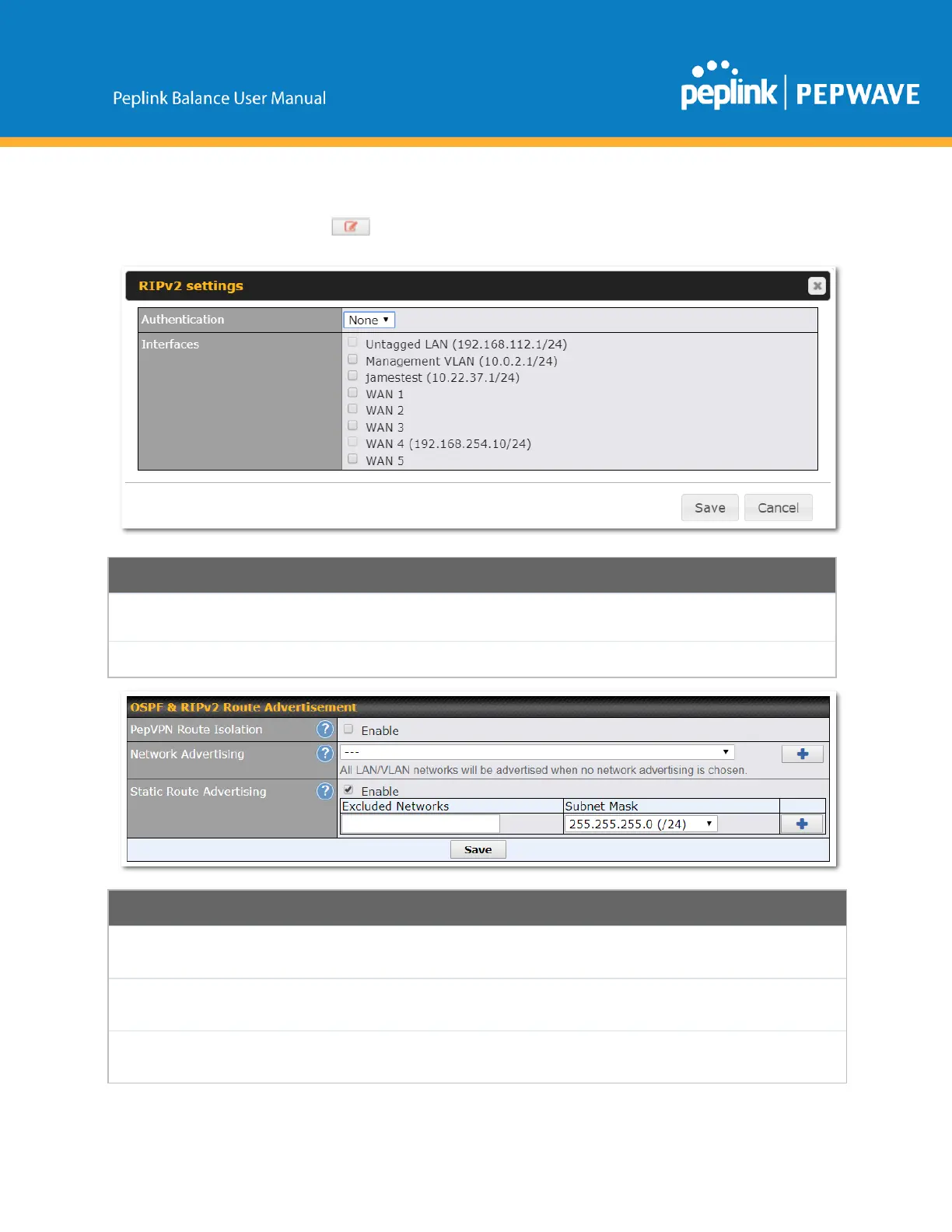
ToaccessRIPv2settings,click .
Chooseanauthenticationmethod,ifoneisused,fromthisdropdownmenu.Available
optionsareMD5andText.Entertheauthenticationkeynexttothedropdownmenu.
DeterminewhichinterfacesthisgroupwillusetolistentoanddeliverRIPv2packets.
OSPF&RIPv2RouteAdvertisement
IsolatePepVPNpeersfromeachother.ReceivedPepVPNrouteswillnotbe
forwardedtootherPepVPNpeerstoreducebandwidthconsumption..
NetworkstobeadvertisedoverOSPF&RIPv2.Ifnonetworkisselected,allLAN/
VLANnetworkswillbeadvertisedbydefault.
StaticRoute
Advertising
EnablethisoptiontoadvertiseLANstaticroutesoverOSPF&RIPv2.Staticroutes
thatmatchtheExcludedNetworkstablewillnotbeadvertised.
Copyright@2019Peplink



 To Next Page