Anelaborationonthetechnicaldetailsoftheimplementationofvirtualrouterredundancyprotocol(VRRP,
RFC3768)bytheBalancefollows:
● InanHAconfiguration,thetwoPeplinkBalanceunitscommunicatewitheachotherusingVRRP
overtheLAN.
● ThetwoPeplinkBalanceunitsbroadcastheartbeatsignalstotheLANatafrequencyofone
heartbeatsignalpersecond.
● IntheeventthatnoheartbeatsignalfromthemasterPeplinkBalanceunitisreceivedin3
seconds(orlonger)sincethelastheartbeatsignal,theslavePeplinkBalanceunitbecomes
active.
● TheslavePeplinkBalanceunitinitiatestheWANconnectionsandbindstoapreviously
configuredLANIPaddress.
● AtasubsequentpointwhenthemasterPeplinkBalanceunitrecovers,itwillonceagainbecome
active.
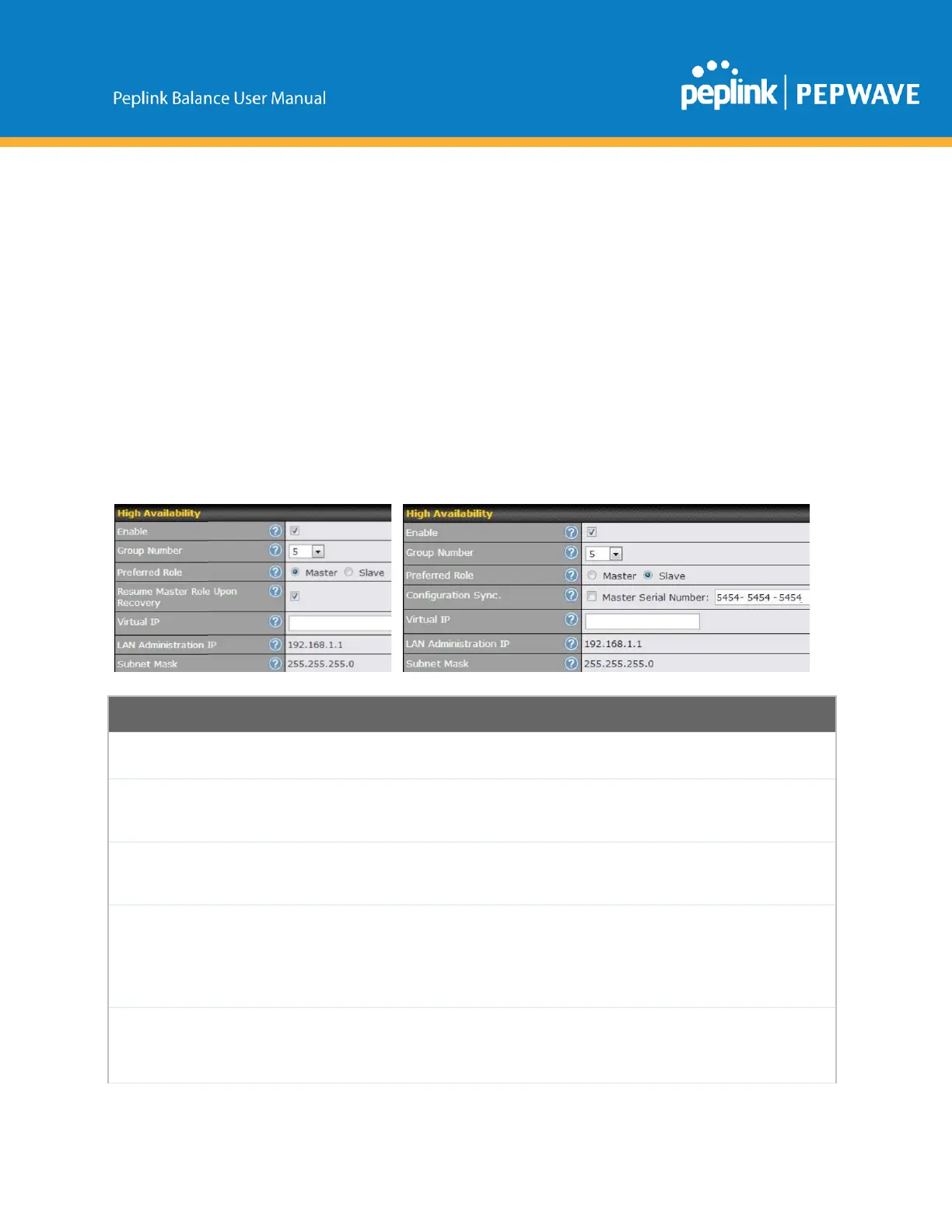
YoucanconfigurehighavailabilityatNetwork>Misc.Settings>HighAvailability.
InterfaceforMasterRouter
InterfaceforSlaveRouter
CheckingthisboxspecifiesthatthePeplinkBalanceunitispartofahighavailability
configuration.
ThisnumberidentifiesapairofPeplinkBalanceunitsoperatinginahighavailability
configuration.ThetwoPeplinkBalanceunitsinthepairmusthavethesameGroupNumber
value.
ThissettingspecifieswhetherthePeplinkBalanceunitoperatesinmasterorslavemode.
Clickthecorrespondingradiobuttontosettheroleoftheunit.Oneoftheunitsinthepair
mustbeconfiguredasthemaster,andtheotherunitmustbeconfiguredastheslave.
Resume
MasterRole
Upon
Recovery
ThisoptionisdisplayedwhenMastermodeisselectedinPreferredRole.Ifthisoptionis
enabled,oncethedevicehasrecoveredfromanoutage,itwilltakeoverandresumeits
Masterrolefromtheslaveunit.
ThisoptionisdisplayedwhenSlavemodeisselectedinPreferredRole.Ifthisoptionis
enabledandtheMasterSerialNumberenteredmatcheswiththeactualmasterunit's,the
masterunitwillautomaticallytransfertheconfigurationtothisunit.Pleasemakesure
theLANIPAddressandtheSubnetMaskfieldsaresetcorrectlyintheLANsettingspage.
Copyright@2019Peplink



 To Next Page