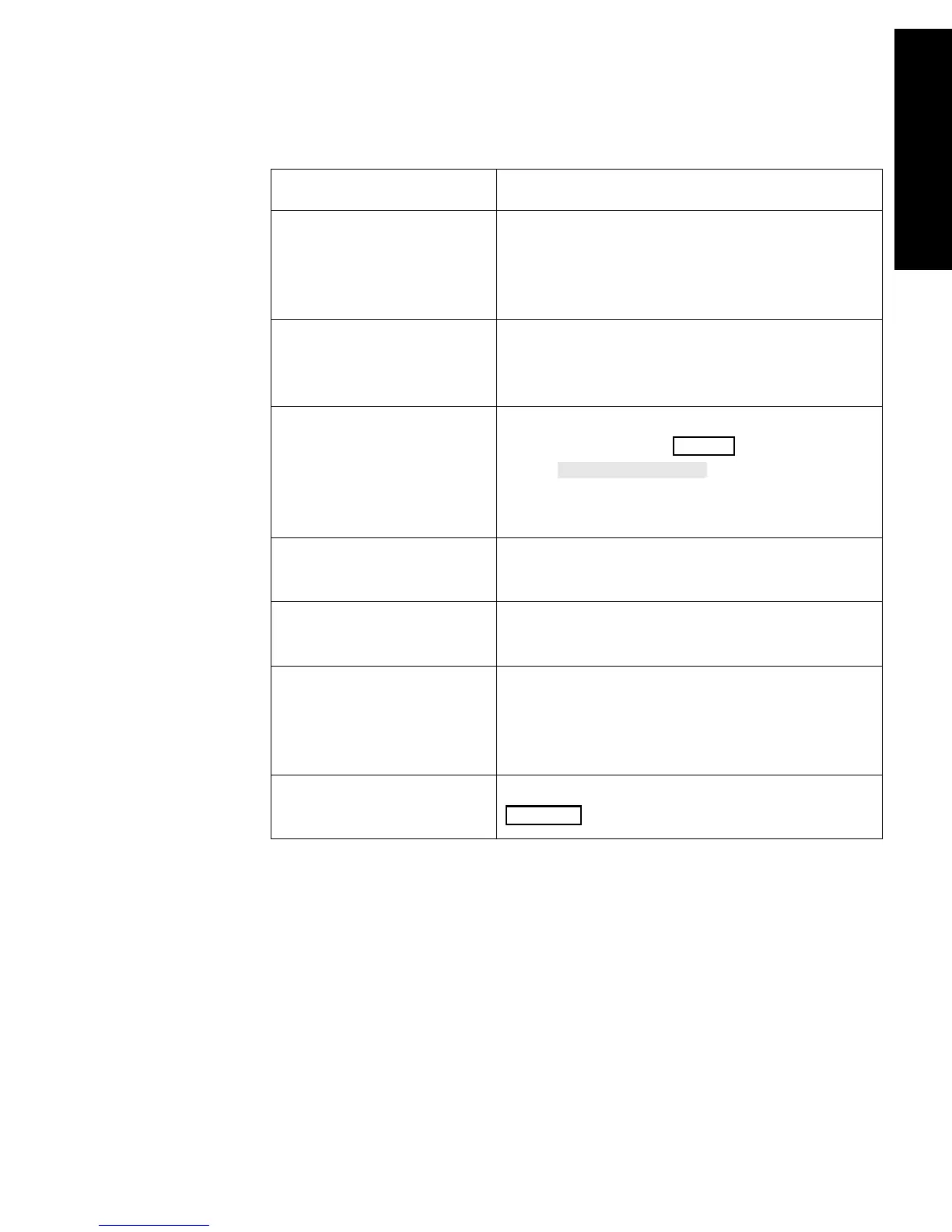
Recording Status Messages
Recording Functions 6-47
Recording Functions
Note—Recording ink sometimes fades when covered with transparent
tape. Please avoid covering any part of a recording that is clinically
relevant (annotation or waveforms) when taping a recording strip to a
patient record or other patient documentation.
Wrong Procedure
Recorder Configuration
A trended vital signs recording or neonatal
event recording has been requested but not
supported by the selected procedure
recorder.
Check Paper/Door on
Recorder Name
Recorder|
The bedside recorder is out of paper or the
recorder door is open - load new paper and/
or shut the door.
Recorder Name Recorder
Stopped
An actively running recording has been
stopped by pressing on the recorder
or the
softkey on the
display or a timed recording has stopped
automatically.
Recording: Waves that
are being Rec.
A timed recording is currently running on a
Bedside or a Central Recorder.
Waiting for Recorder
Name Recorder
A recording has been requested for a
recorder that is currently busy.
Recorder does not
support Recording Type
The recorder configured cannot support the
requested application. For example, an
oxyCRG recording that is requested on a
recorder other than M1116B.
Running Recordings
Mode
A list of running recordings is shown when
is pressed.
Message Meaning
STOP
Record



 To Next Page