detail in the subsequent sections respectively.
4.1.2.1 AC Filter
Definition:
You are allowed to set the bandwidth for selecting one of the three AC
filters (Slow, Medium and Fast), in order to achieve either higher
accuracy in low frequency measurements or faster AC settling time.
Defaults
The factory default is 20 Hz (Medium). You can select the filter type as
you wish when setting bandwidth value. The selection is stored in a
volatile memory and the default setting will be restored when the meter
is power-off.
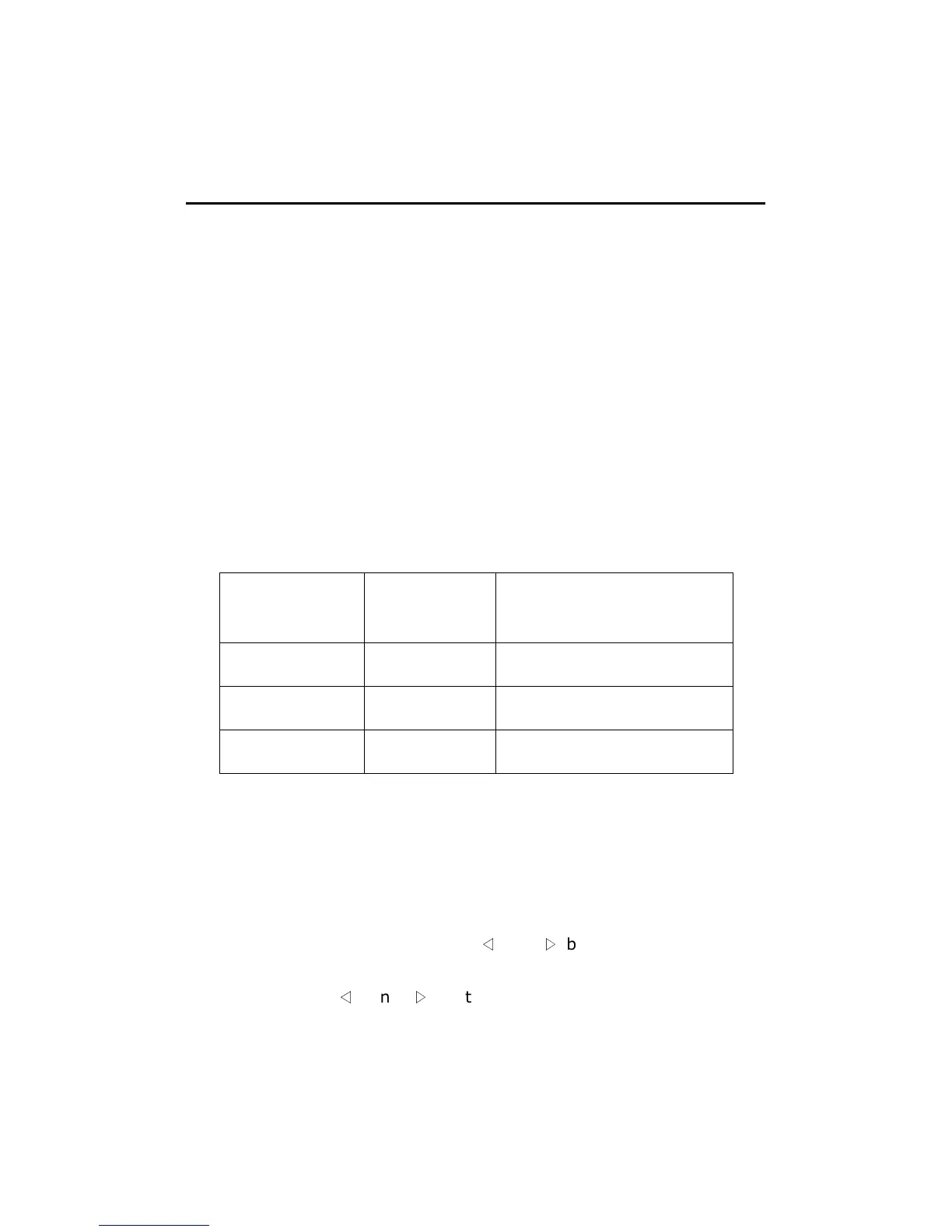
Table 4-2
Bandwidth AC Filter
Time
( seconds per reading)
3 Hz ~ 300 KHz Slow 7
20 Hz ~ 300 KHz Medium 1
200 Hz ~ 300 KHz
Fast 0.1
How to set AC Filter in AC measurements:
You can set the AC Filter either through the front panel operation or
through the remote interface operation.
Front Panel Operation
Press CONFIG + ACV button. Use
◁
and
▷
buttons to locate “BAND
WIDTH” submenu, and then press ENTER to select it. Look for the desired
bandwidth using
◁
and
▷
buttons. Then press ENTER on your
selection. There are three options: 3Hz, 20Hz and 200Hz. The locations
of these buttons are shown with red rectangle frames in Figure 4-2.



 To Next Page