The default band is 0.1%. Your selection is stored in a volatile memory
and it will be cleared after the meter has been turned off.
How to adjust the sensitivity band
You can adjust the sensitivity band through either the front panel
operation or the remote interface operation.
Front Panel Operation
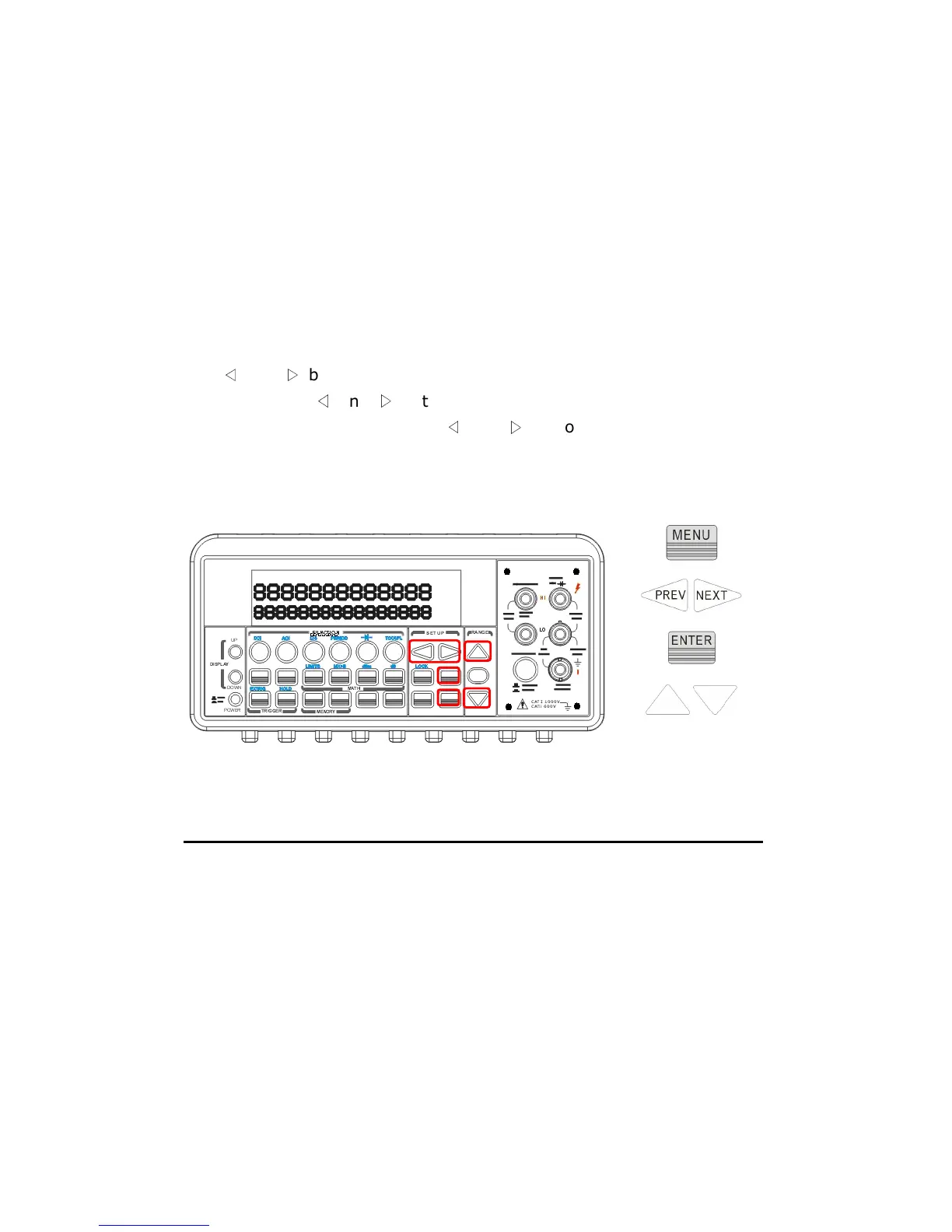
In order to adjust the sensitivity band, please press MENU button then
use
◁
and
▷
buttons to find “TRIG” submenu. Press ENTER to select it.
Then again use
◁
and
▷
buttons to find “READ HOLD” submenu. Press
ENTER to choose it. Then use
◁
and
▷
buttons to choose a desired
band. Press ENTER to set the desired sensitivity band. The locations of
the buttons are shown with red rectangle frames in Figure 4-30.
Figure 4-30
4.4.5 Scanning (Scan)
You can purchase an optional scanner card for multi-function
applications. We provide three kinds of the cards, M3500-opt01 (10 CH
for general purpose as the example below), M3500-opt09 (20CH for
general purpose), and M3500-opt12 (10 CH for general purpose plus
thermocouple and RTD measurements). When using it, it’s important to
press the “Terminals” on the front panel in order to change the control to
the rear. For more information, refer to their user’s guides.
This multipoint scanner card lets you switch and scan many channels of



 To Next Page