Remote Interface Operation
Use the following commands to enable dBm feature or to set the
reference resistance:
CALCulate:FUNCtion DBM
CALCulate:STATe {OFF|ON}
CALCulate:STATe?
CALCulate:DBM:REFerence {<value>|MINimum|MAXimum}
4.4 Other System Related Operations
Each system related operation performs a task that is not measurement
related but plays an important role in making your measurements.
4.4.1 Display
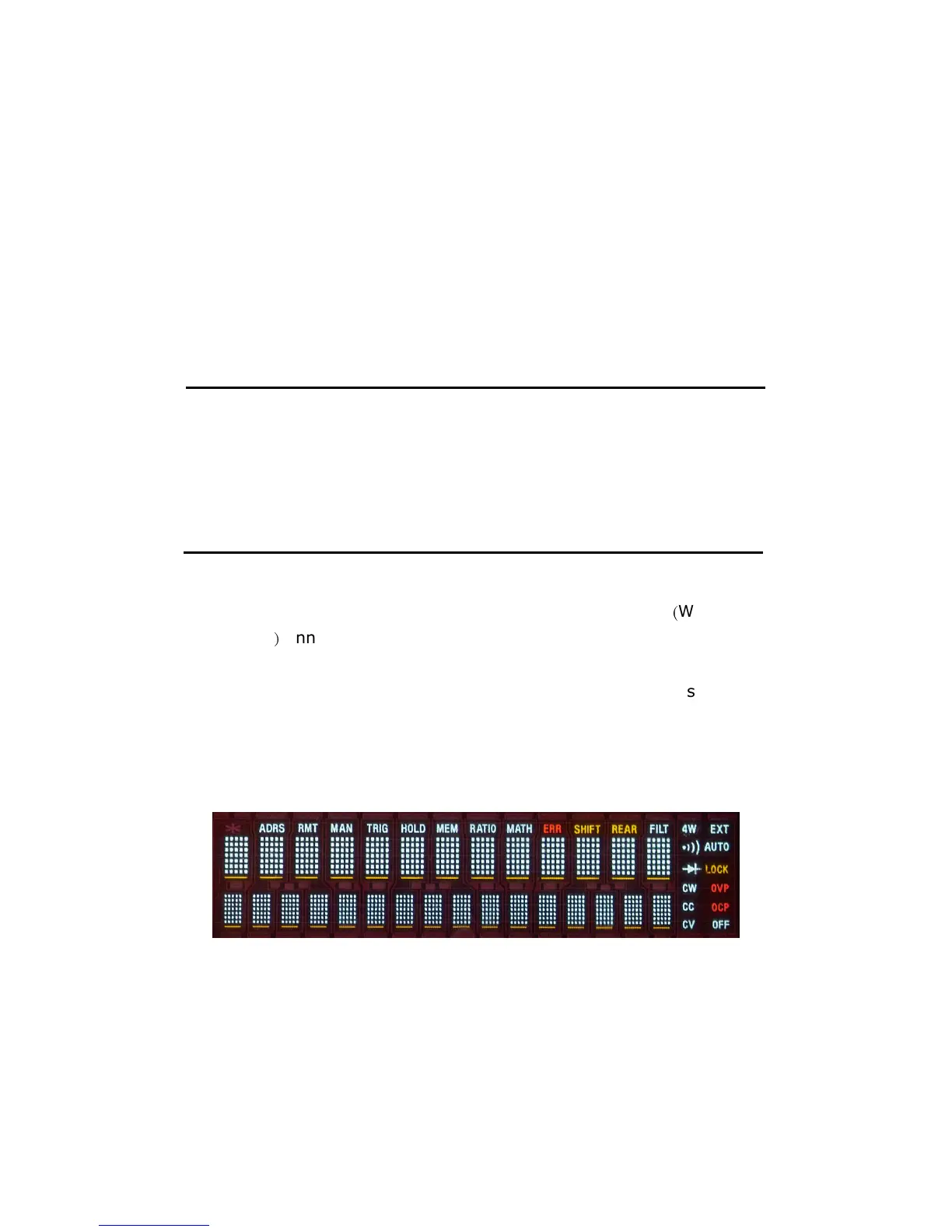
M3500A has a 5x7 dot matrix, dual-display with three-color
(
White, Red
and Yellow
)
annunciators for a better view. A maximum 13 characters
are allowed for upper row dot-matrix display and a maximum 16
characters are allowed for lower row dot-matrix display
as shown on
Figure 4-25.
You
have an option to turn off the display for a faster
measurement without waiting for display, or when the measurement is
done through the remote interface operations on you PC terminal.
Figure 4-25
When the display is turned off, an “OFF” will be lit at the lower right
corner of the display screen. This doesn't mean the display is
POWER-OFF, but only that the measurement readings will not be sent to
the display. This option will accelerate the measurement process



 To Next Page