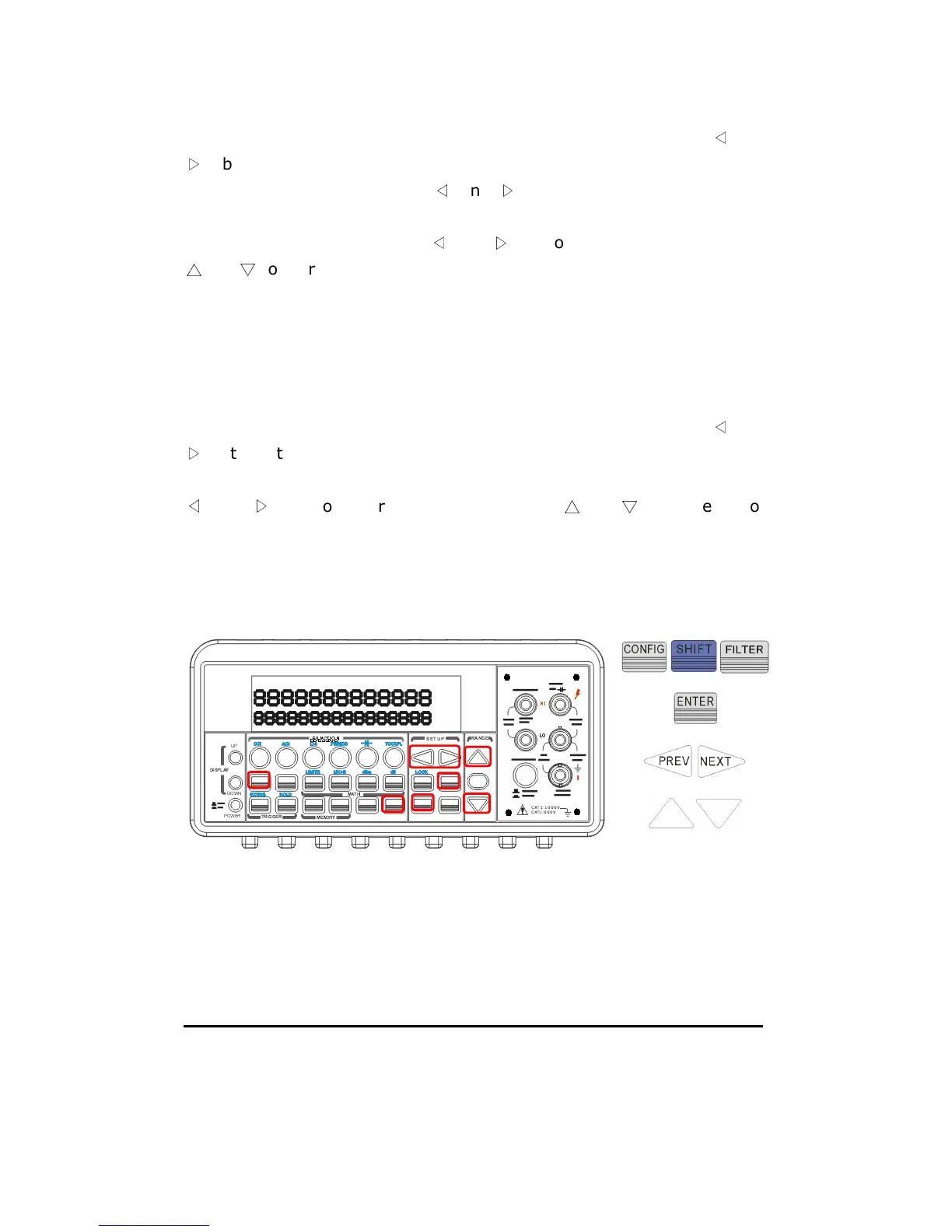
Press CONFIG + SHIFT + FILTER for scanning configuration. Use
◁
and
▷
buttons to scroll through submenus. Press ENTER to select
“OPERATION” submenu. Use
◁
and
▷
to switch among scan count
(COUNT), scan interval (TIMER) and store (STORE) options. Then press
ENTER on your selection. Use
◁
and
▷
to move through the digits and
△
and
▽
to increase or decrease the numbers to a desired value. For
STORE option, you can select ON to instruct the meter to store the
measurement results for later retrieving or select OFF. Press ENTER to
set the value.
How to open and close the channels
Press CONFIG + SHIFT + FILTER for scanning configuration. Use
◁
and
▷
buttons to scroll through submenus. Press ENTER on “----” when you
need to close a specific channel. Press ENTER again on “CHANNEL”. Use
◁
and
▷
to move through the digits and
△
and
▽
to increase or
decrease the numbers to the desired channel number. Press ENTER to
close the channel. To open all channels, simply press ENTER on “OPEN
ALL” option. Press SHIFT + FILTER to scan as shown as Figure 4-32.
Figure 4-32
4.4.7 Initial Mode
The section contains two selections: “DEFAULT” and “SAVE DATA”. You



 To Next Page