A. Number of samples on each trigger
By default, the multimeter takes only one reading on each trigger, but
you can instruct the multimeter to take specific number (up to 50000) of
readings each time it receives a trigger. The user’s input setting is stored
in a volatile memory which will be cleared after the meter has been
turned off and the default value will be restored. You can set the number
of samples on each trigger through front panel or the remote interface.
Front Panel Operation
Press MENU button and locate “TRIG” submenu by pressing
◁
and
▷
buttons. Press ENTER to choose “TRIG” option. Again locate “N SAMPLE”
submenu using
◁
and
▷
buttons and then press ENTER to select it.
Then set the desired number by pressing
△
and
▽
buttons to increase
or decrease the number, and using
◁
and
▷
buttons to move through
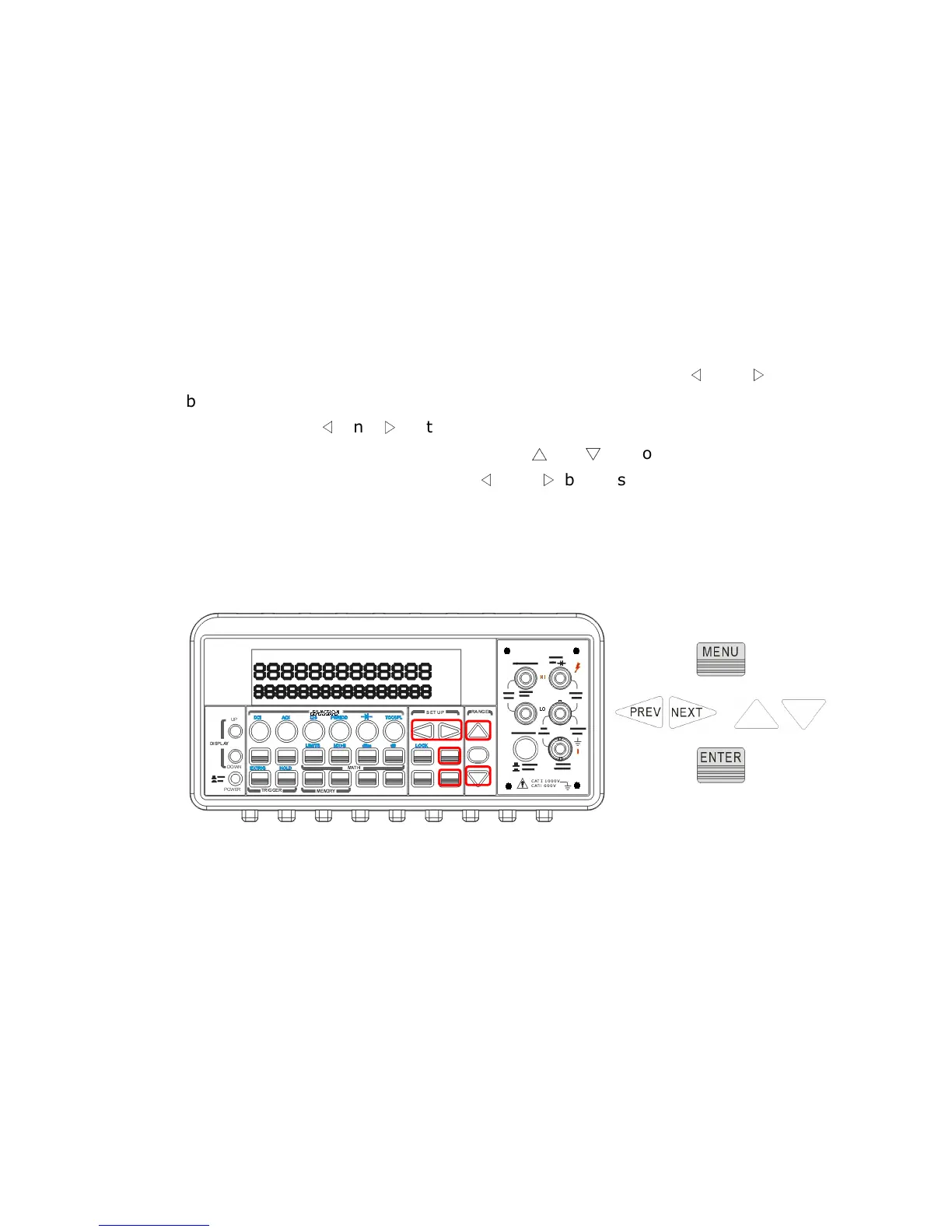
the digits. The locations of these buttons are shown with red rectangle
frames in Figure 4-11.
Procedures: MENU →
→→
→ TRIG →
→→
→ N SAMPLE →
→→
→<Number>
Figure 4-11
Remote Interface Operation
Use the following command to set the number of samples from your PC
terminal.
SAMPle:COUNt <value>
B. Number of triggers
Although the meter normally takes one trigger before returning to the
“idle” state, you can manually specify the number of triggers it accepts
+



 To Next Page