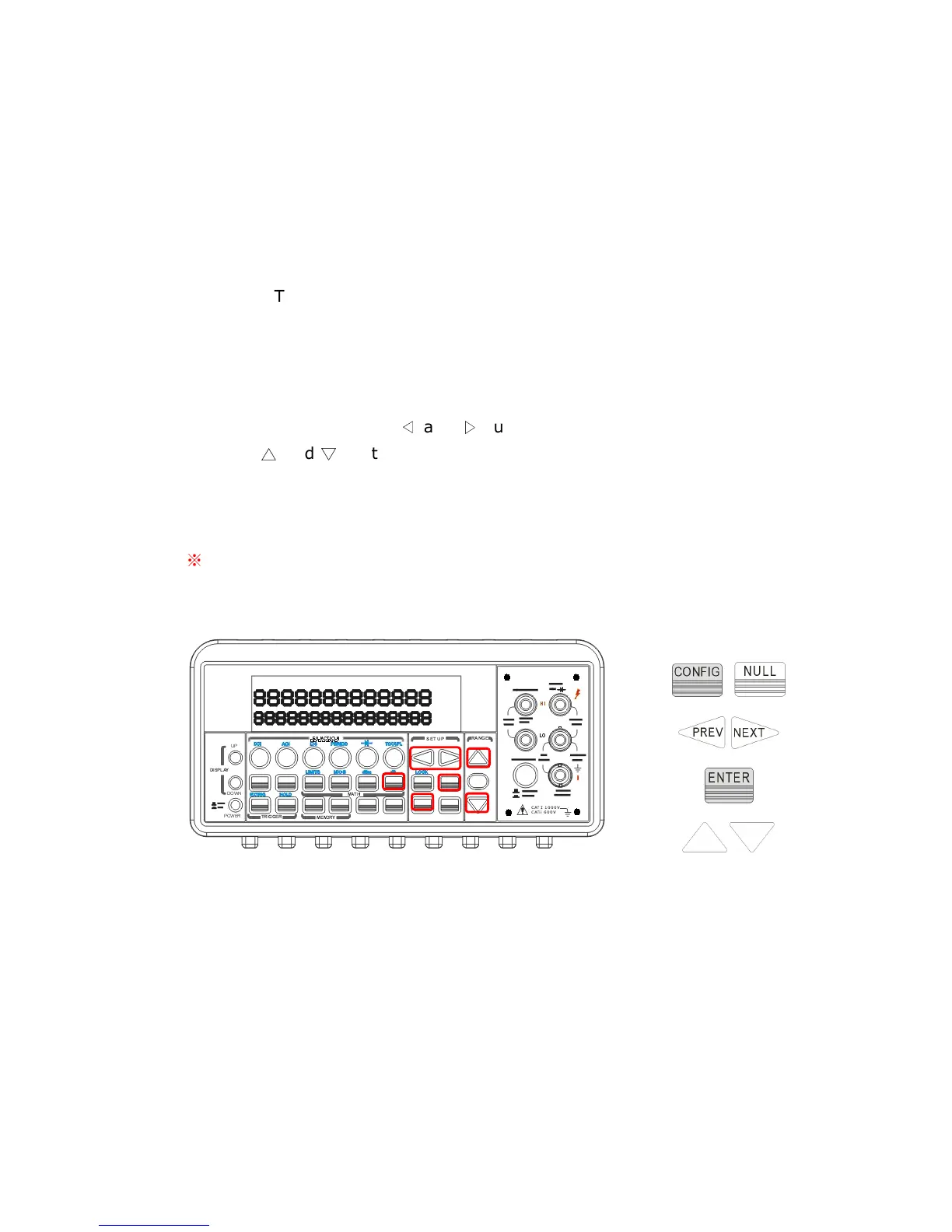
How to use null (relative) measurement
You can activate null feature from either the front panel operation or the
remote interface operation.
The Front Panel Operation
The null measurements can be used with any function except continuity
and diode.
To store the null test lead resistance, short the two test leads
together and then press NULL button. The new reading taken will replace
the old value, if any, in the null register. Then, connect the two test leads
to the input source. The value with null offset will show on the display. In
addition, the null offset value can be adjusted manually by pressing
CONFIG then NULL. Use
◁
and
▷
buttons to move through the digits
and use
△
and
▽
buttons to increase or decrease the numbers to a
desired value. Press ENTER to set the value. The locations of the buttons
are shown with red rectangle frames in Figure 4-17.
※
Note: Press NULL again to disable this feature. The “MATH”
anunnciator on the display indicates the state of a mathematical feature.
Figure 4-17
The Remote Interface Operation
You can use the following commands on your PC terminal to make a null
measurement.
CALCulate:FUNCtion NULL
CALCulate:STATe {OFF|ON}
CALCulate:STATe?



 To Next Page