a first in and first out condition.
Front Panel Operation
Before using the reading memory feature, you need to select a
measurement function (or the math function) first and then select the
trigger mode.
To store readings, use the following steps:
Press STORE button, and the multimeter will start to store the readings
produced until the specified number of readings is reached. The default
number of readings to store is 100. To change this number, press
CONFIG and then STORE buttons. Then use
◁
and
▷
buttons to move
between the digits and
▽
and
△
buttons to increase or decrease
numbers as desired. When ready, press ENTER button.
The default
number of readings will be restored when the meter has been turned off.
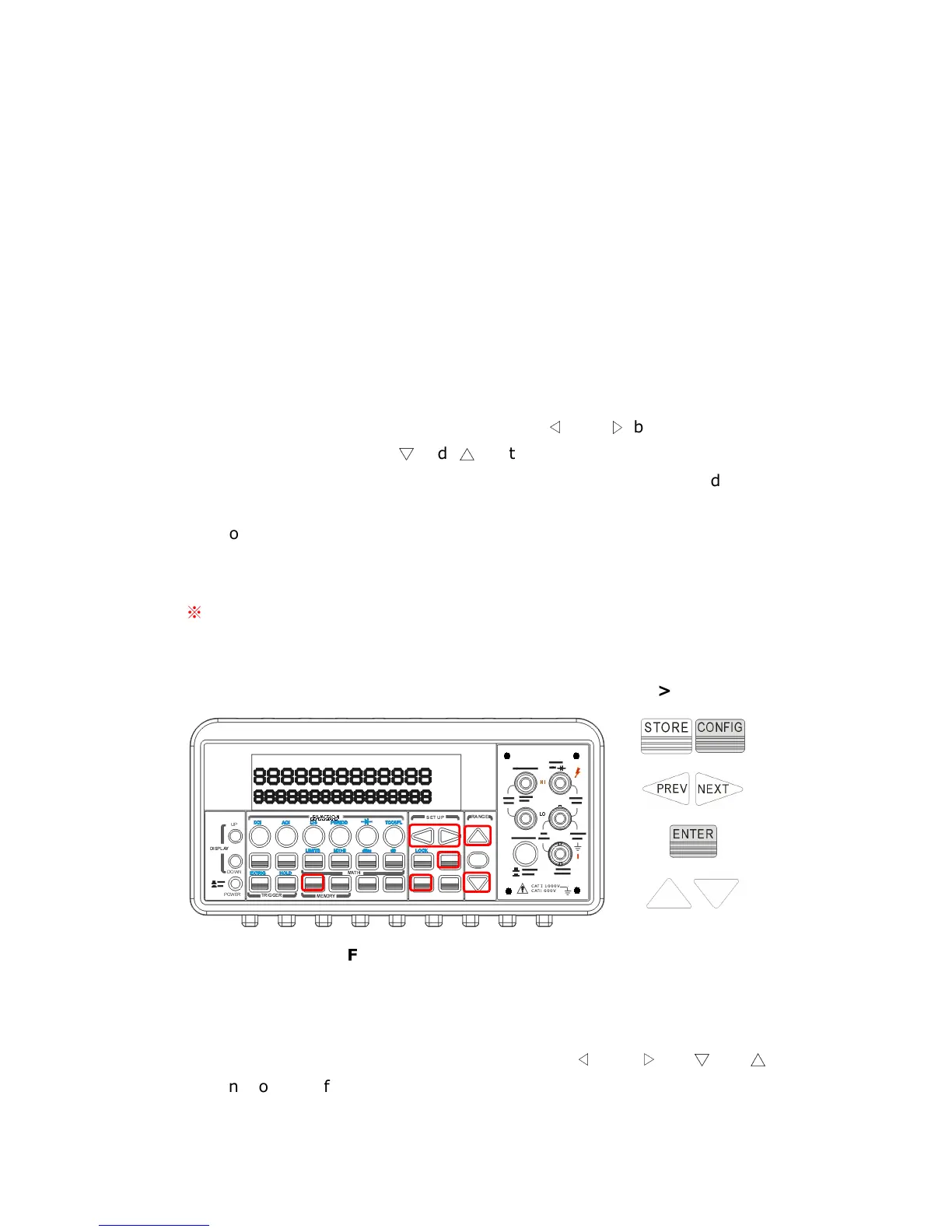
The location of the buttons are shown with red rectangle frames in
Figure 4-28.
※
Note: The MEM annunciator will be lit while the multimeter stores
readings and be turned off when the specified number of readings is
reached.
Procedures: CONFIG +STORE→
→→
→
<NUMBER>
Figure 4-28
To recall the stored readings, use the following steps:
Press RECALL button, and the multimeter will display all the stored
readings starting from the first reading. Use
◁
and
▷
or
▽
and
△
buttons to move from the first reading to the last reading the meter has



 To Next Page