156
Front Panel≫ Rear Panel≫ Remote≫
Contents
≫
Connections
≫
Playback
≫
Setup
≫
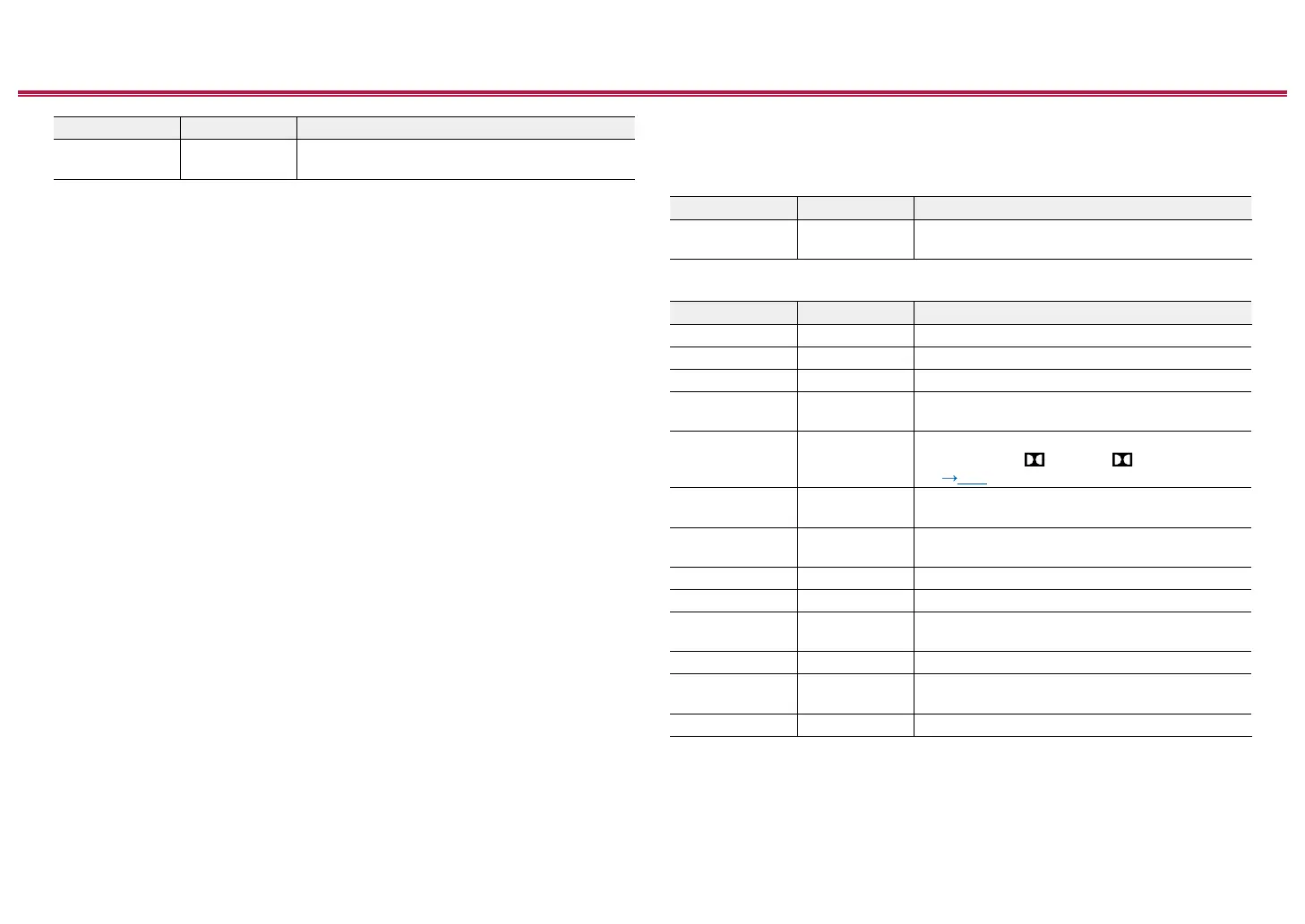
Setting Item Default Value Setting Details
BLUETOOTH Use Set whether to skip the BLUETOOTH input
selector. Select "Skip" to skip this input.
PERSONAL PRESET Information
Conrm the registered contents of 1 to 3 buttons of PERSONAL PRESET.
The registered settings are displayed in the list.
Setting Item Default Value Setting Details
Preset Preset 1
Selects a preset number from among "Preset 1",
"Preset 2" and "Preset 3".
(Main)
Setting Item Default Value Setting Details
Input Selector --- Displays the input selector that has been set.
Network Service --- Displays the Network Service that has been set.
Band --- Displays the band, "AM" or "FM" that has been set.
Station --- Displays the Preset Name of the radio station that
has been set.
Listening Mode ---
Displays the listening mode that has been set.
•
Modes such as Atmos and Atmos 2.0/2.1/2.2
( p139) may be displayed as "Dolby Audio - Surr".
Volume --- Displays the volume level that has been set. (Upper
limit "0.0 dB")
Multi Zone --- Displays the output destination (Multi Zone) that
has been set.
MCACC Memory --- Displays the number of the set MCACC Memory.
MCACC EQ --- Displays the status of the set MCACC EQ.
Standing Wave --- Displays the status of the set Standing Wave
setting.
Phase Control --- Displays the status of the set Phase Control.
Auto Phase
Control Plus
--- Displays the setting value of the set Auto Phase
Control Plus.
Sound Delay --- Displays the setting value of the set Sound Delay.
• "Band" is displayed only when the input selector is set to "TUNER".
• "Station" is displayed only when the input selector is set to "TUNER" or "NET".
• "Network Service" is displayed only when the input selector is set to "NET".
• Preset Name of "Station" (only when the input selector is set to "TUNER") is displayed with the
name set by "Source" - "Name Edit". If the name is not set, the frequency of the radio station is



 To Next Page
 Loading...










