15
Contents
≫
Connections
≫
Playback
≫
Setup
≫
Front Panel≫ Rear Panel≫ Remote≫
Remote Controller
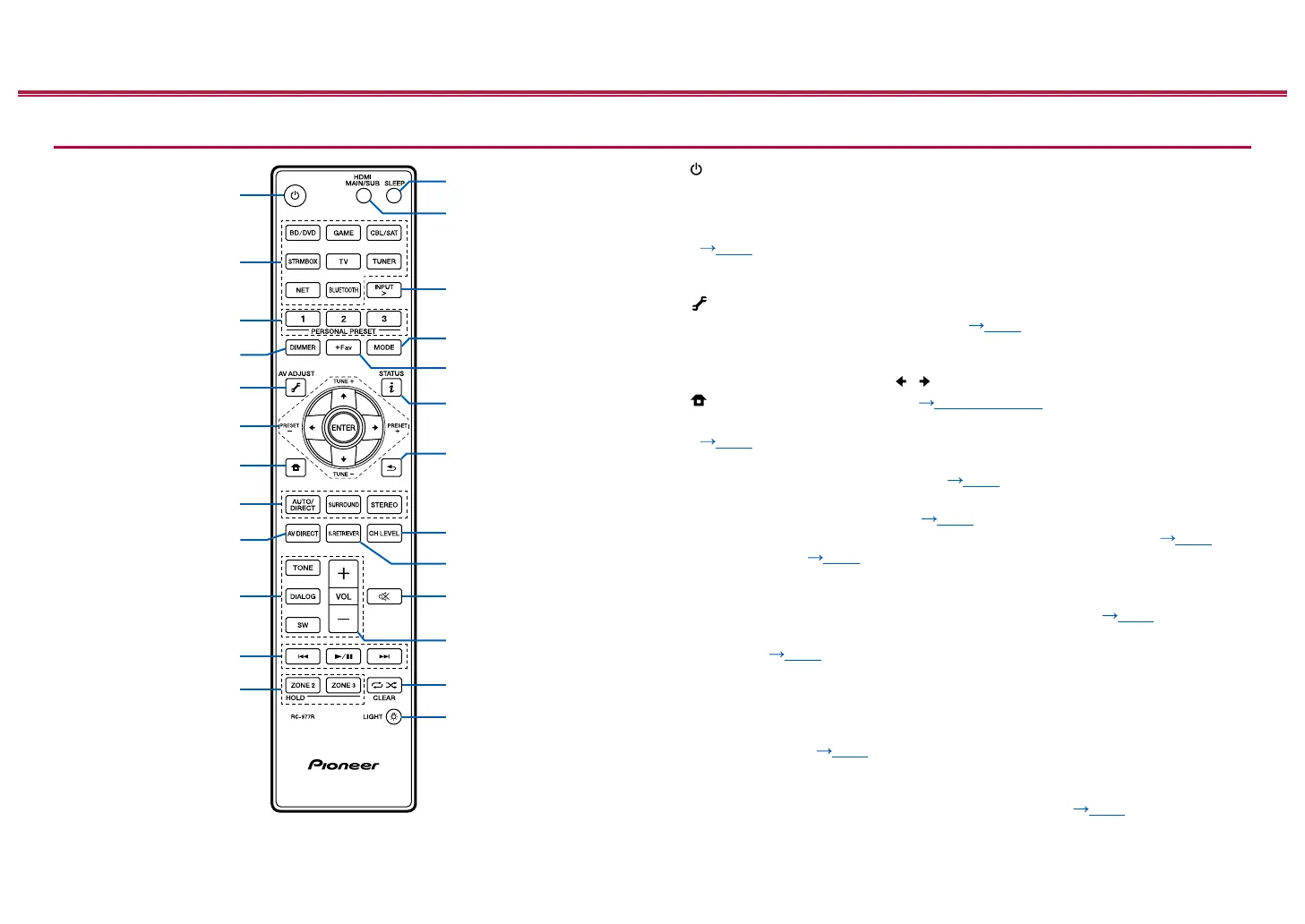
1. STANDBY/ON button
2. INPUT button: Switch the input to be played.
3. PERSONAL PRESET 1/2/3 buttons: Registers the current setting conditions
such as input selector, listening mode, etc. or call the registered settings.
( p127)
4.
DIMMER button: You can switch the display off or adjust the brightness of the
display in three steps.
5. (AV ADJUST) button: Settings such as "HDMI" and "Audio" can be made
quickly during play on the TV screen. ( p198)
6. Cursor buttons and ENTER button: Select the item with the cursors and press
ENTER to conrm your selection. When the folder or le lists are not shown on
one screen on the TV, press / to change the screen.
7. button: Displays the Home. ( p151, 179, 194)
8. LISTENING MODE buttons: Allows you to select the listening mode.
( p133)
9. AV DIRECT button: Sound quality can be improved by suppressing the noise
that is generated in digital circuits. ( p131)
10.
TONE/DIALOG/SW buttons: Adjusts the sound quality of the speakers and
volume level of the subwoofer. ( p129)
11.
Play buttons: Used for playback operations for the Music Server ( p106)
or USB device ( p103). If the unit is switched to "CEC MODE" using
"16. MODE button", an HDMI CEC function-enabled AV component can be
operated. (Depending on the device, operation may not be possible.)
12.
ZONE 2/ZONE 3 button: Controls the multi-zone function. ( p122)
13.
SLEEP button: Set the sleep timer. Select the time from "30 min", "60 min" and
"90 min". ( p132)
14.
HDMI MAIN/SUB button: Select the HDMI OUT jack to output video signals
from "MAIN", "SUB", and "MAIN+SUB".
15.
INPUT > button: Switches the input to be played.
16.
MODE button: Switches between automatic tuning and manual tuning for
AM/FM stations ( p117). Also, when an HDMI CEC function-enabled
AV component is connected to this unit, you can switch "11. Play buttons"
between "CEC MODE" and "RCV MODE" (normal mode).
17.
+Fav button: Used to register AM/FM radio stations. ( p119)



 To Next Page
 Loading...










