82
Front Panel≫ Rear Panel≫ Remote≫
Contents
≫
Connections
≫
Playback
≫
Setup
≫
Connecting an Audio Component
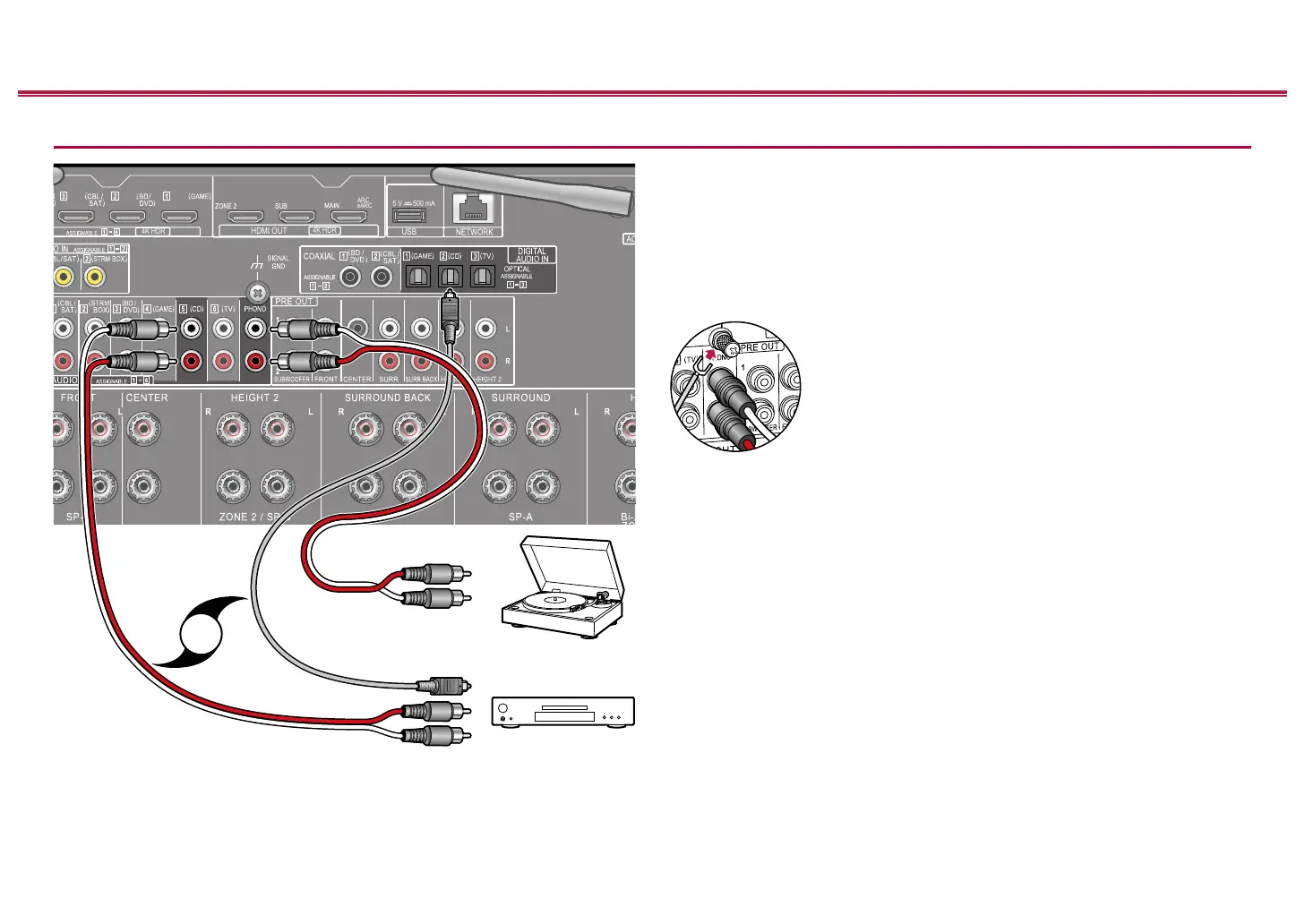
This is a connection example of an audio component. Connect a CD player using
a digital optical cable or analog audio cable. You can also connect a turntable that
has an MM-type cartridge to the PHONO jack.
• If the turntable has a built-in phono equalizer, connect it to any of the AUDIO
IN jacks other than the PHONO jack. Further, if the turntable uses an MC type
cartridge, install a phono equalizer compatible with the MC type cartridge
between the unit and the turntable, and then connect it to any of the AUDIO IN
jacks other than the PHONO jack.
If the turntable has a ground wire, connect it to the GND
terminal of this unit.
4K HDR
4K HDR
HDMI OUT
ARC
eARC
USB
5 V 500 mA
b
OR
a a
Turntable
CD
a Analog audio cable, b Digital optical cable



 To Next Page
 Loading...










