User’s Manual of GS-5220-16S8C & GS-5220-16S8CR
4.3.3 SNMP Trap Configuration
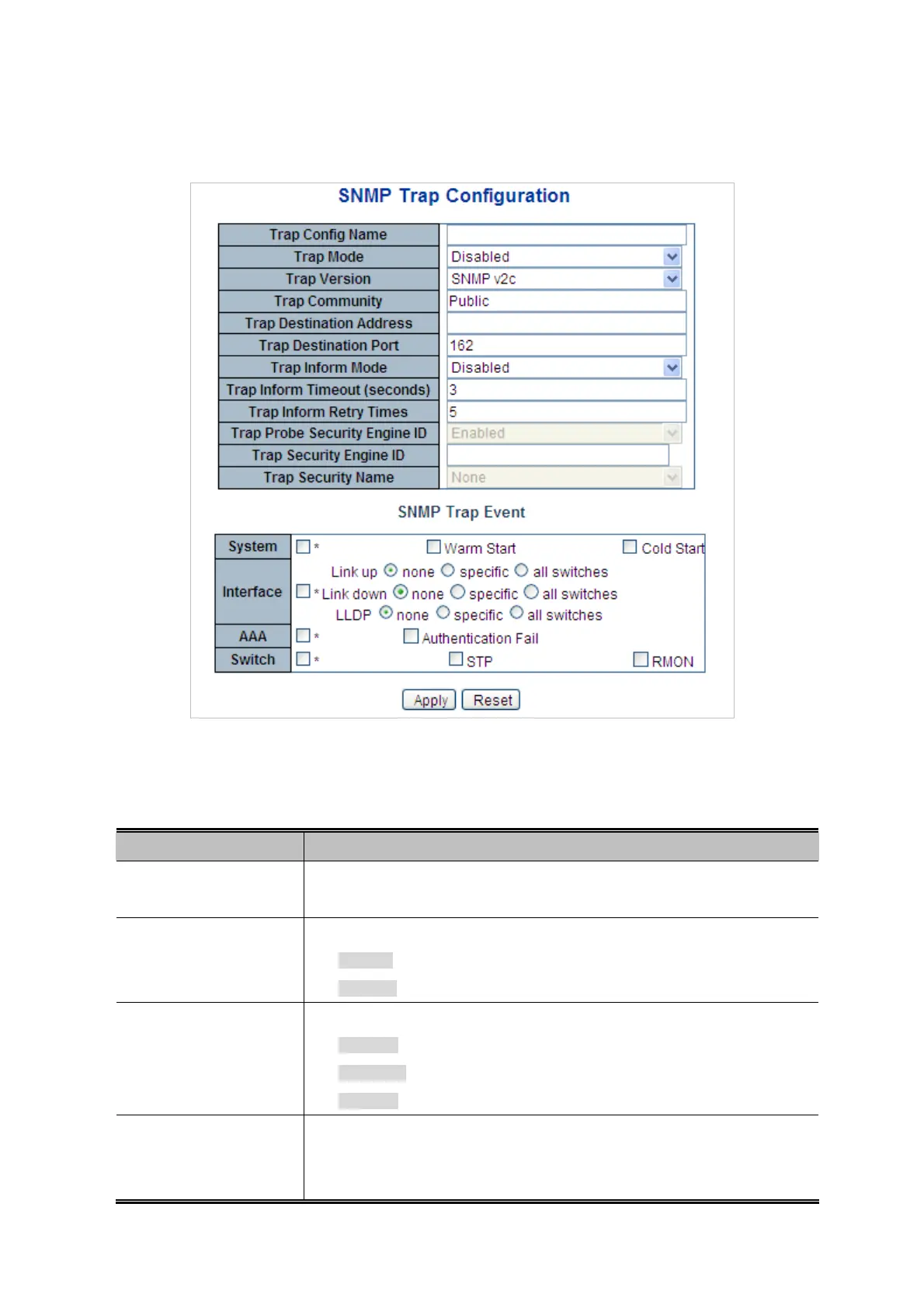
Configure SNMP trap on this Page. The SNMP Trap Configuration screen in Figure 4-3-2 appears.
Figure 4-3-2: SNMP Trap Configuration Page Screenshot
The Page includes the following fields:
Object Description
Trap Config
Indicates which trap Configuration's name for configuring. The allowed string
length is 0 to 255, and the allowed content is ASCII characters from 33 to 126.
Trap Mode
Indicates the SNMP trap mode operation. Possible modes are:
Enabled: Enable SNMP trap mode operation.
Disabled: Disable SNMP trap mode operation.
Trap Version
Indicates the SNMP trap supported version. Possible versions are:
SNMP v1: Set SNMP trap supported version 1.
SNMP v2c: Set SNMP trap supported version 2c.
SNMP v3: Set SNMP trap supported version 3.
Trap Community
Indicates the community access string when send SNMP trap packet. The
allowed string length is 0 to 255, and the allowed content is the ASCII characters
from 33 to 126.
75



 To Next Page
 Loading...












