121
Polyend Synth Manual
120
Polyend Synth Manual
NOTESNOTES
8.5 External Control Change Messages
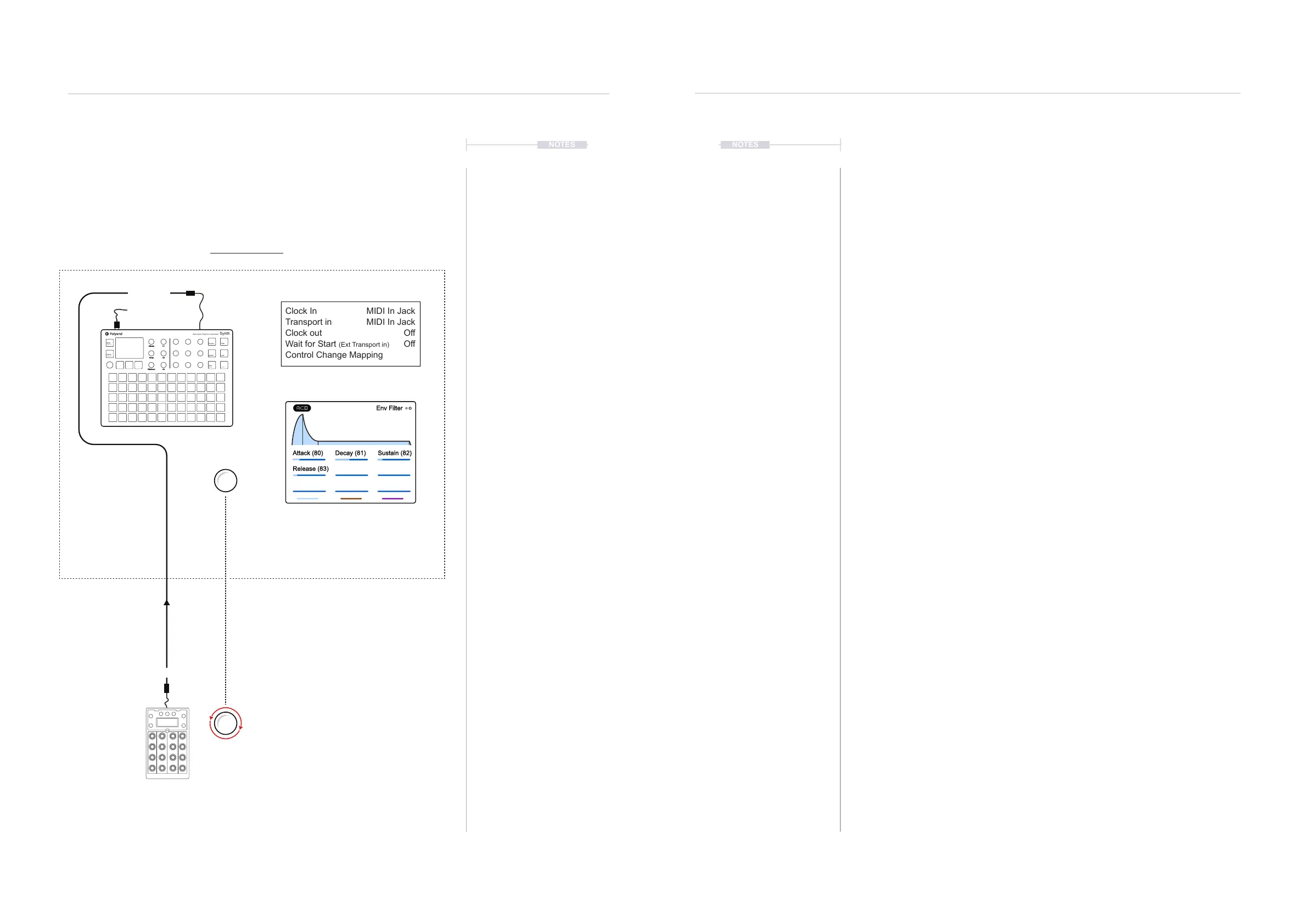
An external MIDI device can be connected to control Synth by MIDI to send
CC messages. CC or Control Change messages are used to control
assigned parameters, adjusting the values remotely.
MIDI In Jack
MIDI In Jack
Off
Off
Clock In
Transport in
Clock out
Wait for Start (Ext Transport in)
Control Change Mapping
Main Menu > MIDI
Main Menu > MIDI >
Control Change Mapping
The MIDI Channel is set per synth.
The CC range is 0-127 which would map to
the destination parameters range.
Example: 0-10 Seconds for the Attack time.
The CC numbers which are used for remote
control are displayed on the selected page
when ‘Control Change Mapping’ is selected.
This is a visual indicator only.
Example: Attack
CC 80
Mapped CC 80
0-127
Attack (80) Decay (81) Sustain (82)
Release (83)
Env Filter
USB MIDI
Optional controller used for Control
Change (CC) messages
Example Conguration 2: Synth as the secondary follower controlled with Faderfox EC4.
MIDI OUT
MIDI IN
Mixer
Effects
Engine Filter
Scene
Preset
ADSR LFO
Seq
Mod
Shift
Volume
Tempo
Pitchbend
C1
C2
C3
Multi-engine Polyphonic Synthesizer
Synth
MIDI & Connectivity
8
MIDI & Connectivity
8
Setting up CC messaging will need conguration in Synth as well as
conguration in the connected device. Refer to the connected devices
documentation. Synth has preset CC mapping assigned to specic
parameters in the synth engine functions.
▌ CONNECTING AN EXTERNAL CC CONTROLLER
1. Ensure the connected device has the ability to congure CC output
messages for example using a knob or fader. Typically the CC number
to match the destination address and possibly the range which is
typically 0-127. Connect the devices using the MIDI or USB
connections.
2. Ensure the Synth to control is set to the same MIDI Channel as the
external device. Press (Screen) to open the Main Menu. Navigate to the
‘Synths’ menu and Press (Screen). Use the parameter knobs to set the
‘Midi Channel’ port and number.
3. Select a function page to control. For example, select the [ADSR]
Envelope page for Filter. The current setting will be the starting value.
4. To view the CC numbers assigned to the Synth parameters, open the
Main Menu by Pressing (Screen). Turn (Screen) to navigate to the
‘MIDI’ option and Press (Screen). Open the ‘Control Change Mapping’
option by pressing (Screen) when highlighted.
5. The Control Change Mapping page shows the parameters for the
selected function. The parameter titles will be followed by a number in
brackets, i.e. (80) for Attack time for the Filter ADSR Envelope. This is a
visual reference only and displayed parameters cannot be changed.
6. Ensure the external MIDI device control parameter is set to send CC
messages to same number i.e. 80. The external range is typically 0-127
which will control the destination. For example, Attack time will vary
between 0-10 Seconds with the 0-127 range.



 To Next Page