Edition: A03 September 6, 2018
20
Current Value: Set the current value of the counter, value should be within the begin value
and maximum value.
Repeat Index Value: Set the current repeat index value, only settable while repeat value is not
0, repeat index value range is 0-repeat value.
Pre-zero: Pre-zero setting of counter, four options: 0001, ___1, 1___, 1.
Alarm: This function will provide an alarm when the counter reaches the maximum value.
User can switch this option on or off.
4) Shift Source
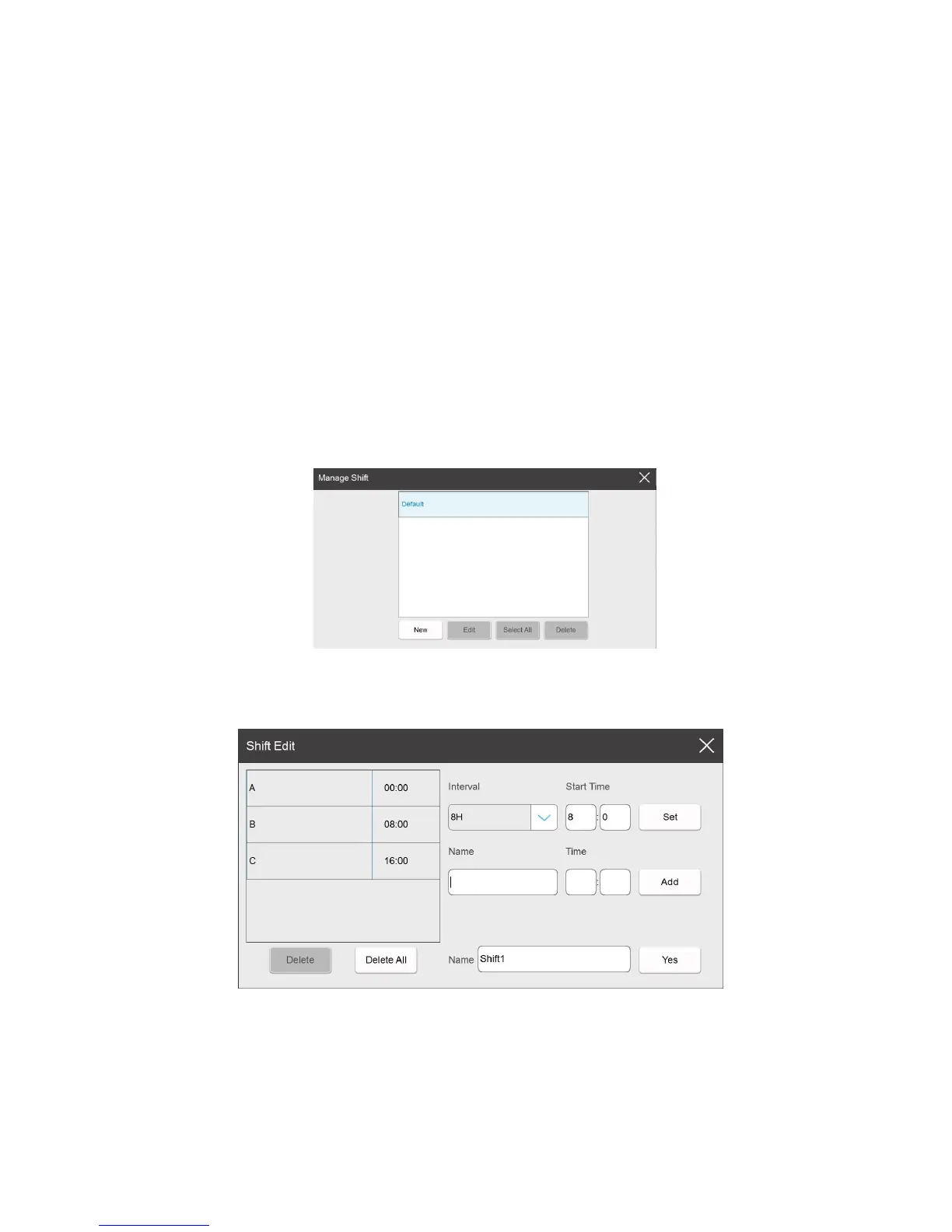
Shift: Click to switch shift, (default A:8:00 B:16:00 C:0:00), if you need to create a new one
or modify any of them, click 【Edit】
Shift List:
Show the default and newly built shift settings.
New: Building a new shift
Interval: User can choose 0.5h/1h/2h/3h/4h/6h/8h/12h, according to the selected time interval,
24 hours a day is divided into the corresponding number of shifts.
Start Time: Time of first shift.
Set: Select the time interval and the start time, click the button【Set】, it will generate the
default shifts automatically, and shows in the left list.( For example, set the interval to 4H, the



 To Next Page