15
PORA ELECTRIC MACHINERY CO.,LTD.
PR-DTC-4100.A / AD
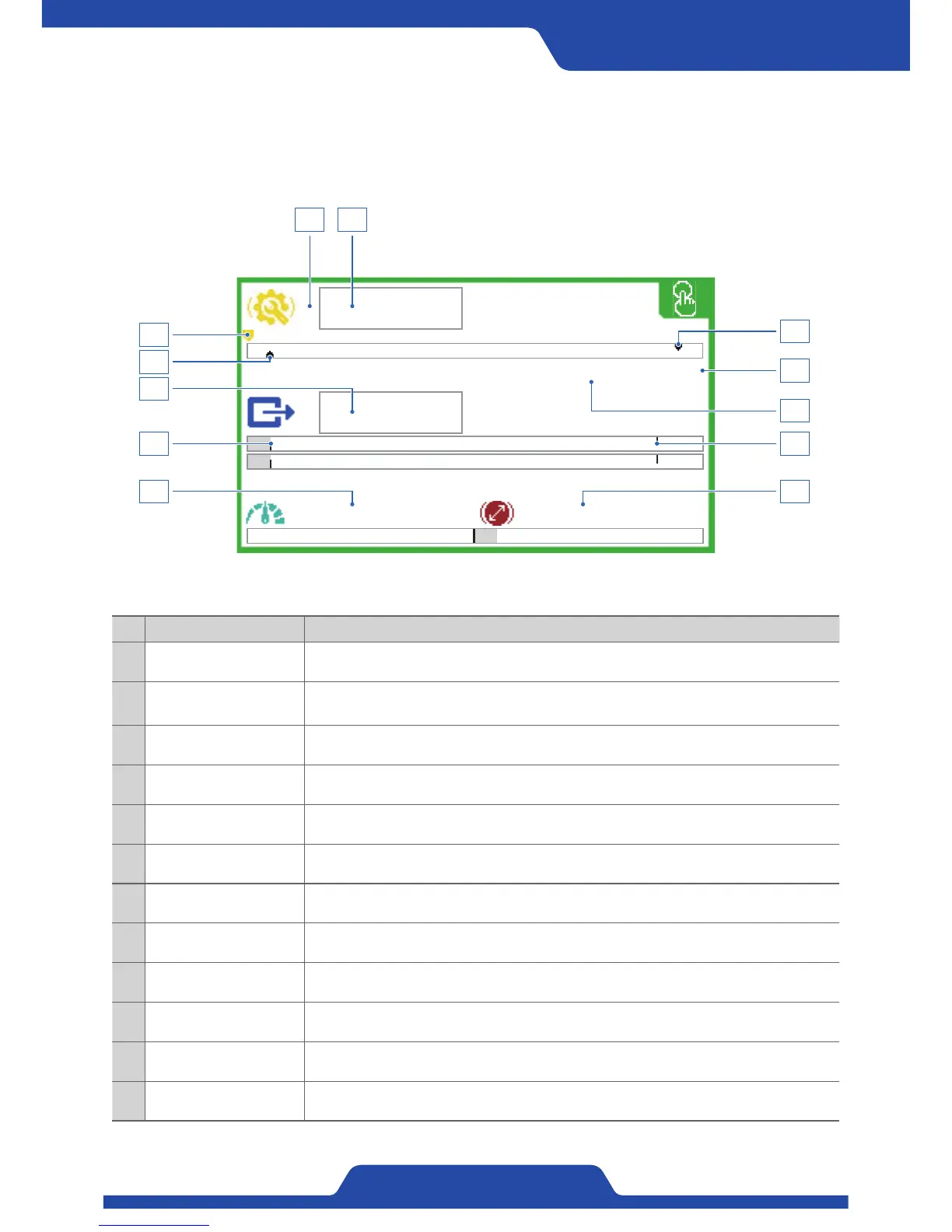
1) Type 1 (Bar graph display): It shows tension values, output values, operation
diameter and line speed as the shape of bar
graph.
0.0kg
0.0kg
0.0mpm 100.0mm
T
5.8%
~
3
9
10
6
12
4
5
8
11 12
7
Name Guidance
1 Target tension It shows set-up target tension.
2 Using analog input
When using ‘Analog input’, a wave dash ( ~ ) is shown.
(In case that ~ (Wave dash) is shown, the dial button at front part does not work.)
3 Target tension arrow The position of target tension is indicated as an arrow.
4 Lower limit of tension It shows set-up lower limit of tension.
5 Upper limit of tension It shows set-up upper limit of tension.
6 Measured tension It shows currently measured tension.
7 Indicating tension Tension total (T), Left (L), Right (R)
8 Control output It shows values of control output.
9 Excitation voltage It shows set-up excitation voltage.
10 Output limit It shows set-up output limit.
11 Line speed It shows line speed.
12 Diameter operation It shows current diameter operation.


 To Next Page
 Loading...