955725_4
18
Summary Information
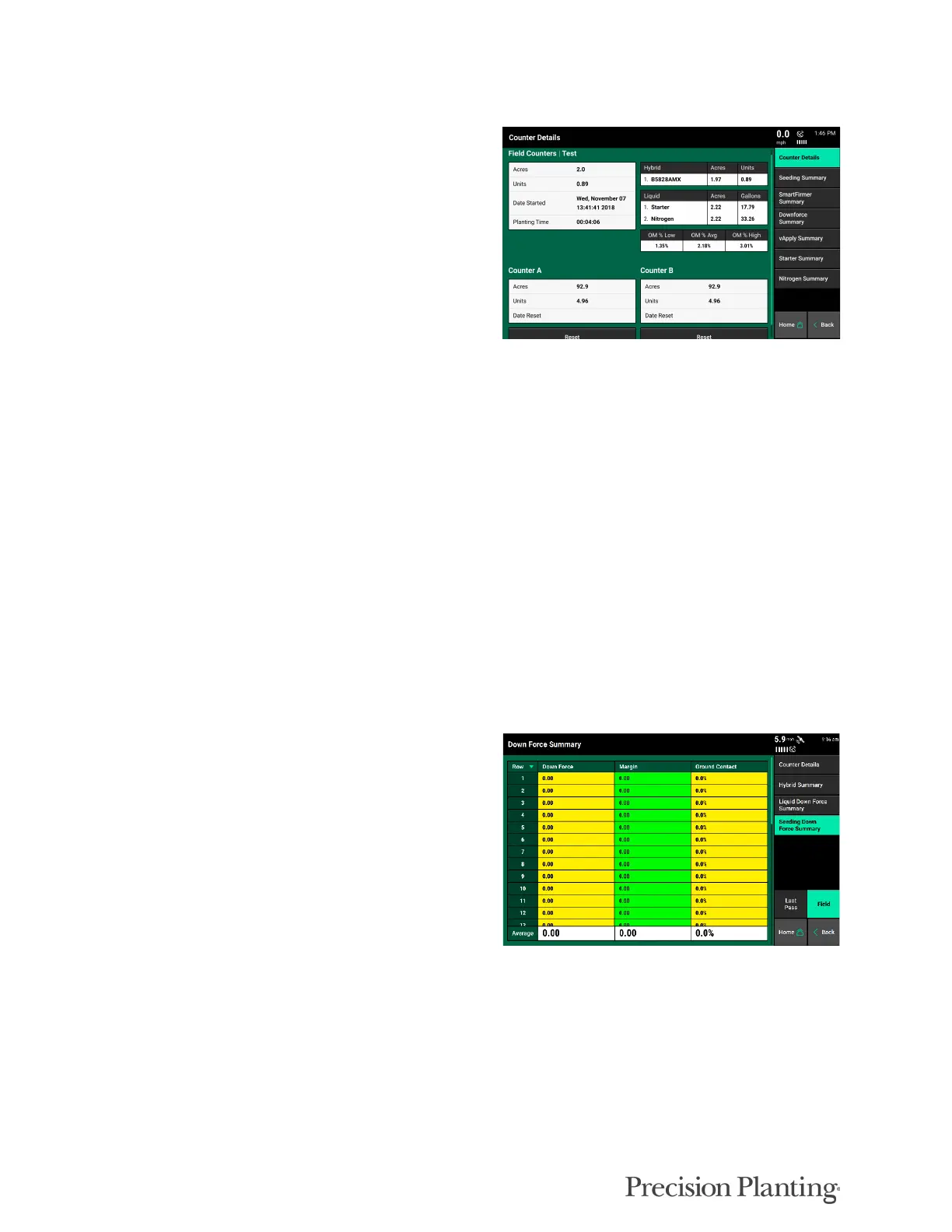
Summary information for the active field can be
found by pressing any of the different acre
counters on the home screen or the Field
Summary button under Field Setup (Setup —
Fields). When an acre counter is selected, the
“Counter Details” page will be selected. On this
page summary information will be provided for
acres and seeds planted. Additionally, Liquids
and Insecticides will be displayed with the
number of acres planted and amount used for
each type. At the bottom of the page there are
two acre counters (A & B). These acre counters
do not reset when a different field is made active.
The operator has to press the reset button for
these to reset back to 0.
On the navigation menu on the right side of the screen there are two additional summary pages:
Seeding Down Force Summary and Liquid Down Force Summary. Both the Seeding and Liquid
Down Force summary pages can be displayed for the entire field or for the last pass through the
field. Toggle between these modes at the right side of the page.
Seeder wide averages are available at the bottom of the screen. Colors for each metric will
change according to the limit adjustments configured in the Alerts menu (Setup – Alerts – Seed
or Air Seeder).
Down Force Summary displays row by row
information for average Down Force value (as
determined by the load cell), Margin, Ground
Contact, and Ride Quality for each individual
row. These values are averages for the entire field
or the last pass through the field for each
individual row. Seeder wide averages are
available at the bottom of the screen.



 To Next Page