955725_4
54
Systems – Down Force
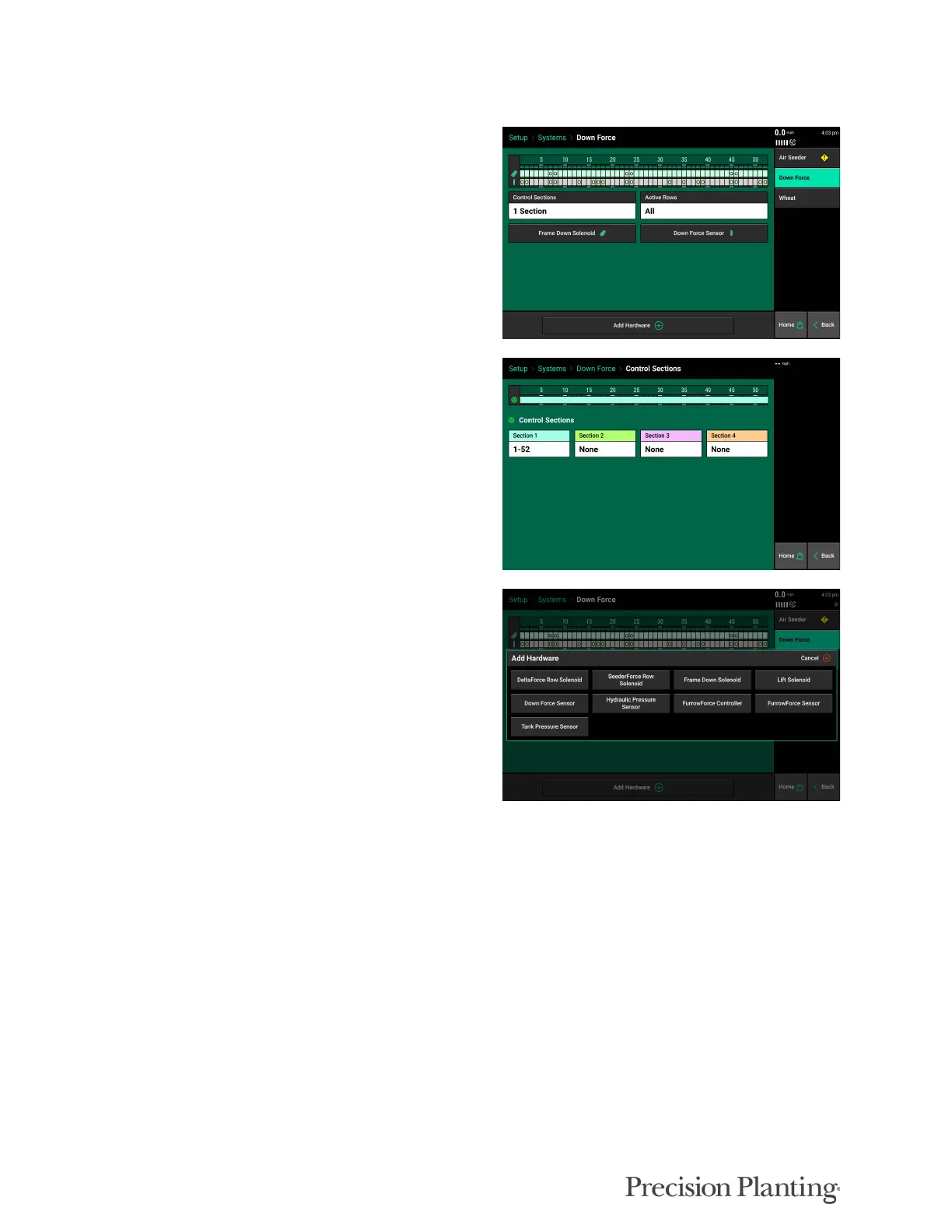
When a DownForce system has been added in
Equipment it will appear on the Systems menu,
select DownForce on the Systems screen to
configure.
Select “Control Sections” and make sure all rows
are assigned to a section (in most scenarios all
rows can be assigned to one section.)
Click on “Add Hardware” at the bottom of the
screen. There are multiple options to choose
from, depending on the configuration of the
system.
• DeltaForce Row Solenoid — Used on Planters only: Do not use for Seeders
• SeederForce Row Solenoid — Select for row by row SeederForce Systems
• Frame Down Solenoid — Select for Rockshaft Frame Controlled Systems
• Lift Solenoid — Used on Planters only: Do not use for Seeders
• Down Force Sensor — Select to add all Down force Sensors (Load Cells)
• Hydraulic Pressure Sensor — Select for all most controlled Down Force Systems
• FurrowForce Controller, FurrowForce Sensor, Tank Pressure Sensor — Not used on Seeders



 To Next Page