955725_4
55
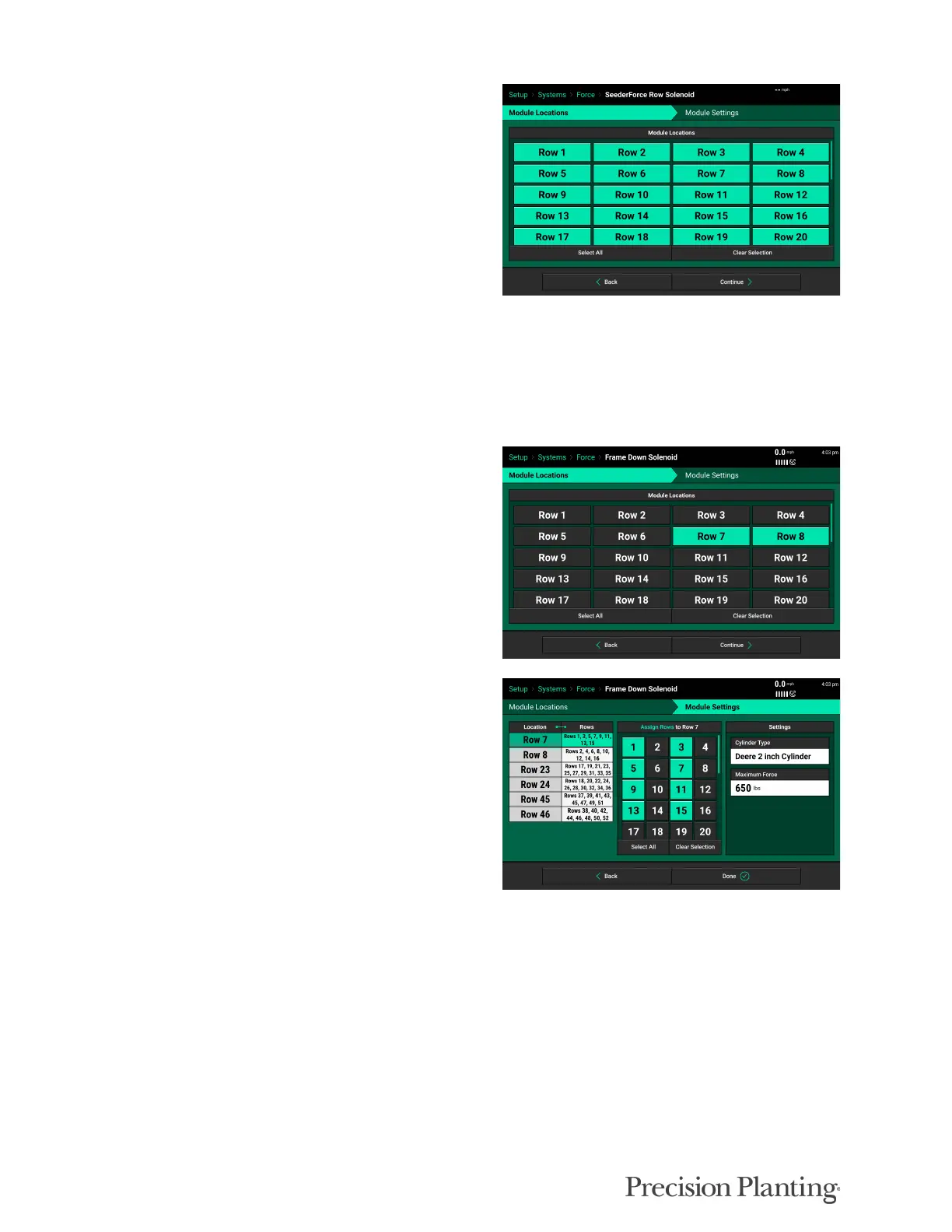
SEEDERFORCE ROW SOLENOID- Row by
row SeederForce Systems
Select Add Hardware and select SeederForce
Row Solenoid.
Select the Rows that have a SeederForce
Solenoid (Cylinder) on them, and then click
Continue
Cylinder Type and Max DownForce can be specified on each row. The only cylinder type
available is “SeederForce Single Row”. If Rockshaft control is being used instead, it is
configured n the Frame Down Solenoid option. Click Done when finished.
FRAME DOWN SOLENOID- Rockshaft
Controlled Systems
Select “Add Hardware” and select “Frame Down
Solenoid.”
Select the rows that have a Frame/Rockshaft
control solenoid connected. Refer to Appendix E.
Assign the rows on the corresponding frame
section that each solenoid are controlling. Refer
to Appendix E.
Cylinder type must be selected for each row. Cylinder type may differ across the seeder.
Note: The cylinder type, or dimension, refers to the piston head diameter. This measurement can
be found on the data tag on JD cylinders.



 To Next Page