955725_4
45
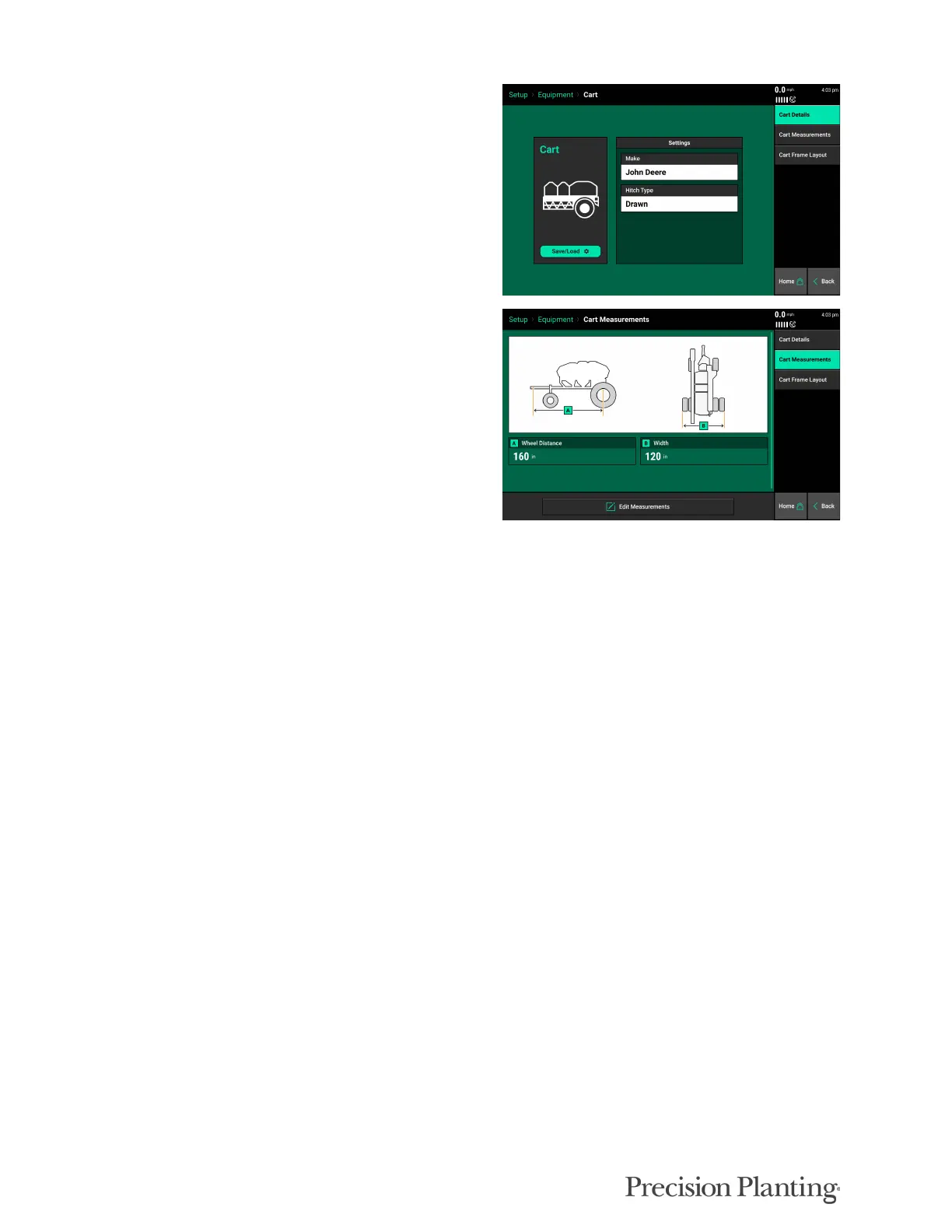
CART DETAILS
Select the appropriate make and Hitch Type.
CART MEASUREMENTS
Wheel Distance— Enter the distance from the
pivot point to the center of the rear frame wheel
axle
Hitch Distance(In-between Carts Only) — Enter
the distance from the rear axle to the rear hitch.
Width — Enter the distance from the outside of the left rear wheel to the outside of the right rear
wheel.
CART FRAME LAYOUT
Currently the cart frame layout shows the same diagram as the Air Seeder Frame Layout.
Save/Load
Both Tractor and Seeder configurations can be saved in the 20|20. Once a tractor and or seeder
has been configured press the Save/Load button to save these setup configurations. Press the
“Save Current Vehicle (or Implement) Configuration” button to create a name for the current
configuration on the 20|20. It will be saved under the entered name.
Both the seeder setup/GPS measurements and all the configurations for all products will be saved
under the Air Seeder profile. Tractor setup and GPS measurements are saved under the Tractor
profile.
Configurations can then be reloaded later by pressing the Save/Load button and then selecting the
“Load” Button. This will reload a saved configuration. Saved configurations that no longer apply
can be deleted by pressed the “Delete” button.
It is important to note that when changing the Implement Type, all configurations will be reset
back to factory defaults. Using the Save/Load feature will allow the operator to quickly load a
previously saved configuration after changing the implement type.



 To Next Page