Translation of the original German user manual
50
ENGLISH
If you have programmed e.g. 90, you will be reminded to clean the brew group after 90 brews via the
display. Now clean the brew group (see chapter 10.2).
The note on the display can be reset via the ”Reset Reminder“ function in the PID (see 7.9).
We recommend cleaning the brew group after 90 – 140 extractions/shots. Only brewing
operation over 15 seconds is counted as one extraction/shot of coffee/espresso.
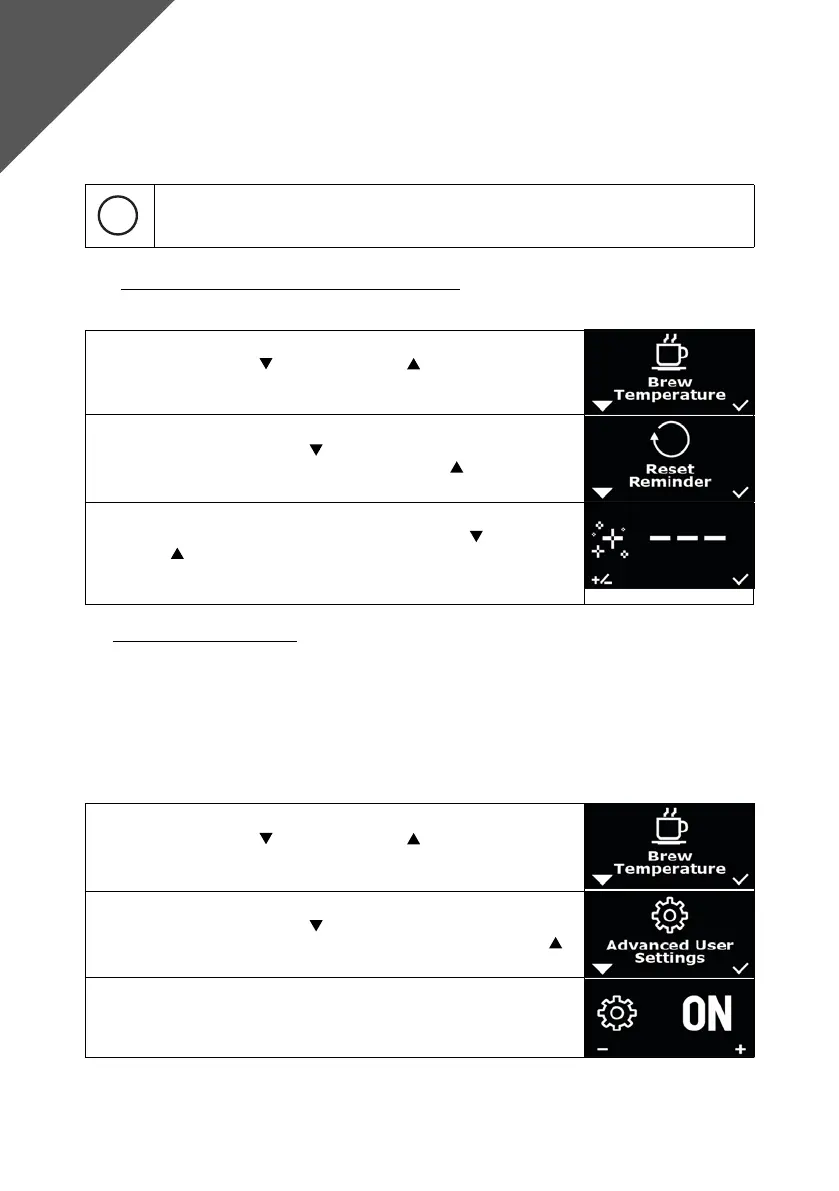
7.9 Resetting the reminder functions “Reminder Reset“
To reset the reminder functions, please proceed as follows:
1. Press the left button and the right button simultaneously, “Brew
Temperature“ appears on the display.
2. Navigate with the left button
until “Reminder Reset“ appears on the
display. Conrm the selection with the right button .
3. Now you can choose between the options “Cleaning Reminder“ (see
7.8) and “Filter Reminder“ (see 8.1) with the left button
. The right
button must be kept pressed. A successful reset of the reminder
is conrmed by “---“ in the display. The key can be released and the
menu is automatically exited.
8. ADVANCED USER SETTINGS
In addition to the basic settings listed, the DRIVE has a number of other settings. These are hidden
during the initial start-up and can be displayed with the menu item “Advanced User Settings“ menu item.
The machine can be used regularly without the Advanced User Settings (OFF). The advanced settings
can also be shown and hidden at any time. Settings made in OFF remain activated even when OFF is
hidden.
To show or hide the Advanced User Settings, please proceed as follows:
1. Press the left button and the right button simultaneously, “Brew
Temperature“ appears on the display.
2. Navigate with the left button
until “Advanced User Settings“
appears on the display. Conrm the selection with the right button .
3. Now you have the option to choose between “ON“ and “OFF“. The
selection is conrmed after 5 seconds. The additional settings are
now displayed in the menu.
Advanced
User Settings



 To Next Page