Translation of the original German user manual
53
ENGLISH
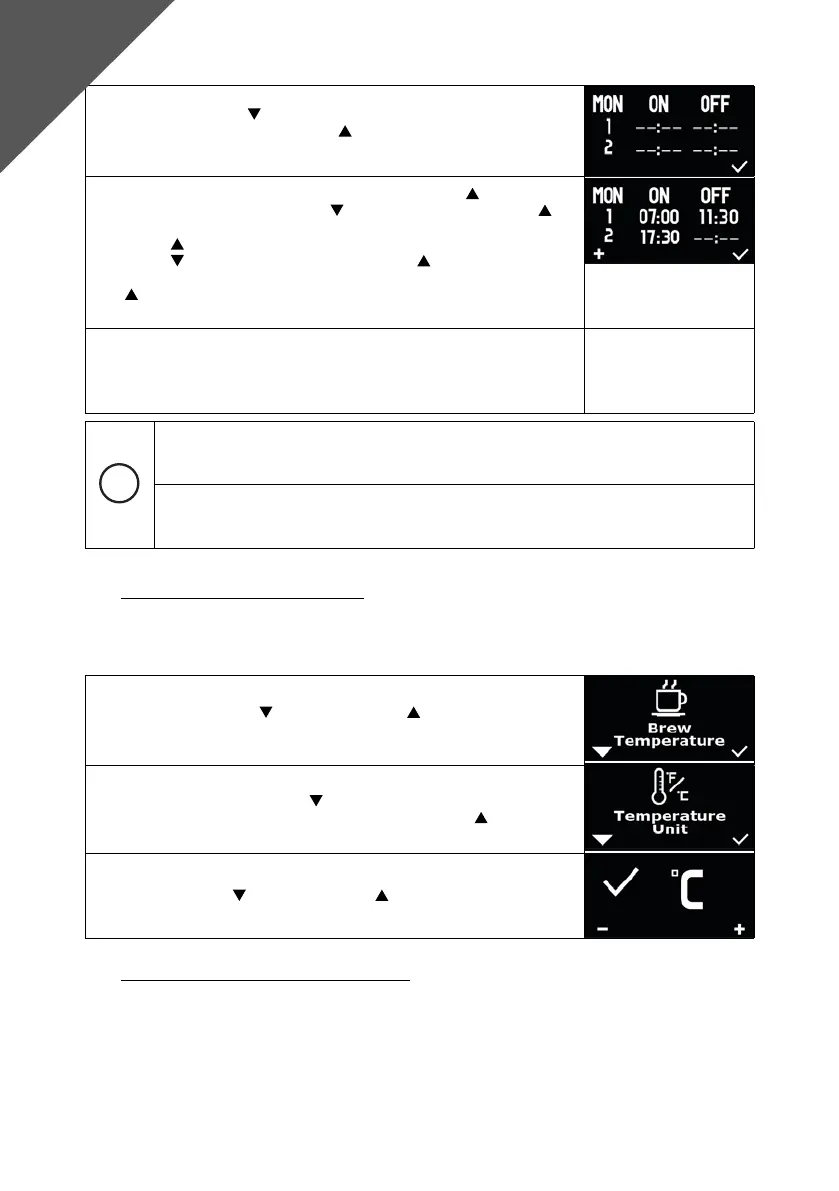
3. Use the left button to select the day of the week you want to set
and conrm with the right button to make the setting. Two switch-
on and switch-off times can be dened for each day.
4. To set the rst switch-on time, press the right button and then
set the hour with the left button
. Conrm with the right button
to then enter the minutes. With a further conrmation with the right
button
, you can dene the hour of the switch-off time with the left
button . Conrm again with the right button to dene the minutes
of the switch-off time. A further conrmation with the right button
lets you enter the hour of the second switch-on time. Continue as
described above.
5. As soon as no further settings are made, the menu is exited after 5
seconds.
A value does not have to be assigned to each switch-on or switch-off time.
If you want to delete an entry, set the corresponding value to “--:--“.
To use the timer function, the date and time must be set and “Timer Enable“ must be set
to “ON“.
8.5 Change °C and °F “Temperature Unit“
Through the display, you have the option to set whether temperatures are displayed in °C or °F.
Make sure that “Advanced User Settings“ is activated.
1. Press the left button and the right button simultaneously, “Brew
Temperature“ appears on the display.
2. Navigate with the left button until “Temperature Unit“ appears on
the display. Conrm the selection with the right button .
3. Now you can choose between C for Celsius and F for Fahrenheit by
pressing the left and/or right button . The selection is conrmed
after 5 seconds.
8.6 Adjustment of the offset “Offset Correction“
The DRIVE is supplied with software designed for the optimal preparation of coffee drinks.
beverages. Due to external circumstances, there may be slight deviations between the temperature
temperature measurement point in the machine and the output temperature. In this case, you can make
slight adjustments to the offset (temperature sensor to brewing temperature) using the offset value. The
default value is 0° C.
Advanced
User Settings



 To Next Page