PROLiNK® PRC3801 Wireless AC1200 MU-MIMO Dual-Band Gigabit Router
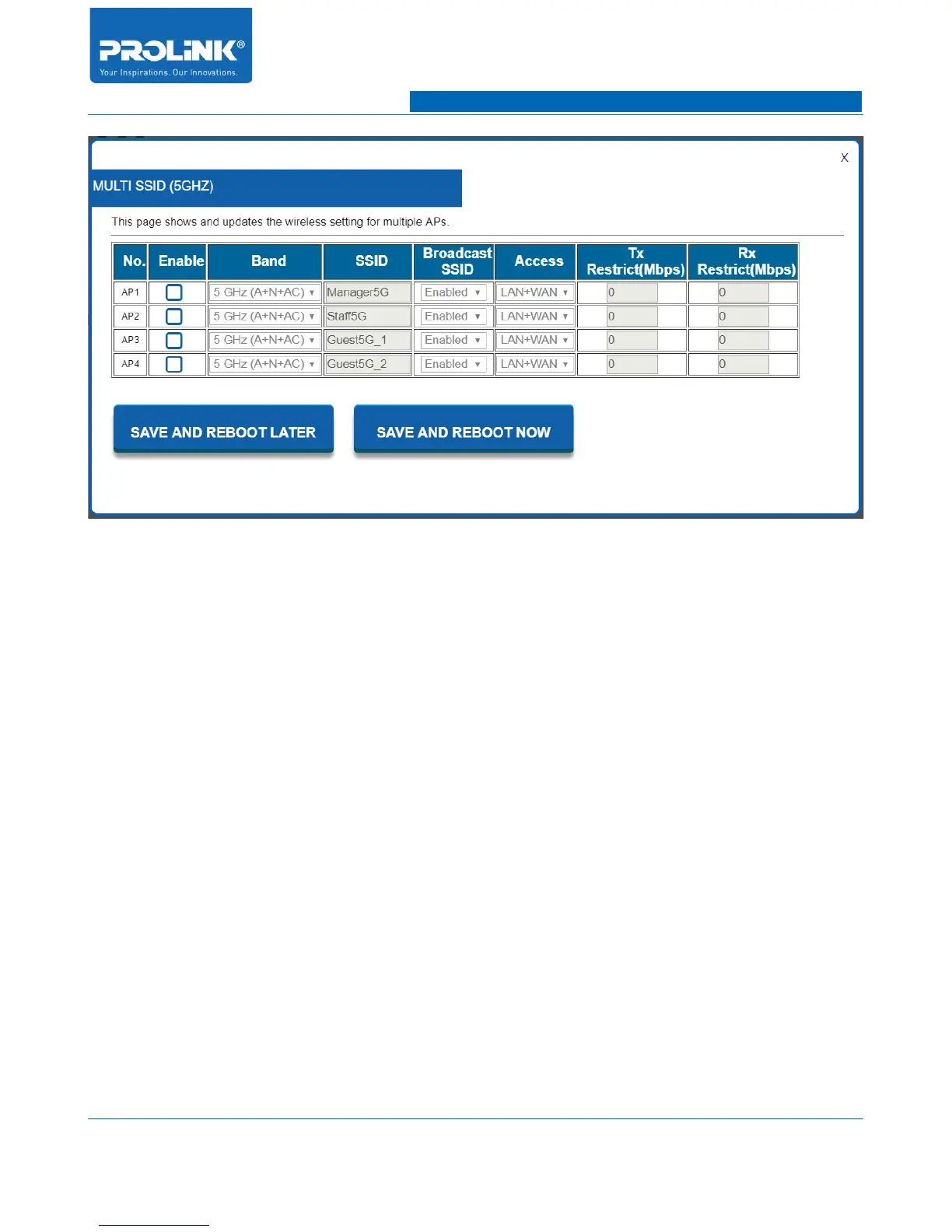
• No. AP: This show AP number.
• Enable: Check the box to enable the according AP. Once enable then you will be able to edit all
the configuration.
• Band: You able to change individually wireless mode of AP to suit your current configuration.
• SSID: Wireless name of the SSID that will be discover by client on local area survey wireless
network.
• Broadcast SSID: To broadcast wireless access point SSID for wireless client to detect on local
area survey wireless network. Select Disable to hide the Wireless Network Name.
• Access: To assign access permission of the AP. By default it will have access for LAN and
WAN connection. You are able to change either LAN only or WAN only access connection.
• Tx Restrict (Mbps): To control Download bandwidth to client. By default the value is 0 for no
restriction.
• Rx Restrict (Mbps): To control Upload bandwidth from client. By default the value is 0 for no
restriction.
20



 To Next Page