PROLiNK® PRC3801 Wireless AC1200 MU-MIMO Dual-Band Gigabit Router
2. Click “DELETE” to specifically remove specific MAC Address or click “DELETE ALL” to
remove all the MAC Address in the list.
Multi SSID
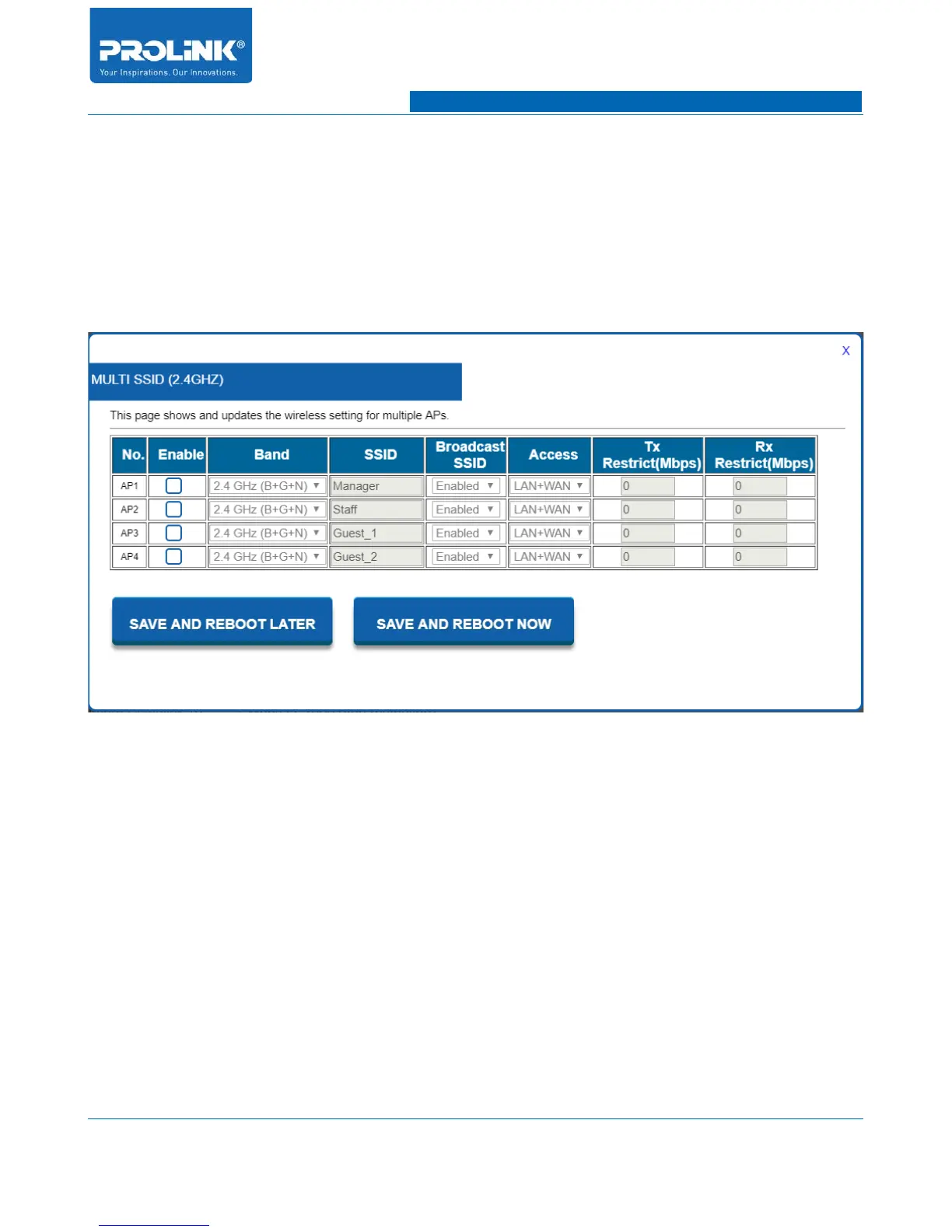
PRC3801 is capable to add up to 4 guest SSID in one single band therefore total SSID available is 5
SSID in one single band. To open the configuration, navigate to Setting → Wireless 2.4GHz → Multi
SSID and a window will pop up as above picture.
• No. AP: This show AP number.
• Enable: Check the box to enable the according AP. Once enable then you will be able to edit all
the configuration.
• Band: You able to change individually wireless mode of AP to suit your current configuration.
• SSID: Wireless name of the SSID that will be discover by client on local area survey wireless
network.
• Broadcast SSID: To broadcast wireless access point SSID for wireless client to detect on local
area survey wireless network. Select Disable to hide the Wireless Network Name.
• Access: To assign access permission of the AP. By default it will have access for LAN and
WAN connection. You are able to change either LAN only or WAN only access connection.
30



 To Next Page