RDM0001/3_2 Page 11 of 70 © 2015 - 2017 Protec Fire Detection plc
4.0 Indications and Controls
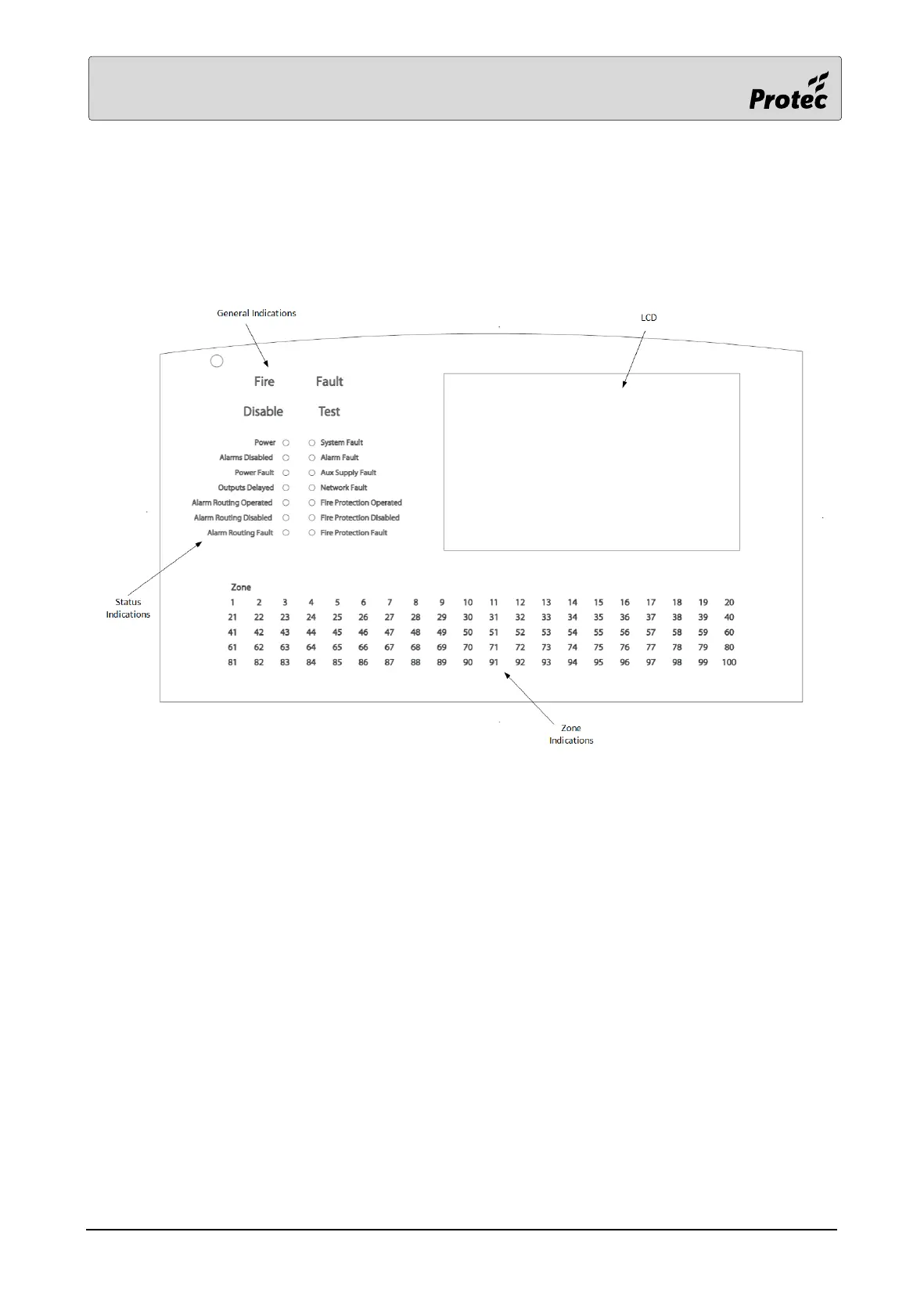
Each panel has a comprehensive front panel display enabling the current state of the system to be
rapidly determined. Figure 5.0 shows the indications and controls.
Figure 5.0 Front panel indications and controls.
4.1 LCD (Liquid Crystal Display)
The LCD gives a clear indication of the current status of the panel. Under normal conditions
the LCD shows the System Normal screen. This screen changes to the status display screen if
the panel has fires, faults, disablements or tests present.
4.2 General Indications
These are the General Fire, Fault, Disablement and Test indicators. These give clear indication
that the panel has at least one Fire, Fault, Disablement or Test condition. It is possible for the
panel to indicate multiple conditions simultaneously.
4.3 Status Indications
These provide important fault and status information at a glance without having to search for
it on the LCD.
4.4 Zone Indications
The zone in fire is always indicated on the LCD however if the fire occurs in one of the first
100 zones (40 zones on a standalone panel) then it is also indicated by the zone indicator
flashing red. If the user touches Accept then the zone indicator will remain on but stop
flashing.



 To Next Page