RDM0001/3_2 Page 29 of 70 © 2015 - 2017 Protec Fire Detection plc
12.11 The Fire Alarm Display
The panel enters the alarm state if one or more loop devices have triggered (this may be because an
automatic detector has sensed a fire, or a Manual Call Point has been operated).
The panel will activate its alarms as dictated by the system programming once commissioned.
The General Fire indicator will illuminate and (if the alarm is in zones 1 to 100) the zone indicator will
flash red.
Note: - A standalone panel will only illuminate zone indicators 1 to 40 as it only allows 40 zones to be used.
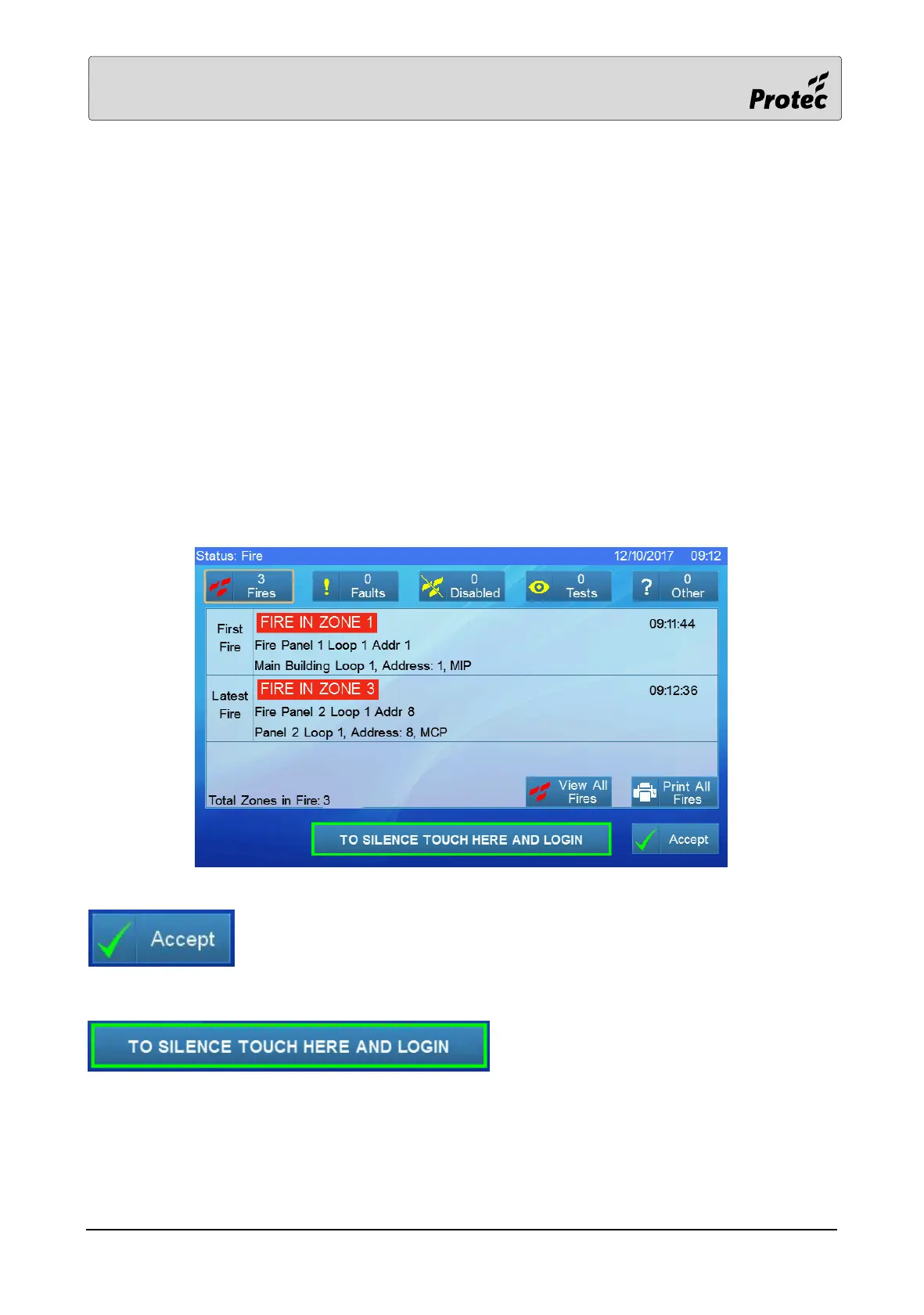
The LCD shows the fire display (overriding any normal or fault displays) as shown below
The display follows the format of displaying the first zone in fire, latest zone in fire and the total
number of zones in fire.
Touching ‘Accept’ will mute the panel buzzer
To silence the sounders (section 11.4) and to reset the system (section 11.5) requires the user to login
(section 12.8) by pressing the ‘To silence touch here and login’ button instead of the usual ‘Login’
button.



 To Next Page