Chapter 5: Configuration
Unicode Mapping
98
Psion Teklogix 7530 Hand-Held Computer User Manual
Adding And Changing Unicode Values
Important: Changes to Unicode mappings are not saved until you exit the
Keyboard Properties dialogue box.
• Press <TAB> to highlight the
Add/Change button, and press <ENTER>.
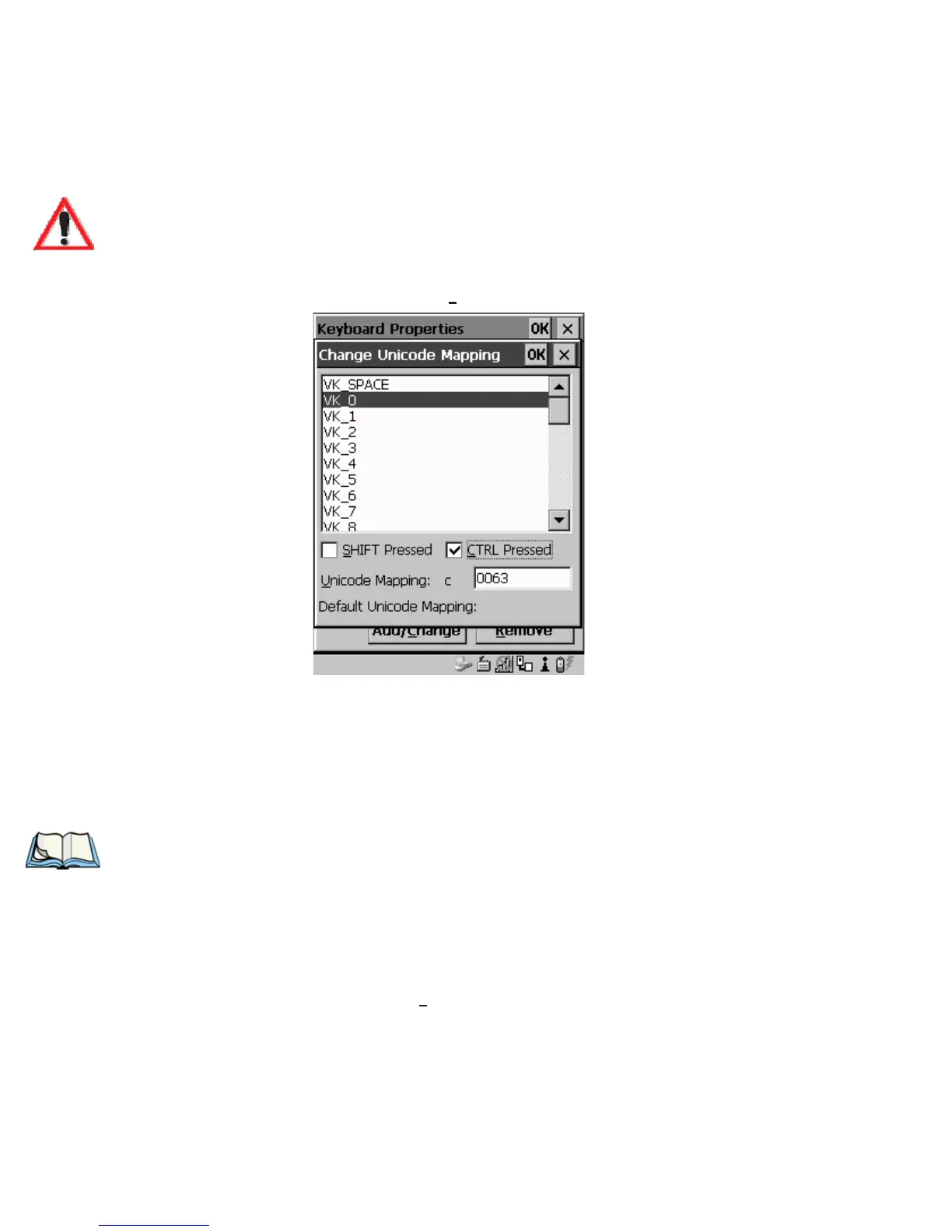
Figure 5.13 Adding And Change Unicode Values
• Highlight the a value in the Unicode mapping list – in the sample screen
above, a value will be assigned to virtual key 0 (VK 0).
• Press <TAB> to position the cursor in the ‘Unicode Mapping’ field and
type a Unicode value for the highlighted key.
Note: To add a shifted state – <SHIFT> and/or <CTRL>, press <TAB> to posi-
tion the cursor in the checkbox next to ‘SHIFT Pressed’ and/or ‘CTRL
Pressed’. Press <SPACE> to select (
√
) the shift state you want to assign.
Removing Unicode Values
• In the ‘Unicode Mapping’ tab, highlight the item you want to delete, and
press <TAB> to highlight the
Remove button.
• Press <ENTER> to delete the value.


 To Next Page
 Loading...



