Instructions for Use RAUMEDIC
MPR2 logO
Manufacturer: zwo-400EN
RAUMEDIC AG, Hermann-Staudinger-Strasse 2, 95233 Helmbrechts, Germany Rev. 9 2020-09-22
Page 50 of 99
4.4.3.5.1 Setting the pO2 limiting values
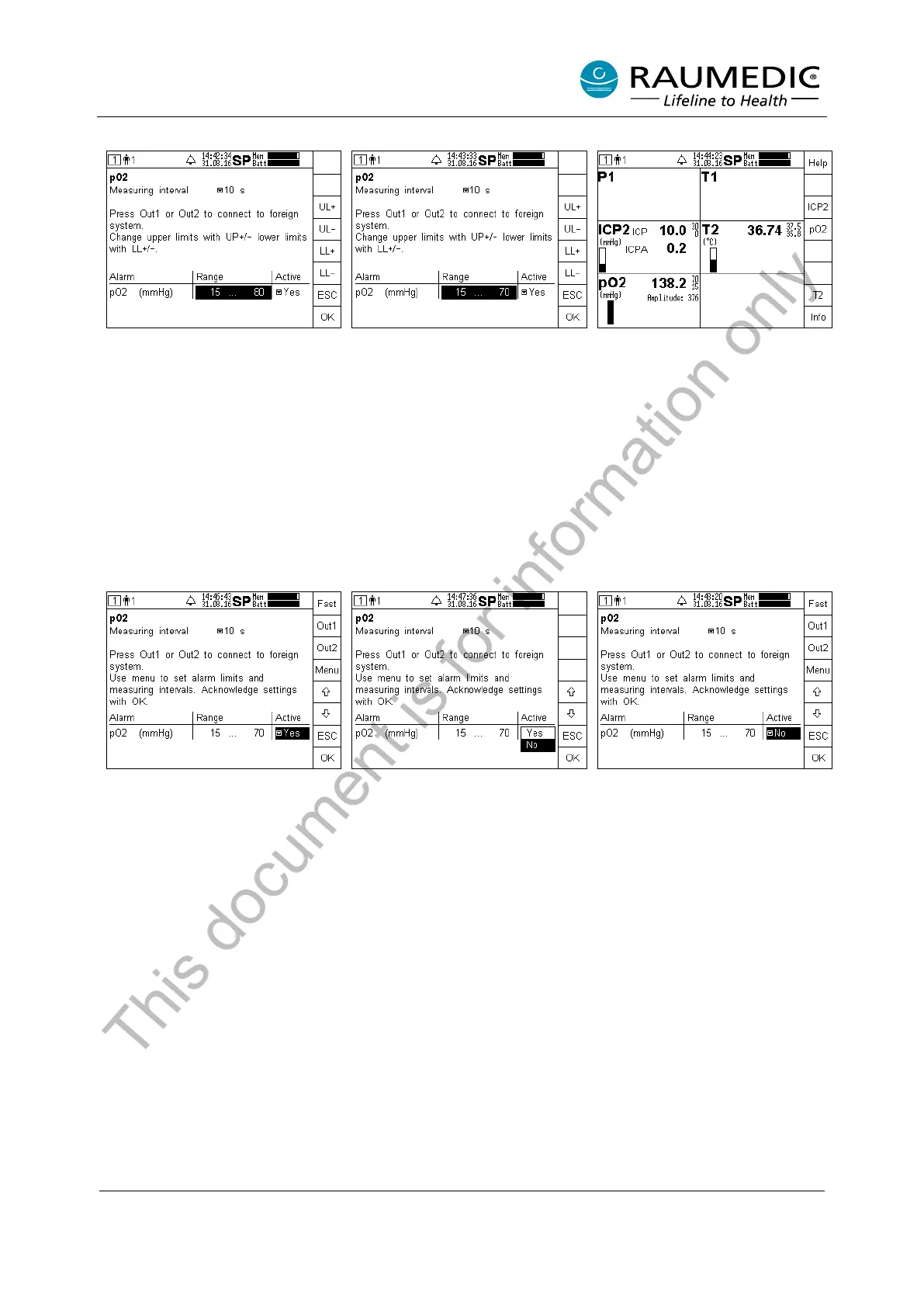
Increasing the lower limiting value:
Keep the LL+ key pressed until the
requested value is reached.
Lowering the upper limiting value:
Keep the UL- key pressed until the
requested value is reached.
Acknowledge the settings by
pressing OK. Leave the window by
pressing OK, if no other changes
are required. Only now will the
settings be active.
You will now a
ccess the overview
of the measured values. The new
limiting val
ues will be displayed,
provided Yes has been activated
for the parameter Active.
4.4.3.5.2 Activating and deactivating pO2 alarms
If you want to activate or deactivate an alarm, please proceed as follows:
Press the pO2 key in the Overview window.
Use
the arrow keys to navigate
into the table field, the settings of
which you want to change.
Subsequently press the Menu key.
Use the arrow keys to select the
requested setting. Subsequently
press the OK key.
The new settings will be accepted.
Press the
screen.
This document is for information only



 To Next Page