Instructions for Use RAUMEDIC
MPR2 logO
Manufacturer: zwo-400EN
RAUMEDIC AG, Hermann-Staudinger-Strasse 2, 95233 Helmbrechts, Germany Rev. 9 2020-09-22
Page 67 of 99
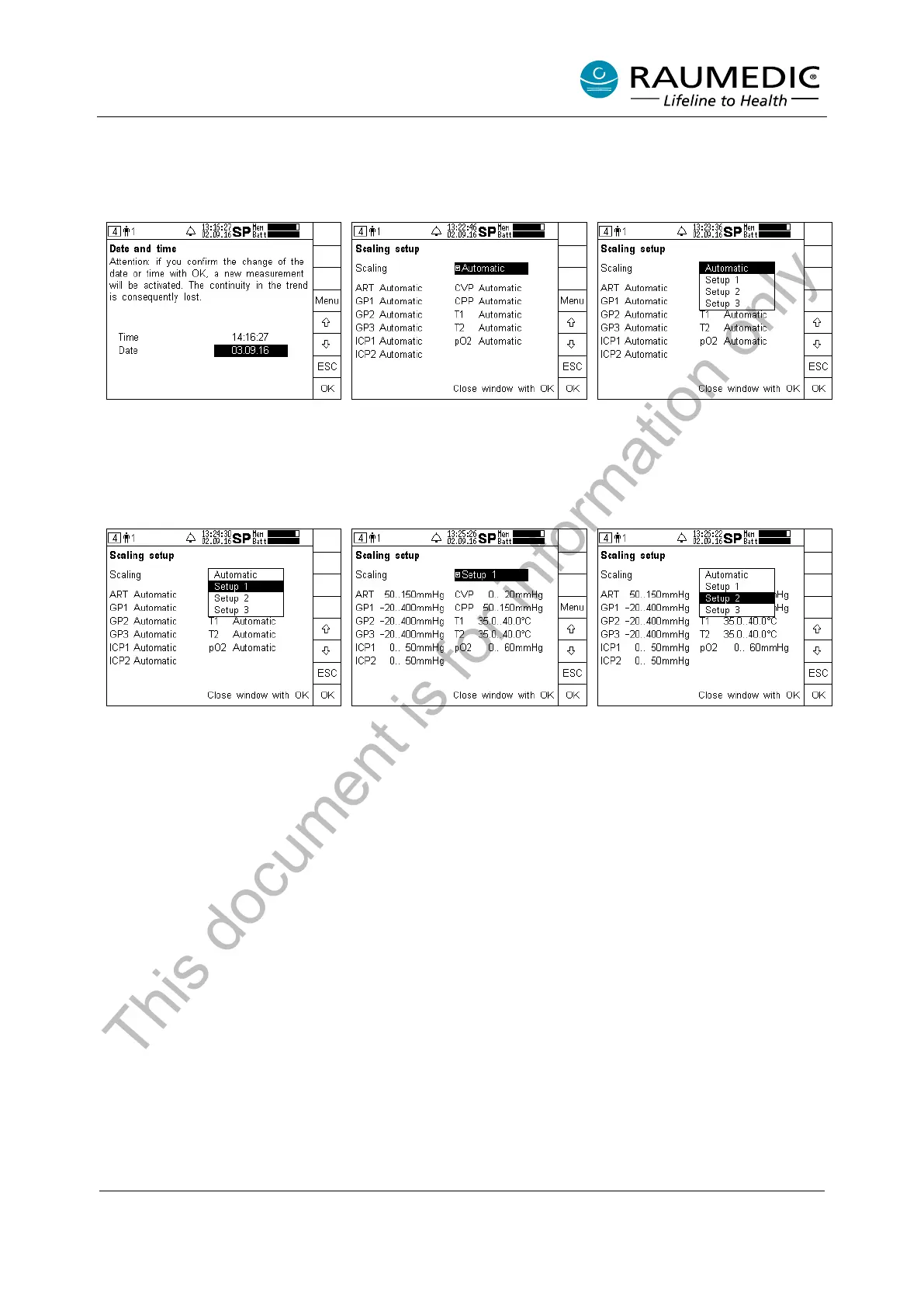
4.6.6 Modifying the scaling
The works setting for the scaling option is “Automatic”, which means that the scaling is automatically
adapted to the signal value. Alternatively one of the three following set-up settings can be chosen for the
scaling:
In the device setup window, press
the Scal key.
The currently set scaling is
displayed. In this case,
“Automatic” has been set as the
works sett
changed yet.
In order to change the setting,
press the Menu key. The available
settings will be rendered in the
pull-down menu.
The arrow keys are used to
change the requested settings,
such as to Setup 1. Subsequently
close t
OK.
The scaling settings for Setup 1
have been accepted, but they are
not active yet.
In order to
press the Menu key. The available
settings will be rendered in the
pull-
down menu. The arrow keys
are used
to change the requested
settings, such as Setup 2.
Subsequently close the window by
This document is for information only



 To Next Page