Instructions for Use RAUMEDIC
MPR2 logO
Manufacturer: zwo-400EN
RAUMEDIC AG, Hermann-Staudinger-Strasse 2, 95233 Helmbrechts, Germany Rev. 9 2020-09-22
Page 63 of 99
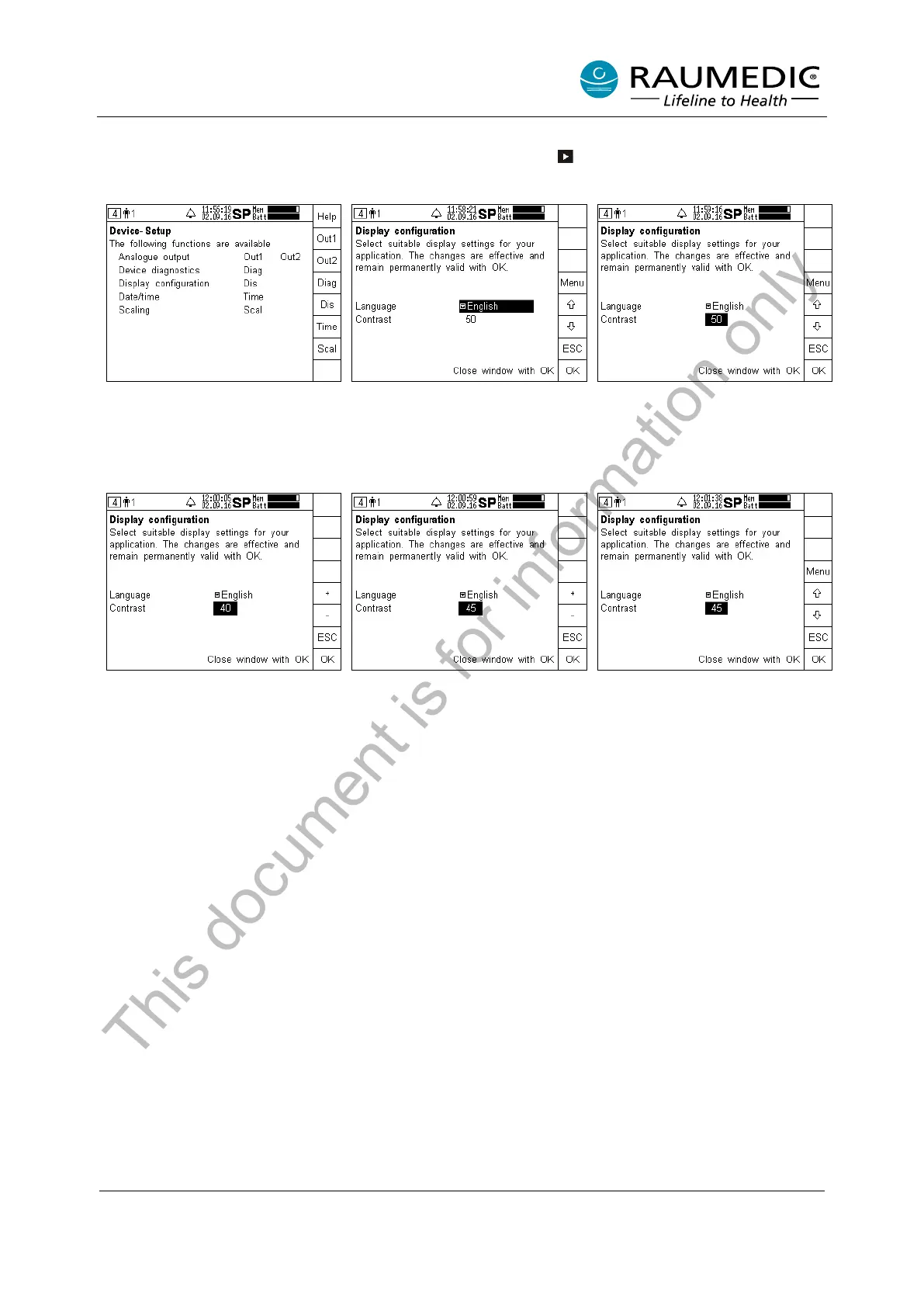
4.6.3 Setting the LCD contrast
Now skip to the set-up screen by pressing the screen selector key several times, if and when required,
and carry out the following steps 1 to 6:
Step 1:
Call the Device setup
the Dis key.
Step 2:
Use the arrow
number in Contrast.
Step 3:
After having changed to Contrast,
press the Menu key.
Step 4:
By pressing the + or –
keys, the
contrast value set can be
ch
anged. Press the ESC key to
return to the previous step.
Step 5:
Set a ne
w contrast value. (Use
ESC to cancel the modification.)
Accept the new value by pressing
OK.
Step 6:
The new contrast value is
displayed.
This document is for information only



 To Next Page