CHAPTER 5
56 Viper Pro Installation & Operation Manual
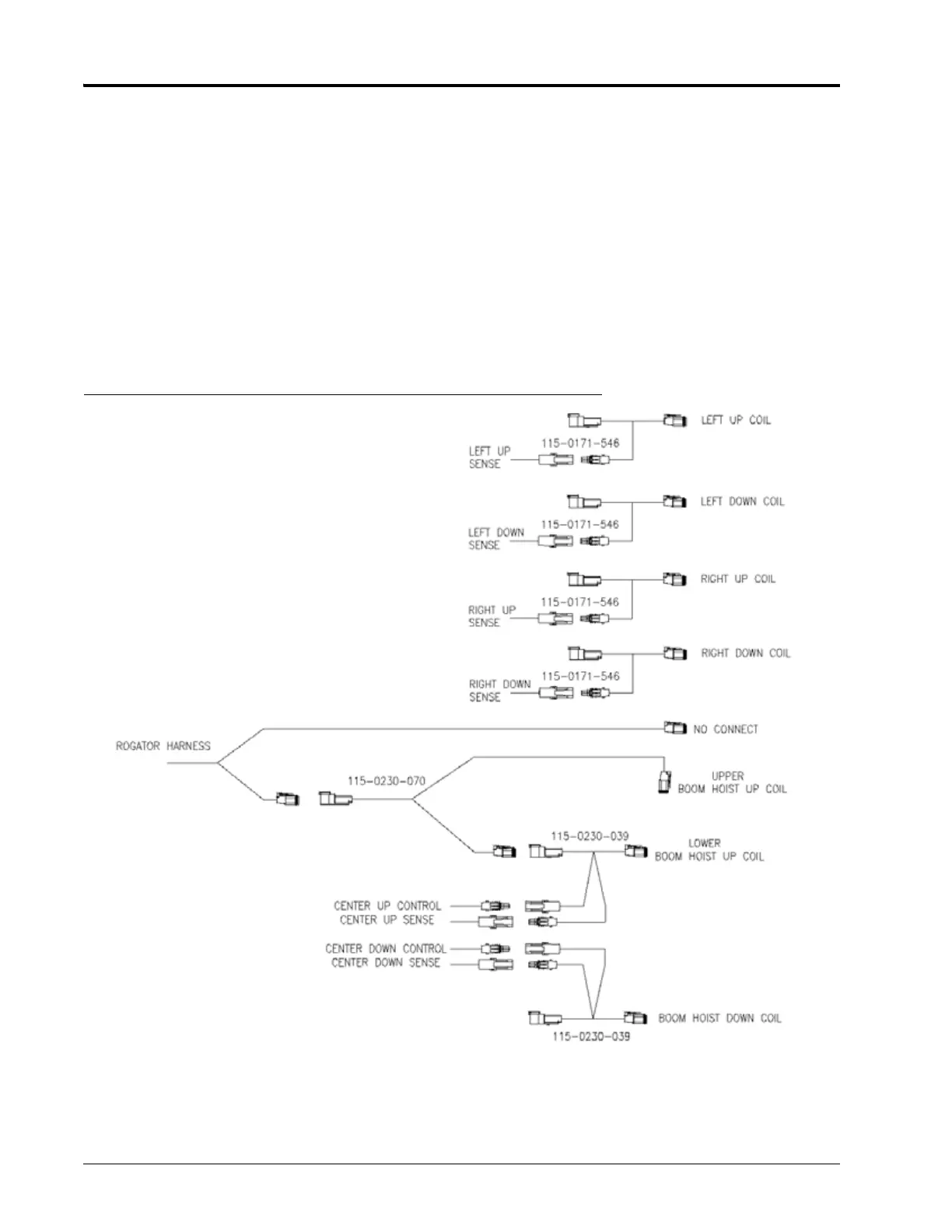
6. Disconnect the cable connector from the upper boom hoist up coil.
NOTE: Use cable ties to tie-off this connector. It is not used in the AutoBoom UltraGlide XT system.
7. Connect the remaining male end of the power splitter cable to the upper boom hoist up coil.
8. Disconnect the connector from the boom hoist down coil.
9. Install a center rack control boom sense adapter cable (P/N 115-0230-039) between the coil and the cable
connector.
10. Connect the ends of the installed boom sense adapter cable (P/N 115-0230-039) on the lower boom hoist up
coil to the CENTER SOL UP SENSE and CONTROL connectors on the AutoBoom harness cable (P/N 115-0230-
095 or 115-0230-116).
11. Connect the ends of the installed boom sense adapter cable on the boom hoist down coil to the CENTER SOL
DOWN SENSE and CONTROL connectors on the AutoBoom harness cable.
FIGURE 19. Boom Sense Schematic
CONNECT THE HARNESS CABLE TO THE SENSORS
1. Install the LEFT OUTER SENSOR connector on the 70’ sensor cable (P/N 115-0171-527).
2. Connect the other end of the 70’ sensor cable to the left outer sensor (P/N 063-0130-026).



 To Next Page
 Loading...

