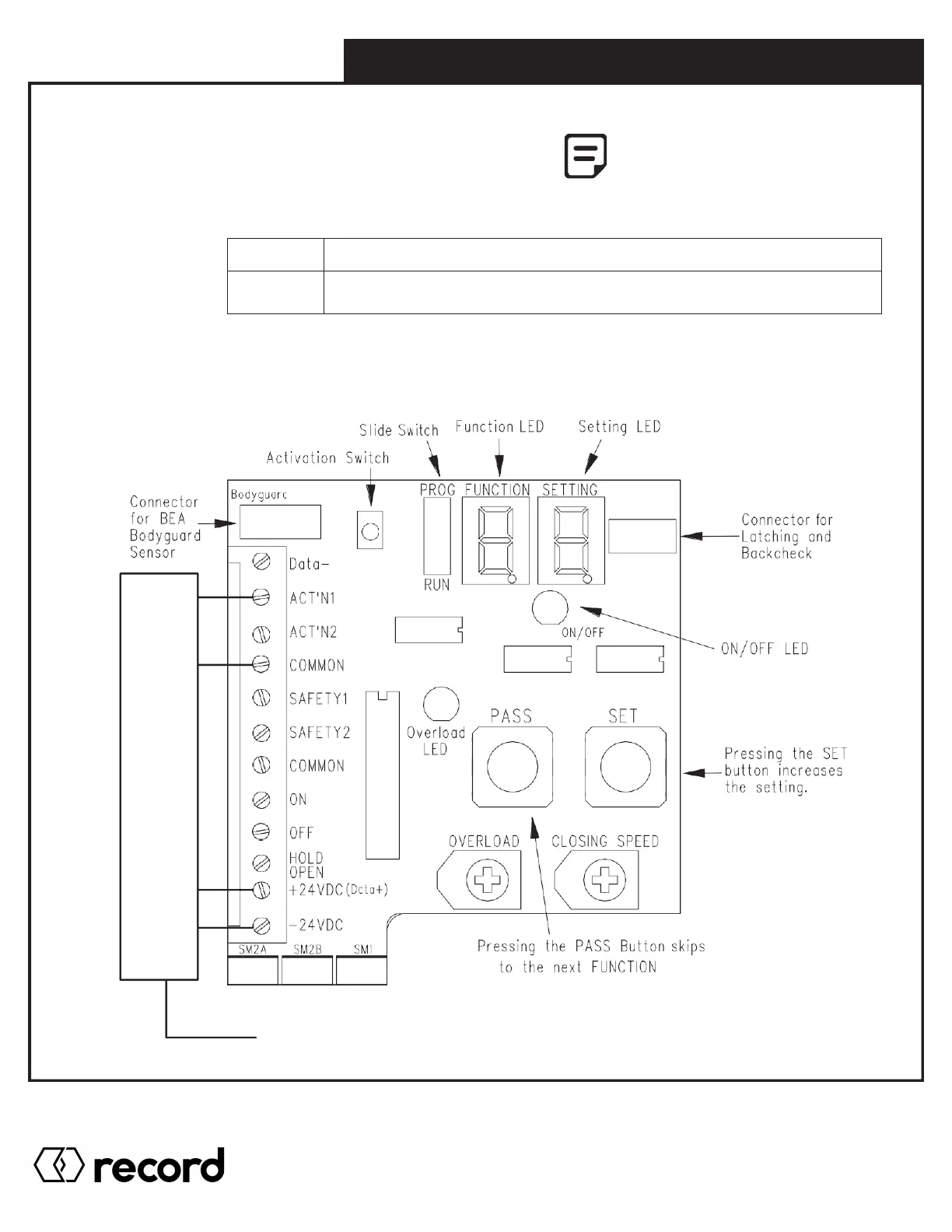
There are two 7 SEGMENT LED DISPLAYS used for programming:
Function LED = Programmed Function
Setting LED = Value of the Function indicate on First digit
There are 3 switches that relate to programming:
Slide switch
PASS push button To select the next function
The Operation switch must be set
to “ON” or “Automatic” positions
to allow changes to be made in
programming.
SET push button To change the present function value (when the slide switch is in PROGRAM mode).
N.O.
(Normally
Open)
COM.
(Common)
24V+
24V-
WIRELESS RECEIVER
CONNECTION
4 WIRES USED
6.0 DIGITAL BOARD & PROGRAMMING
Function settings can be viewed but Not modified.
Function settings can be modified. As a safety feature,
THE DOOR WILL NOT OPEN WHEN THE SLIDE SWITCH IS SET TO PROG.
Pg. 46
HA8-SP Manual V. 7.0
Record Canada Inc.
Toll Free: 1-877-348-6837
info.ditec.ca@recorddoors.com
www.recorddoors.ca
Record USA Inc.
Toll Free: 1-866-901-4284
info.ditec.us@recorddoors.com
www.recorddoors.com



 To Next Page