116
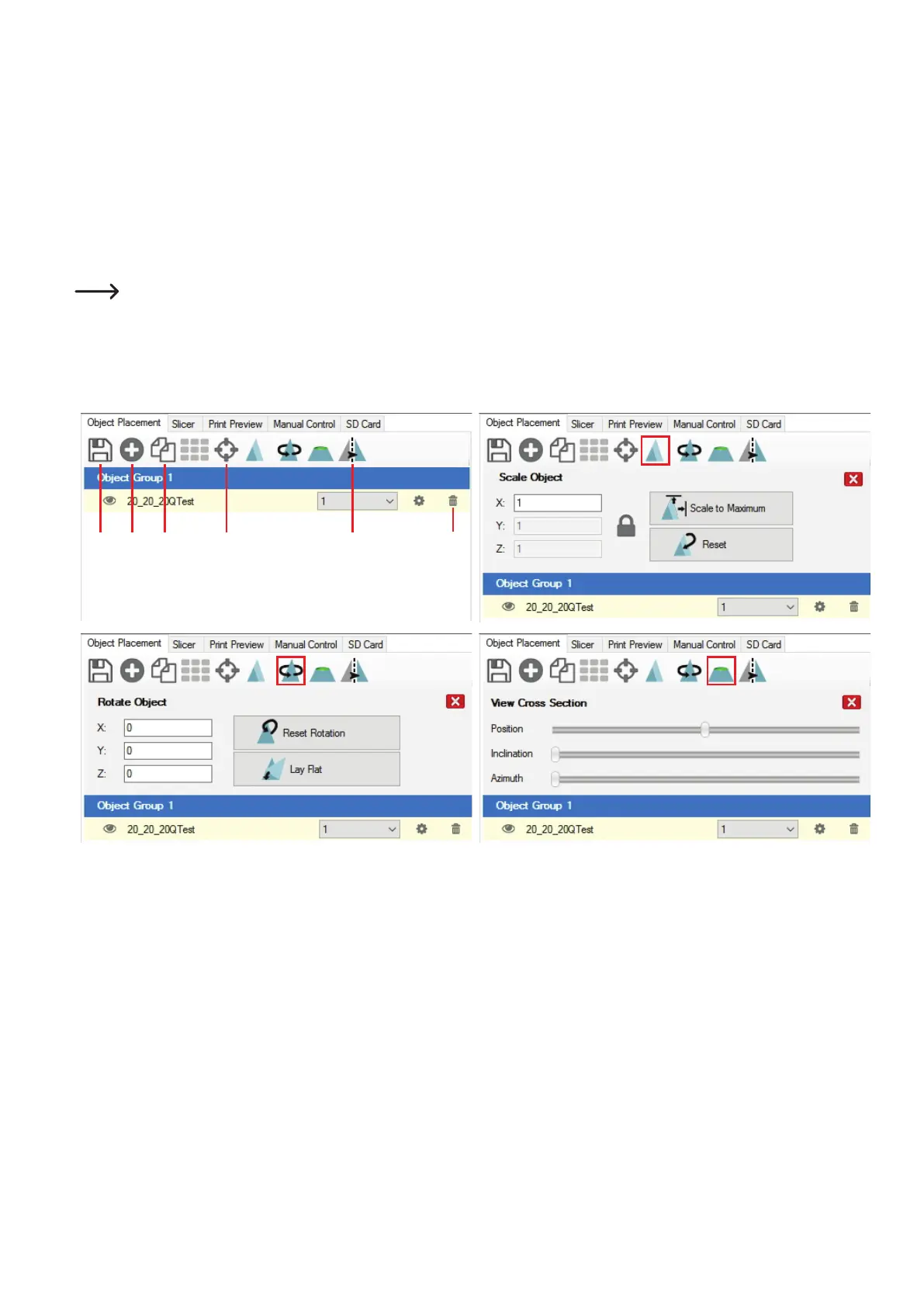
Short description of the most important buttons in the "ObjectPlacement" tab:
(1) Savingtheobject
(2) Addingobjects(asdescribedabove);severalobjectscanbeaddend
(3) Copyingobjectsformultipleprinting(inanotherwindow,thenumberofcopiescanbechosen)
(4) Centringtheobjectontheprintingplate
(5) Mirroringtheobject
(6) Deletingtheobjectfromtheprintingplate
(7) Scalingtheobject
Usethescalingfunctiontocompensatethesizeretentionoftheprintedobjecthereaswell.Ifitisknown,e.g.,thatthelament
materialusedshrinksby2%,setthescalingtothevalue1.02(thisisanapproximatereferencevalue).Afterprintout,youcanmeas-
ure the object and adjust scaling again if required.
(8) Turningtheobject
(9) Showingthecross-sectionoftheobject
1 2 3 54 6
7
8
9



 To Next Page