144
b)SettingupthePrinterSettings
Thischapterisonlytargetedatuserswhodonothavethecustomversionofthesoftwareinstalled.Ifyouhaveinstalled
thecustomversion(canberecognisedbytheimageoftheRF10003D-printerwhentheprogrammestarts),youmayskip
thischapter.Itonlyservesinformationpurposesthen.
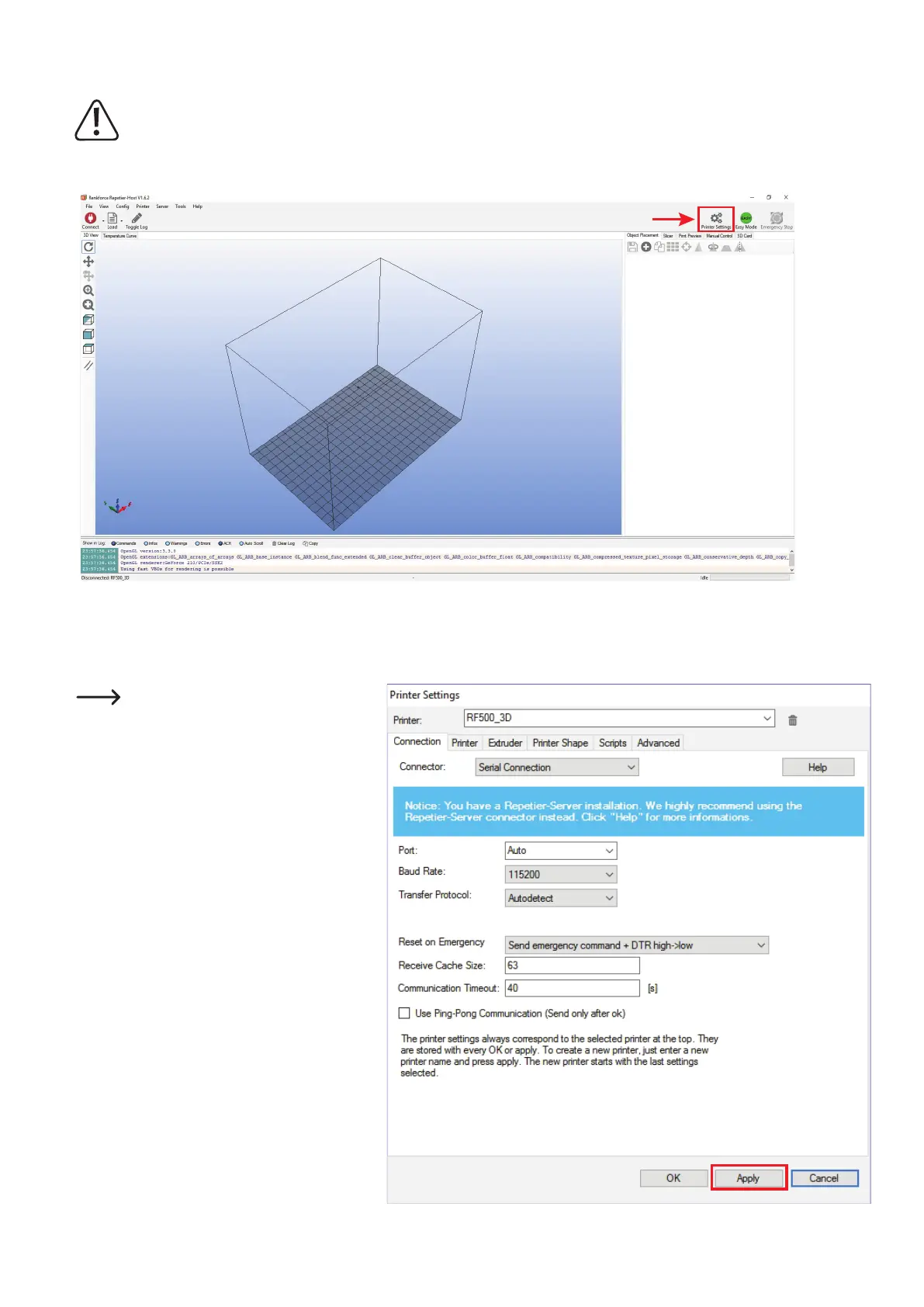
Start the programme Repetier-Host and click on "Printer Settings" at the upper right in the window.
(1) NameyourprinterRF500_3Dinthefollowingwindowintab"Connection" or assign a name of your own.
(2) Settheportandbaudrate.Thebaudratemustbesetto"115200".
Theportnumber(2)issystem-dependent.
Usually, the setting "Auto" should work
withthecurrentversionofthesoftware(as
of 1.6.2).
If this does not work properly for you, you
can check the port in the device manager
of the control panel, under connections
(COMandLPT).
Then set the COM-port from the device
manager in the software.
(3) Setthereceivercachesizeasshown(3).
(4) Click"Apply"(4).
1
2
4
3



 To Next Page